 By Naman Gundaniya
Serverless vs Containers vs GPUs for AI Workloads
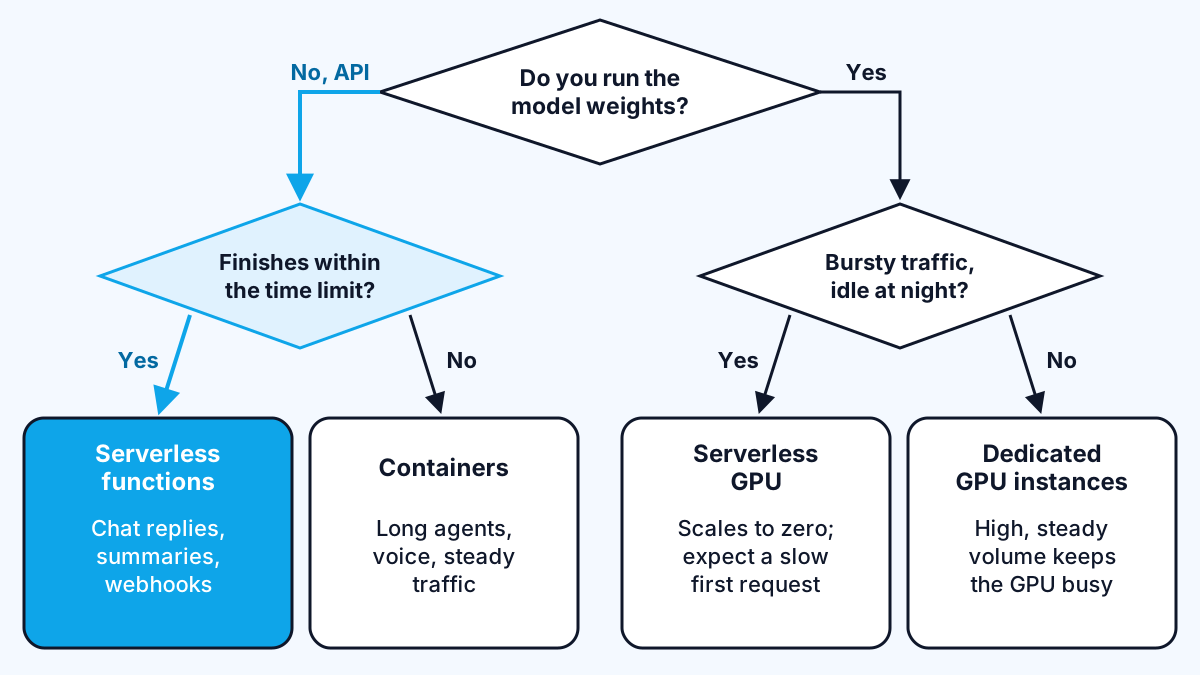
Most AI apps do not need a GPU. If your app calls a hosted model through an API, the work is waiting on the network, so serverless functions or containers are the right home. Choose serverless for short, spiky requests, containers for long streams and agents, and GPUs only when you run the model yourself. Serverless GPUs now sit in between.
I get this question at the start of almost every AI project, usually phrased as "do we need GPUs?". The answer is usually no, and getting it wrong costs real money every month for years. Here is how I decide, with the limits that matter taken from each platform's own documentation.
Do you even need a GPU?
You need a GPU only if your own infrastructure runs the model's maths. If you call Claude, GPT or Gemini through an API, whether directly or through Amazon Bedrock, Microsoft Foundry or Google's Agent Platform, the provider runs the GPUs and your code spends almost all its time waiting for a response.
That waiting is cheap on modern serverless platforms. Vercel's Fluid compute documentation says letting multiple invocations share one instance "is especially valuable for AI applications, where tasks like fetching embeddings, querying vector databases, or calling external APIs can be I/O-bound".
You need a GPU when you:
- Self-host an open-weight model for privacy, residency or cost at very high volume.
- Run custom or fine-tuned models that no provider hosts for you.
- Do heavy embedding, transcription or image work in volume, where per-call API prices add up.
If none of those apply, skip to the serverless versus containers question.
Serverless functions: best for short, spiky requests
Serverless functions are the cheapest way to start when requests are short and traffic is uneven. You pay little or nothing when idle, and you never patch a server.
The limits are what you design around. AWS's Lambda quotas page gives a maximum function timeout of 900 seconds (15 minutes) and up to 10,240 MB of memory, with synchronous request and response payloads capped at 6 MB each and streamed responses up to 200 MB. Vercel's Fluid compute defaults to 300 seconds, with a maximum of 800 seconds on Pro and Enterprise and a 30-minute extended maximum in beta.
Those numbers are fine for a chat reply or a document summary. They become a problem for agents that loop through many tool calls, long transcription jobs or anything that must survive a user closing the tab. I covered the workarounds on one platform in running AI agents on Vercel: stream early, cap steps, and hand long work to a durable workflow.
Good fits: chat endpoints, summarise and classify calls, webhook handlers, scheduled jobs that finish in minutes.
Containers: best for long streams, agents and steady load
Containers suit AI apps that hold connections open, run long agent loops or carry steady traffic. You trade some operating work for freedom from function time limits.
On AWS, a container service such as ECS lets a streamed response or agent run for as long as your load balancer and app allow. My step-by-step for one setup is in deploying a Next.js AI app on AWS Bedrock. Google Cloud Run and Azure Container Apps give you containers with serverless-style scaling, which is often the best of both.
The cost is ownership. You choose instance sizes, set scaling rules, update base images and watch health checks. For a team with no one comfortable doing that, serverless functions plus a background queue is often the better trade.
Good fits: multi-step agents, voice and real-time apps with long-lived connections, retrieval services with warm in-memory caches, and apps with steady daytime traffic.
GPUs: only when you run the model yourself
GPU instances make sense when you host model weights and have enough steady traffic to keep the GPU busy. An idle GPU is the most expensive thing in most AI architectures.
The smallest options are smaller than many people expect. AWS's G6 instance page lists NVIDIA L4 GPUs with 24 GB of memory, and fractional sizes down to g6f.large, which gets one eighth of an L4 with 3 GB of GPU memory. GPU containers on ECS have to run on GPU-backed EC2 instances, according to the ECS GPU documentation, so you also manage that capacity.
Before you commit, compare against a hosted API at your real volume, and check whether a small model would do. The small language models post covers when smaller models are good enough, and cutting LLM app costs covers the cheaper levers to try first.
Serverless GPUs: the middle option
Serverless GPUs let you run your own model without paying for an idle GPU all night. Two of the big clouds now offer them in their container platforms.
- Google Cloud Run. The GPU documentation says GPU services "can scale down to zero", and that instances with pre-installed drivers "start in approximately 5 seconds". It offers NVIDIA L4 GPUs with 24 GB and RTX PRO 6000 Blackwell GPUs with 96 GB, in a limited set of regions, and requires instance-based billing.
- Azure Container Apps. Microsoft's serverless GPU overview lists NVIDIA A100 and T4 GPUs with "per-second billing with scale down to zero when not in use". It names real-time and batch inference with open-source models as a main use.
The catch is the cold start. A few seconds to start the instance is only the beginning: the model weights still have to load into GPU memory. Microsoft's page suggests artifact streaming and storage mounts for large model files to reduce this. For a chat feature where users expect a reply in a second or two, that first slow request matters. For batch jobs and internal tools, it usually does not.
Cost traps to check before you choose
The hosting choice usually goes wrong on cost, not on speed. These are the traps I check for.
- Paying for waiting. On classic per-invocation serverless, a function waiting 30 seconds for a model response is billed for those 30 seconds. Platforms that share an instance across concurrent requests, like Vercel's Fluid compute, reduce this for I/O-bound AI work.
- Minimum instances on GPUs. Cloud Run's GPU page notes that minimum instances are charged at the full rate even when idle. Keeping one warm GPU to avoid cold starts can cost more than the traffic it serves.
- Over-sized containers. A container sized for peak load all day costs the same at 3am. Set autoscaling and check it actually scales in.
- Zonal redundancy you did not need. Cloud Run's GPU docs say turning off zonal redundancy gives a lower cost per GPU second, at the price of no reserved failover capacity. That is often fine for internal tools.
- Forgetting the model bill. A cheaper host does not help if every request still sends a large, uncached prompt to the most expensive model.
A decision matrix with example workloads
Here is how I would place common AI workloads. Treat it as a starting point and check the current limits on your platform.
| Workload | Where I would start | Why |
|---|---|---|
| Chatbot calling a hosted model | Serverless functions with streaming | Short, I/O-bound requests with uneven traffic |
| Multi-step agent with tools | Containers, or functions plus a durable workflow | Runs can outlast function time limits |
| Nightly document tagging via API | Serverless job plus the provider's batch API | No user waiting, and batch pricing is cheaper |
| Voice agent with live audio | Containers | Long-lived connections and steady latency |
| Private open-weight model for an internal tool | Serverless GPU | Bursty use during working hours, idle at night |
| High-volume embeddings or transcription with your own model | Dedicated GPU instances | Steady load keeps the GPU busy |
Operational effort rises down the table. Serverless functions need the least work, containers need scaling and patching, and GPUs add drivers, model loading and capacity planning. Pick the simplest option that meets the limits, and move only when you hit a real wall.
Work with me
If you are deciding where an AI feature should run, or your hosting bill has grown faster than your traffic, I can review the architecture and build the change. See full-stack development and AI integration, or look at my work.
Frequently asked
Do I need a GPU to run an AI app?
You do not need a GPU to run an AI app that calls a hosted model such as Claude, GPT or Gemini through an API, because the provider runs the GPUs. You need one only when you run model weights yourself, for example a self-hosted open-weight model.
Is serverless good for AI applications?
Serverless is good for AI applications whose requests are short and spend most of their time waiting on a model API. It struggles with long agent runs and long-lived connections because of function time limits, such as the 15-minute maximum on AWS Lambda.
What is a serverless GPU?
A serverless GPU is a GPU-backed container that scales with demand and down to zero when idle, so you pay only while it runs. Google Cloud Run and Azure Container Apps both offer them, which suits self-hosted models with bursty traffic.
Are containers cheaper than serverless for AI?
Containers are often cheaper than serverless at steady, high traffic, because you pay for capacity you keep busy. At low or spiky traffic, serverless is usually cheaper because you pay little when idle. Measure model API spend alongside hosting, because on many AI apps it is the bigger line.
Sources
Related services
Building something like this?
Naman Gundaniya takes on full-stack and AI projects fixed quote after a free 30-minute scoping call, replies within 24 hours.
Get in touch