 By Naman Gundaniya
How to Deploy a Next.js AI App on AWS Bedrock
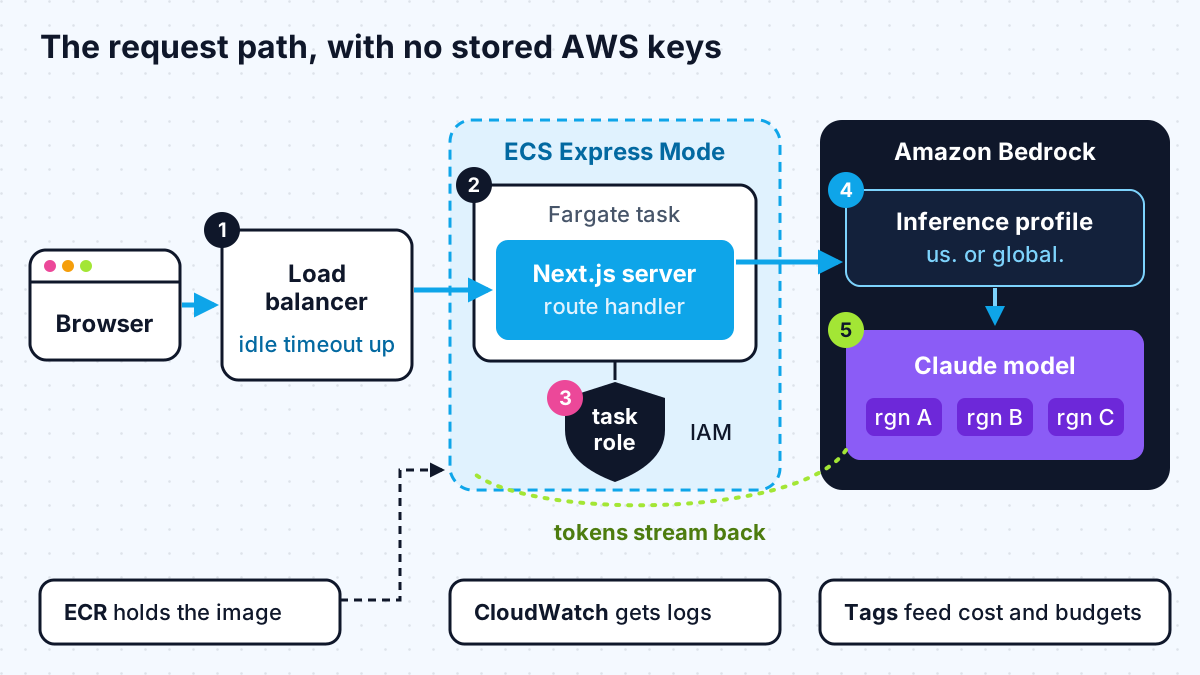
To deploy a Next.js AI app on AWS with Bedrock, build Next.js as a standalone container, run it on Amazon ECS Express Mode, and give the running task an IAM role that may only invoke the models you use. Call Bedrock from a route handler with the AI SDK and the default credential chain, stream the response, and raise the load balancer's idle timeout.
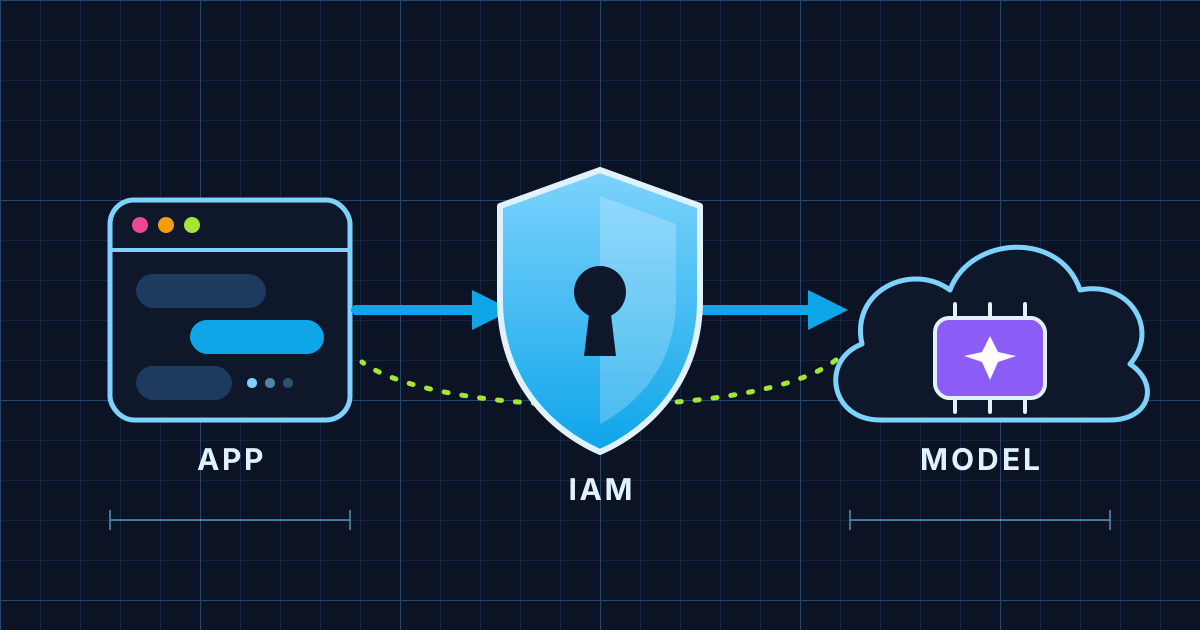
Most guides for this are either dated or stop at "call the API with your access keys". This one is the setup I would use for a production Next.js app on AWS as of early 2027, built from AWS's current documentation. It assumes you already have a working Next.js app with an AI route; if you are still deciding which cloud to use, start with my comparison of Bedrock, Foundry and Google's Agent Platform.
A note on format: this blog does not render code blocks, so I describe each file and quote the important lines inline. Everything named here comes from the linked docs.
Which AWS service should host a Next.js AI app?
For a chat or agent feature that streams tokens, run Next.js as a container on ECS Express Mode. The obvious alternatives each have a catch for AI workloads.
| Option | Good for | Catch for AI apps | Source |
|---|---|---|---|
| Amplify Hosting | Mostly static or server-rendered sites | Lists "Next.js streaming" as unsupported and supports Next.js 12 to 15 | Amplify Next.js support |
| Lambda with function URLs | Single API endpoints | Streaming works on Node.js runtimes, but function URLs do not stream inside a VPC, and you package Next.js yourself | Lambda response streaming |
| App Runner | Existing users only | No longer open to new customers; AWS points to ECS Express Mode | App Runner availability change |
| ECS Express Mode | Containerised web apps and APIs | You build and push a container image | ECS Express Mode |
ECS Express Mode needs only a container image, a task execution role and an infrastructure role. From those it creates a Fargate service, a load balancer with TLS, auto scaling and a URL, and AWS says there is no extra charge beyond the resources it creates. Because it runs a normal Node.js server, streaming responses behave the way they do on your laptop.
Step 1: make sure your account can call the model
Most Bedrock models are now enabled on first use, but there are three things that still trip people up.
- Marketplace permissions. AWS's model access page says the first call to a third-party model starts an AWS Marketplace subscription in the background, which needs the aws-marketplace Subscribe, Unsubscribe and ViewSubscriptions permissions. Make that first call from an admin role, not from your app's locked-down role.
- Anthropic's use-case form. Claude models need a one-time first-time-use form per account or per organisation before the first call.
- Inference profiles. Anthropic's Bedrock guide explains that AWS offers newer Claude models through cross-region inference, so you call an inference profile ID (for example one starting with us. or global.) rather than the bare model ID.
Test the call from the Bedrock console playground first. If it works there and fails in your app, the problem is your IAM policy, which is the next step.
Step 2: write a least-privilege IAM role for the task
Your app needs permission to invoke one model through one inference profile, and nothing else. AWS's inference profile prerequisites give the exact shape, and one line in that page matters most: when you list an inference profile in a policy, "you must also specify the foundation model in each Region associated with it".
The policy I start from has two statements:
- Allow bedrock:InvokeModel* on the inference profile ARN your app calls.
- Allow bedrock:InvokeModel* on the foundation model ARN in each Region the profile routes to, with a condition that bedrock:InferenceProfileArn equals that profile. This stops the role calling the model directly in some other way.
Attach this policy to a role whose trust policy lets ecs-tasks.amazonaws.com assume it. That is the task role: the identity your Next.js code runs as. It is separate from the task execution role, which ECS uses to pull the image and write logs.
If you use the global inference profile and later need to keep traffic in one geography, AWS documents an explicit Deny on requests where aws:RequestedRegion is "unspecified", which blocks global routing.
Step 3: call Bedrock from a route handler without storing keys
The route handler should get credentials from the task role at runtime, so there are no AWS keys in environment variables at all. With the AI SDK this takes a few lines.
The AI SDK Bedrock provider is the package @ai-sdk/amazon-bedrock, plus @aws-sdk/credential-providers for the credential chain. In a small module such as lib/bedrock.ts you create the provider with createAmazonBedrock({ region: process.env.AWS_REGION, credentialProvider: fromNodeProviderChain() }). The node provider chain picks up the ECS task role automatically, the same way the AWS SDK does.
Your route handler at app/api/chat/route.ts then follows the shape of the AI SDK Next.js quickstart:
- read the messages from the request body,
- call streamText with the model set to your provider and the inference profile ID, for example amazonBedrock("us.anthropic.claude-sonnet-5-5"), and the converted messages,
- set maxOutputTokens so one request can never produce an unbounded bill,
- return createUIMessageStreamResponse with the stream from toUIMessageStream.
The client side does not change. Your existing chat UI keeps calling /api/chat. If you are building the route for the first time, integrating Claude into a Next.js app covers the direct API version, and my guide to building an AI agent with MCP and Claude covers the tool-calling side.
Step 4: containerise Next.js and deploy with ECS Express Mode
Next.js can produce a self-contained server that needs no node_modules at runtime, which keeps the image small. The Next.js output docs cover it:
- Set output: "standalone" in next.config.js.
- After next build, copy public into .next/standalone/public and .next/static into .next/standalone/.next/static, because the standalone server does not copy them by default.
- Start the server with node server.js, setting PORT and HOSTNAME=0.0.0.0 so it listens inside the container.
Build the image, push it to Amazon ECR, then create the service. The ECS Express Mode tutorial uses one CLI call, aws ecs create-express-gateway-service, with the image, the execution role, the infrastructure role, the container port and a health check path. The same API accepts a task role ARN, which is where the role from step 2 goes. If you need more control, such as injecting secrets, you can pass your own task definition instead; it must have a container named Main and Fargate compatibility.
The first deployment takes a few minutes and gives you a URL ending in on.aws with TLS already set up.
Step 5: keep long streams alive
The Application Load Balancer closes a connection that sends no data for its idle timeout, which AWS sets to 60 seconds by default, according to the load balancer attributes page. A steady stream of tokens keeps the connection open, but a model that thinks for a long time before its first token, or an agent that waits on a slow tool, can hit that limit and the user sees a 502.
Two fixes, used together:
- Raise the idle timeout on the load balancer; the valid range is 1 to 4,000 seconds. I pick a value a little above the longest response I am willing to wait for.
- Send something early. Streaming a status message or a heartbeat before the model's first token keeps the connection active.
Add a timeout in your own code as well. The AI SDK settings accept an abortSignal, such as AbortSignal.timeout(...), so a stuck request ends on your terms rather than the load balancer's.
Step 6: secrets, logging and cost controls
With the task role in place you have no AWS secret to protect, which removes the most common leak. Other secrets, such as a database URL, belong in a secrets manager injected into the task rather than in the image.
For cost, I set up four things before anyone outside the team uses the app:
- A tagged application inference profile. AWS's inference profiles page says you can attach tags to an application inference profile to track costs. One profile per app or per customer makes the bill readable.
- Output caps and rate limits. maxOutputTokens per request and a per-user request limit in your route.
- Prompt caching. The AI SDK provider supports Bedrock cache points through providerOptions, which pays off when every request repeats a long system prompt.
- Alerts. A budget alert on the account so a bug shows up as an email, not as an invoice.
Work with me
I build and deploy AI features in Next.js on the cloud a client already uses, including the IAM, streaming and cost controls that make them safe to run. See full-stack development and AI integration, browse my work, and book a scoping call.
Frequently asked
Can I deploy a Next.js AI app on AWS Amplify?
You can deploy the site, but Amplify Hosting lists Next.js streaming as unsupported, so token-by-token chat responses will not stream. For AI features that stream, a container on ECS Express Mode, or a separate streaming Lambda for the AI route, is a better fit.
Do I need AWS access keys to call Bedrock from Next.js?
No. On ECS the task role provides temporary credentials, and the AI SDK's Bedrock provider picks them up through the AWS default credential chain. Avoid long-lived access keys in environment variables wherever the platform can provide a role.
Why does my Bedrock call return AccessDeniedException?
Usually one of three things: the model's Marketplace subscription has not been set up, the Anthropic first-time-use form has not been submitted, or your IAM policy lists the inference profile but not the underlying foundation models in each Region. AWS's model access and inference profile pages describe each case.
How do I stop an AI app on AWS from running up a large bill?
Cap output tokens on every request, rate-limit users, tag an application inference profile so you can see spend per app, use prompt caching for repeated context, and set a budget alert on the account. These are cheap to set up before launch and painful to add after a surprise invoice.
Sources
- Amplify Next.js support (docs.aws.amazon.com)
- Lambda response streaming (docs.aws.amazon.com)
- App Runner availability change (docs.aws.amazon.com)
- ECS Express Mode (docs.aws.amazon.com)
- model access page (docs.aws.amazon.com)
- Bedrock guide (platform.claude.com)
- inference profile prerequisites (docs.aws.amazon.com)
- AI SDK Bedrock provider (ai-sdk.dev)
- AI SDK Next.js quickstart (ai-sdk.dev)
- Next.js output docs (nextjs.org)
- ECS Express Mode tutorial (docs.aws.amazon.com)
- load balancer attributes page (docs.aws.amazon.com)
- settings (ai-sdk.dev)
- inference profiles page (docs.aws.amazon.com)
Related services
Building something like this?
Naman Gundaniya takes on full-stack and AI projects fixed quote after a free 30-minute scoping call, replies within 24 hours.
Get in touch