 By Naman Gundaniya
How to Integrate Claude Into a Next.js App
To integrate Claude into a Next.js App Router app, install the official Anthropic TypeScript SDK, keep the API key in a server-only environment variable, and call Claude from a route handler. Stream the reply back as a web ReadableStream, read it in a client component, then add tool use, error handling and cost limits before real users arrive.
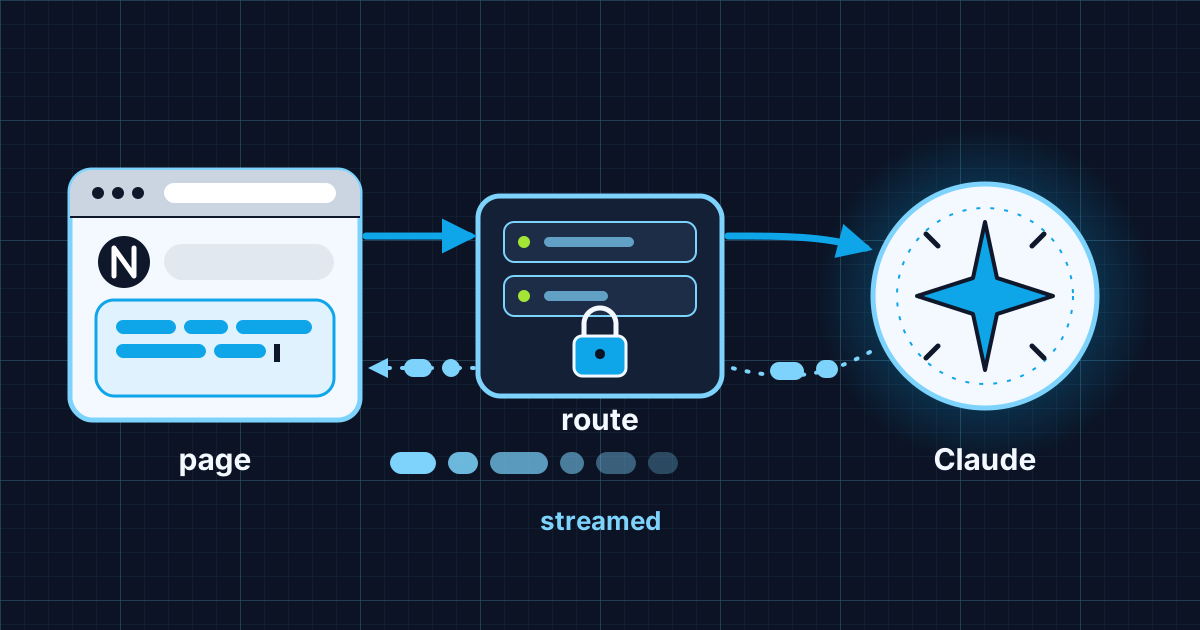
Most tutorials stop once text appears on screen. This guide covers the same first step, then the parts that decide whether the feature survives production: where the key lives, how errors surface, how tools run, and what each request costs. It is the API and model layer of the five layers I describe in what an AI full stack developer actually does. The code uses the current Anthropic TypeScript SDK and Next.js App Router conventions as of late 2026. Check both pages before you copy anything, because SDKs move.
What does the architecture look like?
The browser never talks to Claude directly. A client component sends the user's message to your own route handler, the route handler calls Claude with the secret key, and the reply streams back through the same route.
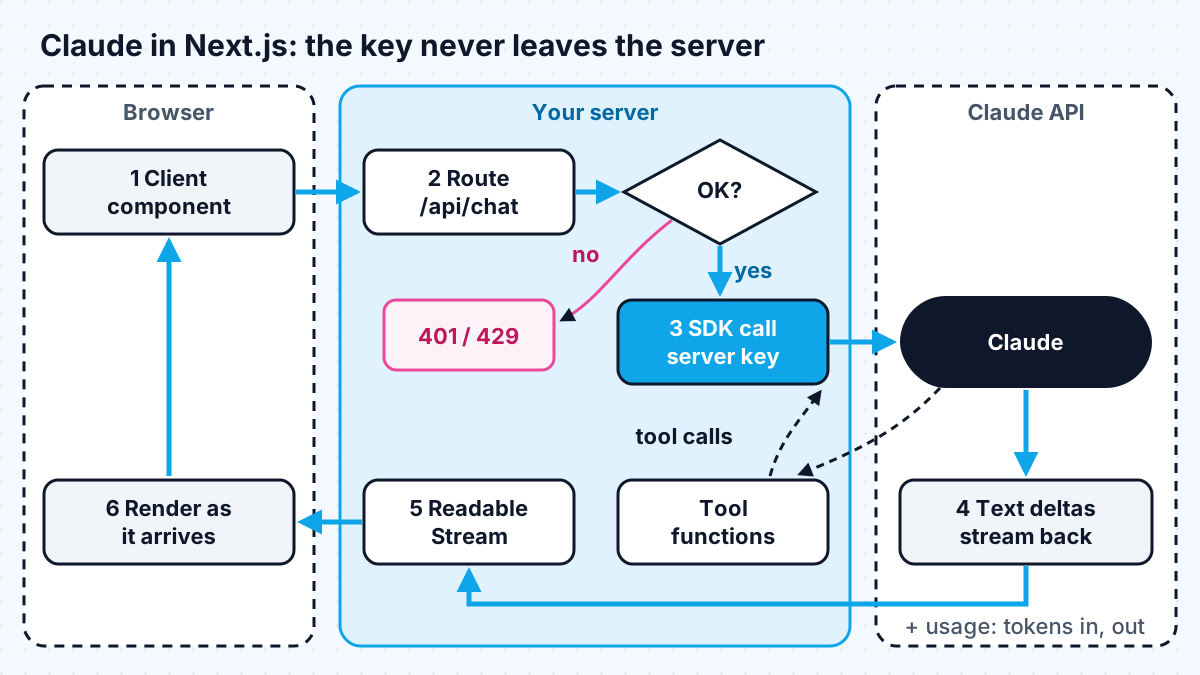
The SDK makes the browser rule explicit. Its docs say browser use is "disabled by default to avoid exposing your secret API credentials", and turning it on requires setting a flag literally named dangerouslyAllowBrowser. Leave it off.
Step 1: install the SDK and keep the key on the server
Install the package with npm install @anthropic-ai/sdk, and put your key in .env.local as ANTHROPIC_API_KEY. The SDK reads that variable by default, so the client constructor needs no arguments.
Two rules from the Next.js docs matter here:
- Never prefix the key with NEXT_PUBLIC_. The environment variables guide explains that public variables are inlined "into any JavaScript sent to the browser" at build time.
- Create the client in one module, such as lib/claude.ts, and put import "server-only" at the top. The server and client components guide says importing such a module into a client component then causes a build-time error.
That module exports one shared client: new Anthropic() with a sensible timeout and retry count (more on both below). Every route that needs Claude imports it from there.
Step 2: call Claude from a route handler
A route handler is a route.ts file that exports functions named after HTTP methods. The route handler reference shows they use the standard Web Request and Response APIs, so streaming needs no special framework support.
The non-streaming version of app/api/chat/route.ts is short:
- export async function POST(req: Request), then read const { messages } = await req.json().
- Validate the input: an array of user and assistant turns, a maximum length per message, a maximum number of turns. Reject anything else with a 400.
- Call claude.messages.create({ model, max_tokens, system, messages }).
- Collect the text blocks from message.content and return Response.json({ text }).
For the model, the models overview suggests starting with Claude Opus 5.5 for most workloads and lists Claude Haiku 5.5 for "high-volume, latency-sensitive tasks such as classification, extraction, and routing". I keep the model ID in one constant so I can test a cheaper model on the same evaluation set later. If your company already runs on a major cloud, Claude is also available through Bedrock, Foundry and Vertex AI.
Step 3: stream the reply
Streaming makes a chat feel fast, because the first words appear while the rest is still being generated. The SDK offers two ways in: messages.create with stream: true, which returns an async iterable of raw events, and messages.stream, which adds helpers such as an on("text") event and a finalMessage() promise.
In the route handler, I wrap the helper in a ReadableStream:
- Create const stream = claude.messages.stream({ model, max_tokens, system, messages }).
- Return new Response(new ReadableStream({ start(controller) { ... } }), with a text/plain; charset=utf-8 content type.
- Inside start, register stream.on("text", (t) => controller.enqueue(encoder.encode(t))), where encoder is a TextEncoder.
- Then await stream.finalMessage() and call controller.close(). Wrap that in try and catch, and on failure call controller.error(err) so the client sees the stream end abnormally rather than hang.
On the client, a component marked "use client" posts to /api/chat with fetch, takes res.body.getReader(), decodes each chunk with a TextDecoder, and appends it to state. Pass an AbortController signal to fetch so a Stop button can cancel the request.
If you would rather not write the plumbing, the Vercel AI SDK's useChat hook handles the client side and exposes a status value of submitted, streaming, ready or error, according to its chatbot docs. I use the raw SDK when I want full control of the stream format and the AI SDK when the UI is a standard chat.
Production streaming has its own edge cases: timeouts, aborts and errors that arrive halfway through a reply. Plan for all three before launch, not after the first support ticket.
Step 4: let Claude call your functions with tool use
Tool use lets Claude ask your server to run a function, such as looking up an order, and then answer with the result. The TypeScript SDK includes a beta tool runner: you define each tool with betaZodTool, giving it a name, a description, a Zod inputSchema and a run function, then call claude.beta.messages.toolRunner({ model, max_tokens, messages, tools }). The runner passes Claude's inputs to the right function and sends results back until Claude produces a final answer.
Rules I follow for tools in a web app:
- The run function executes on your server, so it must apply the same authorisation as the rest of your API. Pass the user's ID in from the session, never from the model's input.
- Start with read-only tools. Anything that sends, deletes or pays should return a proposal the user confirms in the UI.
- Throw a ToolError with a clear message when a tool fails. The SDK sends it back to Claude as content instead of crashing the request.
For a deeper walk-through of tools and the Model Context Protocol, see how to build an AI agent with MCP and Claude.
Step 5: handle errors, timeouts and retries
Failed calls throw subclasses of Anthropic.APIError, each with a status, which you can map to a sensible response. The SDK docs list the main cases:
| Status | SDK error | What I return to the browser |
|---|---|---|
| 400 | BadRequestError | 400 with a generic "could not process" message; log the details |
| 401 / 403 | AuthenticationError / PermissionDeniedError | 500; this is a server misconfiguration, alert on it |
| 429 | RateLimitError | 503 with "busy, try again"; the SDK has already retried |
| 500+ | InternalServerError | 503 with a retry button |
| none | APIConnectionError | 503 with a retry button |
Two defaults are worth changing. The SDK retries certain errors "2 times by default, with a short exponential backoff", which is sensible; keep it. But requests "time out after 10 minutes" by default, which is far longer than any user will wait. Set timeout on the client to match your UX, and set maxDuration on the route so your host does not cut the function off first. On Vercel, the function duration docs list a 300-second default with fluid compute.
Log message._request_id for every failed call. It is the ID support will ask for.
Step 6: control cost before launch
Every response includes a usage object with input_tokens and output_tokens, so you can record the cost of each request against the user who made it. Store it from day one. Prices as of late 2026, from the models overview:
| Model | Input per million tokens | Output per million tokens |
|---|---|---|
| Claude Opus 5.5 | $4 | $20 |
| Claude Sonnet 5.5 | $2 | $10 |
| Claude Haiku 5.5 | from $0.10 | from $0.50 |
The same page notes Batch API requests are 50% off and prompt cache reads cost a fraction of base input price (5% on Opus 5.5 and Sonnet 5.5). A long, stable system prompt is the shape caching rewards. Then cap the obvious risks: a max_tokens that fits the feature, a limit on conversation length, and per-user quotas checked in the route before the model is called.
Before launch I run the feature against a small set of real examples, the same approach I describe in how to add AI to an existing app, so a model or prompt change is measured, not guessed.
Work with me
I build Claude-powered features into Next.js products, from the route handler and streaming UI to the evaluation set and cost controls. See AI integration and full-stack development, or look through my work and book a scoping call.
Frequently asked
Can I call the Claude API directly from a Next.js client component?
You should not. The SDK disables browser use by default because anyone can read a key shipped to the browser. Call Claude from a route handler or server action, keep the key in a server-only environment variable, and let the client talk only to your own endpoint.
Should I use the Anthropic SDK or the Vercel AI SDK with Next.js?
Both work. The Anthropic SDK gives you direct access to every Claude feature and full control of the stream. The Vercel AI SDK adds ready-made React hooks such as useChat and makes switching providers easier. I choose the Anthropic SDK for custom flows and the AI SDK for standard chat interfaces.
How do I stream Claude responses in the App Router?
Call messages.stream in a route handler, forward each text event into a web ReadableStream, and return it in a Response. On the client, read res.body with a reader and a TextDecoder and append each chunk to state as it arrives.
Which Claude model should I use in a Next.js app?
Start with the model Anthropic recommends for general workloads, then test cheaper models against your own examples. Simple classification or extraction steps often run well on Haiku; complex reasoning or long agentic tasks justify Opus or Sonnet. Keep the model ID in one constant so you can switch easily.
Sources
Related services
Building something like this?
Naman Gundaniya takes on full-stack and AI projects fixed quote after a free 30-minute scoping call, replies within 24 hours.
Get in touch