 By Naman Gundaniya
Customer Support With AI: What to Automate and What Not To
Automate support tickets that are frequent, have one correct answer and are cheap to get wrong: order status, opening hours, password resets, policy questions. Let AI draft or triage, with a person deciding, for refunds, complaints, billing disputes and anything emotional or legal. Always offer a fast, visible route to a human, and pass the context along.
Support is the most common first AI project I am asked about, and it is easy to see why: the tickets are repetitive, the volume is measurable, and the cost of staff time is obvious. It is also where a badly built bot does the most visible damage, because every customer who gets stuck tells someone.
This post is a decision guide. It sorts ticket types into what to automate, what to assist and what to leave alone, then covers the escalation rules and metrics that keep an AI support agent honest.
Why do customers distrust AI support?
Customers distrust AI support mainly because they fear they will not be able to reach a person. A Gartner survey of 5,728 customers, published in July 2024, found that 64% would prefer companies did not use AI for customer service, and the top concern was that "it will get more difficult reaching a person."
Regulators have noticed the same pattern. The US Consumer Financial Protection Bureau's report on chatbots in consumer finance describes customers "getting stuck in 'doom loops'" when an issue "falls outside the chatbot's limited capabilities", and warns that "deficient chatbots that prevent access to live, human support can lead to law violations, diminished service" and other harms.
And the business owns what the bot says. In Moffatt v. Air Canada, a Canadian tribunal rejected the airline's argument that its chatbot was responsible for its own actions, calling it "a remarkable submission" and stating that "it should be obvious to Air Canada that it is responsible for all the information on its website", as summarised by McCarthy Tétrault. The airline was held liable for negligent misrepresentation.
None of this says "do not use AI". It says: automate the right tickets, and never trap people.
Which support tickets should AI handle?
Sort tickets by two questions: how often is the right answer the same, and what does a wrong answer cost? That gives four zones, each with a different level of automation.
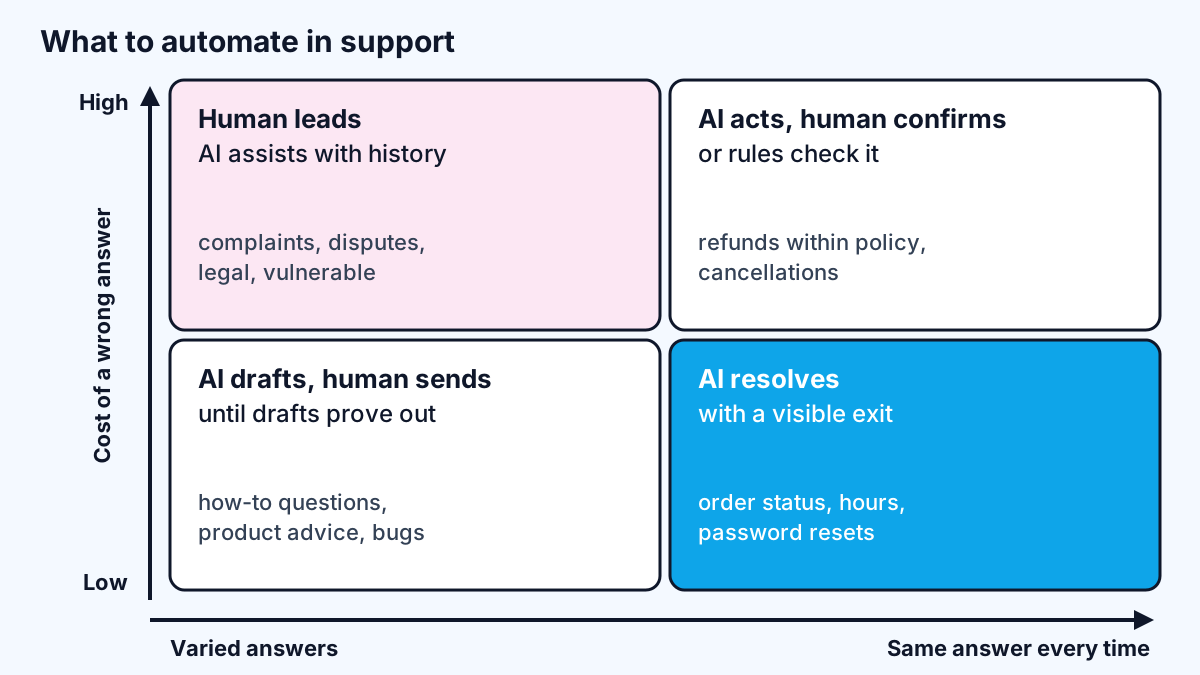
| Ticket type | Zone | What AI does | Human role |
|---|---|---|---|
| Order or delivery status | Resolve | Looks up and answers | None unless the order is stuck |
| Opening hours, prices, policies | Resolve | Answers from a maintained knowledge base | Keeps the knowledge base current |
| Password reset, account access | Resolve | Starts the secure reset flow | Handles failed verification |
| Booking changes | Resolve or confirm | Changes the booking after reading it back | Exceptions outside policy |
| Refund within clear policy | Confirm | Checks eligibility, prepares the refund | Approves above a set amount |
| Cancellation | Confirm | Explains terms, offers options | Retention offers, edge cases |
| How-to and product questions | Draft | Drafts a reply from docs | Edits and sends until quality is proven |
| Bug reports | Draft and triage | Collects details, tags, routes | Investigates |
| Complaints | Assist | Summarises history, suggests next step | Owns the conversation |
| Billing disputes, legal threats | Assist | Pulls the account history | Decides and replies |
| Distress, safety, vulnerability | Hand off immediately | Recognises and escalates | Handles it personally |
Two notes on the table. First, "resolve" still means the AI calls a real system, not that it guesses: order status comes from the order database, not the model's memory. Second, tickets move between zones as you prove quality. Many teams start how-to questions in "draft" and move them to "resolve" once the drafts rarely need editing.
What should never be automated?
Some conversations should go to a person as soon as they are recognised, whatever the model's confidence. On client projects I write these as hard rules in code, not as suggestions in the prompt:
- Anger or distress. A frustrated customer who has already asked twice should not be asked a third time by a bot.
- Safety and health. Anything suggesting harm, a medical issue or an emergency.
- Legal and regulatory. Threats of legal action, data protection requests, formal complaints.
- Money beyond a threshold. Refunds, credits or compensation above an amount the business sets.
- Vulnerable customers. Bereavement, financial hardship, accessibility needs.
- Repeated failure. If the AI has failed to resolve the same issue twice in one conversation, stop and hand over.
The Air Canada case was about a bereavement fare, which is a good reminder of why sensitive policy questions deserve extra care.
How do you design a handoff customers do not hate?
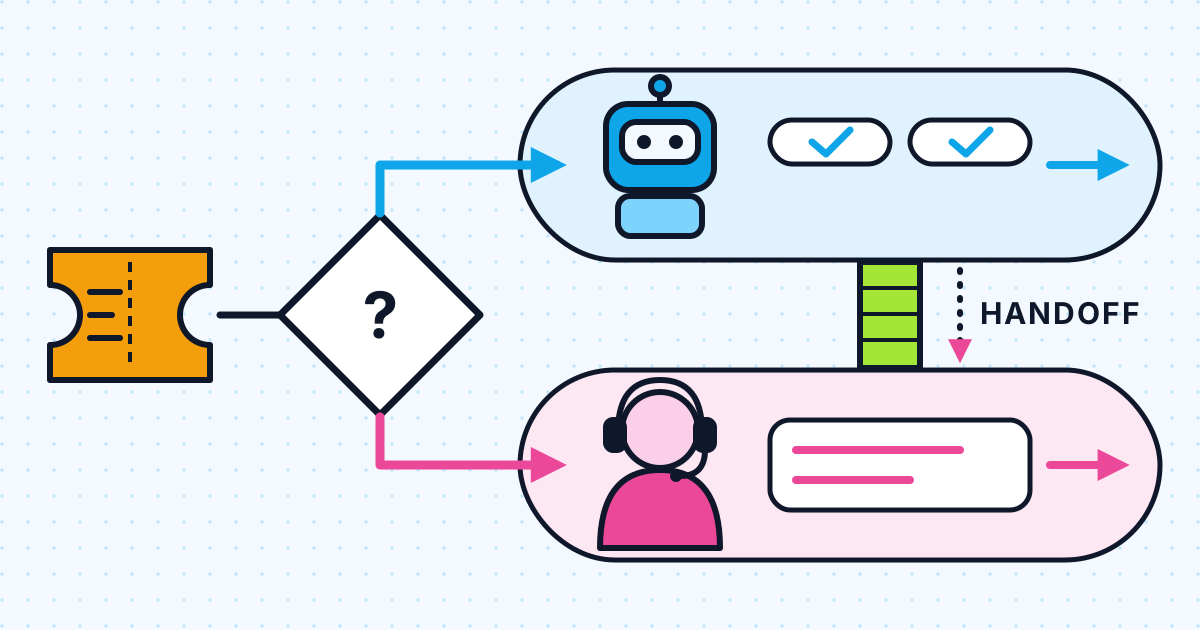
A good handoff is fast, visible and carries context, so the customer never repeats themselves. Design it before the happy path, because it is the part that decides whether people trust the system.
- Say it is a bot, and say how to leave. One line at the start: you are talking to an automated assistant, type "agent" any time for a person.
- Honour the request immediately. If someone asks for a human, do not try one more answer first.
- Pass a summary. The agent receiving the handoff should see who the customer is, what they asked, what the AI tried and what it found.
- Be honest about timing. If no one is available until morning, say so and offer a callback or email, rather than leaving the chat hanging.
- Close the loop. When a person resolves a ticket the AI could not, tag why. Those tags tell you what to fix or what to stop automating.
The same principle runs through my posts on human-in-the-loop AI agents and AI voice agents for customer service: the AI does the routine part, and the route to a person is part of the design, not an afterthought. For WhatsApp, a clear escalation path is also a platform rule, as I covered in the WhatsApp AI agent build guide.
Which metrics show whether AI support is working?
Track resolution quality and customer outcomes, not only how many tickets the AI closed. A bot that closes many tickets by wearing people down looks good on a deflection chart and terrible everywhere else.
| Metric | What it tells you | Warning sign |
|---|---|---|
| Resolution rate (confirmed) | Share of AI conversations the customer confirms are solved | Counting silence as success |
| Re-contact rate | Customers coming back about the same issue within days | Rising while resolution rate rises |
| Time to human | How long it takes to reach a person after asking | More than a minute or two in chat |
| Escalation rate by ticket type | Where the AI struggles | One type escalating far more than others |
| Satisfaction, AI vs human | Whether AI conversations feel worse | A persistent gap |
| Wrong-answer rate from reviews | Errors found when people read transcripts | Any error on policy or money |
If you buy rather than build, watch how your vendor counts success, because it affects both reporting and cost. Intercom's pricing page, for example, prices its Fin agent at "$0.99 per outcome" and counts an outcome when a customer confirms the issue is resolved, when they "don't ask for more help after Fin responds", or when Fin completes a workflow, including handoffs. That is a reasonable definition for billing, but "didn't ask for more help" is not the same as "was helped", so measure re-contact separately.
Read a sample of transcripts every week. Every bad conversation is either a knowledge-base gap, a missing tool, a prompt problem, or a ticket type that belongs in a different zone.
How do you roll out AI support without risking customers?
Roll it out in stages, starting with the AI working behind your team rather than in front of customers, and widen its role only when the numbers support it. Each stage gives you real transcripts to judge before customers depend on the system.
- Shadow mode. The AI reads incoming tickets and drafts answers that only your team sees. Agents mark each draft as usable, needing edits or wrong. Within a few weeks you know, per ticket type, how good the drafts are.
- Assist mode. Agents send AI drafts after editing them. Track how much they change. Ticket types where drafts go out almost untouched are candidates for the next stage.
- Resolve one zone. Let the AI answer customers directly for one or two low-risk, repeatable ticket types, with the handoff live from day one, during staffed hours first.
- Widen carefully. Add ticket types one at a time, and move any type back a stage if re-contact or complaints rise.
Write the escalation rules down before stage three and review them with the support lead. Rules agreed in advance are much easier to enforce than rules invented after a bad conversation reaches social media.
Work with me
I design and build AI support agents with the escalation rules, handoff and metrics built in from the start. See AI chatbot development and AI agent development, browse my work, and book a scoping call to sort your own tickets into the four zones.
Frequently asked
What customer support tasks should be automated with AI?
Automate tickets that are frequent, have one correct answer and cost little if wrong, such as order status, opening hours, policy questions and password resets. Use AI to draft or triage more varied questions, and keep people in charge of refunds above a threshold, complaints, disputes and sensitive situations.
Should AI chatbots always offer a human option?
Yes. Surveys show the main fear customers have about AI support is not being able to reach a person, and regulators have criticised chatbots that block access to human help. Offer a visible way to reach someone at any point, and pass the conversation summary so the customer does not repeat themselves.
Is a business responsible for what its AI chatbot says?
Generally, yes. In Moffatt v. Air Canada, a Canadian tribunal rejected the argument that the airline's chatbot was responsible for its own actions and held the airline liable for incorrect information it gave. Treat everything your bot says as your business speaking, and keep policy answers tied to approved sources.
How do you measure AI customer support success?
Measure confirmed resolution rate, re-contact rate, time to reach a human, escalation rate by ticket type and satisfaction compared with human-handled tickets. Deflection alone is misleading, because a bot can close tickets by frustrating customers into giving up.
What is a good handoff from AI to a human agent?
A good handoff happens immediately when asked, tells the customer what will happen and when, and gives the human agent a summary of who the customer is, what they asked and what the AI already tried. The customer should never have to start again.
Sources
Related services
Building something like this?
Naman Gundaniya takes on full-stack and AI projects fixed quote after a free 30-minute scoping call, replies within 24 hours.
Get in touch