 By Naman Gundaniya
AI Chatbot for Your Website: A No-Nonsense Build Guide
A useful AI chatbot for a website answers only from your own content, says so when it does not know, captures a lead when a visitor shows buying intent, and hands the conversation to a human when the question is risky or the visitor asks. Build those four behaviours first, measure them weekly, and treat everything else as optional.
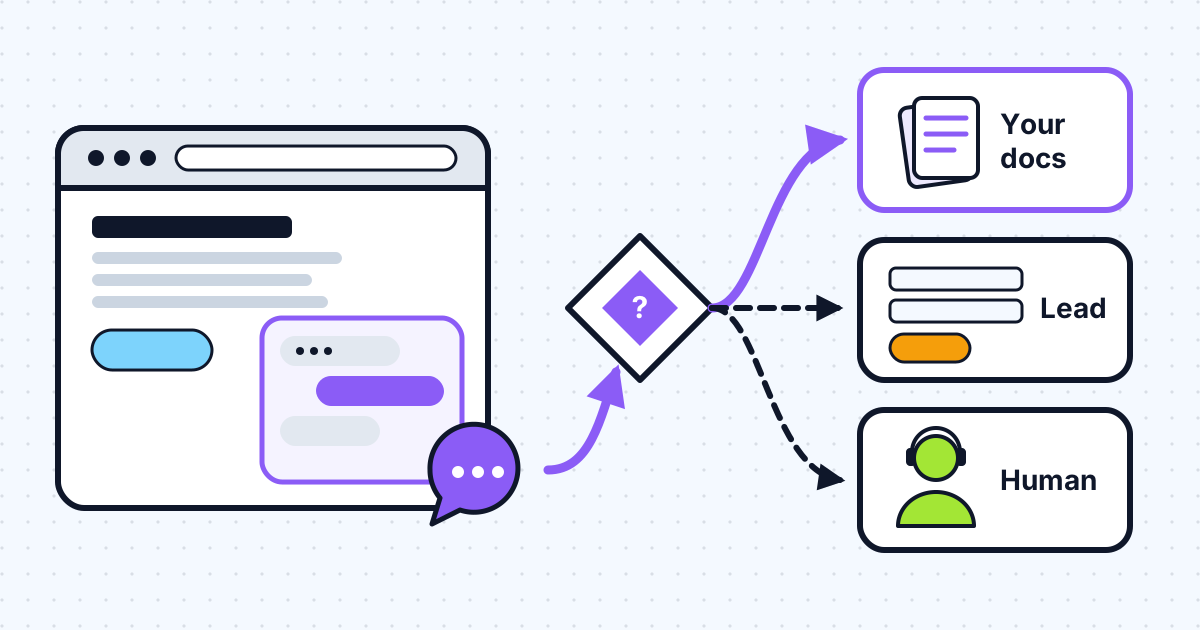
Most chatbot projects start with the widget and end with a bot that sounds confident and is wrong about the refund policy. The widget is the easy part. The work is in the content it reads, the rules about what it may say, and the exits it offers. This guide is the order I build those in on client projects.
What should a website chatbot actually do?
A website chatbot should do three jobs: answer questions from your published content, turn interested visitors into leads, and route anything it should not handle to a person. Pick the jobs before picking a tool, because each one changes the build.
| Job | What good looks like | What it needs |
|---|---|---|
| Answer from your content | Short answers with a link to the source page | Clean content, retrieval, citations |
| Capture leads | Asks for an email only when intent is clear | A form step, CRM or inbox hook |
| Hand off to a human | Clear exit, conversation passed along | Handoff rules, a person on the other end |
| Take actions (bookings, orders) | Confirms before acting | Tools with approval; later, not first |
The fourth row is where a chatbot becomes an agent. I leave it out of the first version. A bot that answers well and hands off cleanly is already worth having, and it gives you the transcripts you need to decide which action to automate next.
Why does the chatbot have to answer only from your content?
Because your business is responsible for what it says. In Moffatt v. Air Canada, the British Columbia Civil Resolution Tribunal found the airline liable after its website chatbot told a passenger he could claim a bereavement fare after travelling, which another page on the same site contradicted. As McCarthy Tétrault's summary records, the airline effectively argued the chatbot was "a separate legal entity that is responsible for its own actions", and the tribunal rejected that, finding Air Canada "did not take reasonable care to ensure its chatbot was accurate."
A public sector example makes the same point. The Markup reported in March 2024 that New York City's MyCity chatbot told business owners "Yes, you can take a cut of your worker's tips", and gave inconsistent answers on whether landlords must accept housing vouchers.
The lesson is not "avoid chatbots". It is: ground every answer in a source you control, show that source, and refuse when there is no source.
How does a grounded website chatbot work?
A grounded chatbot retrieves the relevant passages from your content, passes only those to the model with strict instructions, and returns an answer with links back to the pages it used. The flow below is the one I start from.
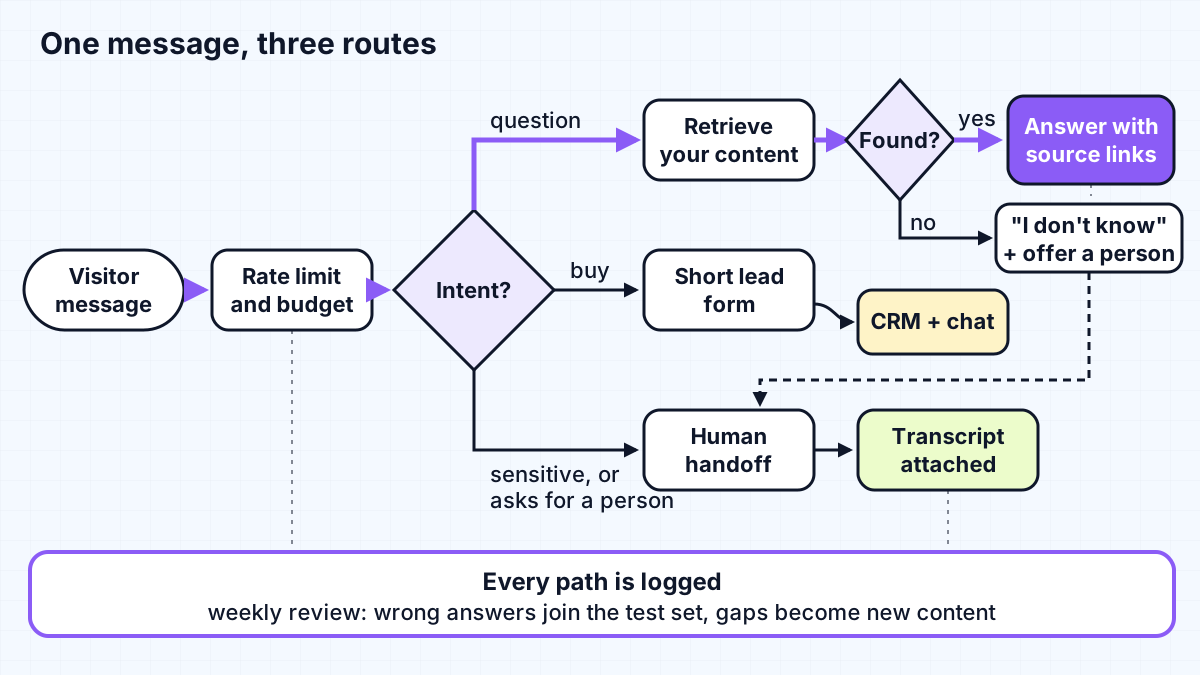
The pieces, in plain terms:
- A chat route on your server. The model API key never touches the browser. My guide to integrating Claude into a Next.js app covers the route; on the client, the AI SDK's `useChat` hook from
@ai-sdk/reactgives youmessages,sendMessage,statusandstopfor the chat UI. - Retrieval over your content. Your pages, help articles and policies, split into chunks and searched per question.
- Grounded generation with citations. Anthropic's API has a citations feature: you pass documents with
citations: {"enabled": true}and the response points to the exact passages it used, with character ranges for plain text and page numbers for PDFs. That turns "trust me" into a link the visitor can click. - A refusal path. If retrieval returns nothing relevant, the bot says it does not know and offers a person. This is a rule in code, not a hope in the prompt.
How should you prepare the content?
Content preparation decides answer quality more than model choice does. Before any code, I collect what the bot is allowed to know and fix what is wrong in it.
- List the sources. Service pages, pricing pages, FAQs, policies, help docs. Leave out internal notes, drafts and anything you would not publish.
- Resolve contradictions. If two pages disagree, the bot will eventually quote the wrong one. The Air Canada case turned on exactly that.
- Write the missing answers. Read your support inbox and sales calls for the ten questions people actually ask. If the answer is not on the site, write it down first.
- Decide on retrieval or no retrieval. For a small site, you may not need a vector database at all. Anthropic's contextual retrieval write-up suggests that for a knowledge base under 200,000 tokens you can "include the entire knowledge base in the prompt", made cheaper with prompt caching. Larger sites need chunking and search; the same article reports that contextual embeddings with contextual BM25 cut failed retrievals by 49% in Anthropic's tests, and 67% with reranking added.
- Re-index on publish. Stale content is a common source of wrong answers. Tie re-indexing to your CMS publish event.
For the trade-off between retrieval and training a model on your content, see RAG vs fine-tuning. For a website chatbot, retrieval is almost always the answer.
When should the bot capture a lead or hand off?
Capture a lead when the visitor shows buying intent, and hand off when the topic is risky or the visitor asks for a person. Both are routing decisions, and I make them explicit rather than leaving them to the model's mood.
Lead capture rules that work:
- Trigger on intent signals: pricing questions, "can you do X for us", availability, booking.
- Ask for one thing at a time: name and email, then the question. Long forms inside chat get abandoned.
- Send the lead with the transcript so whoever follows up does not ask the same questions again.
- Never gate answers behind an email. Visitors leave.
Handoff rules that work:
- Always offer a visible "talk to a person" option.
- Route by topic: refunds, complaints, legal, medical and account security go to a human by default.
- Route by failure: two "I don't know" answers in a row should trigger an offer to escalate.
- Be honest about timing. If nobody is online, say when someone will reply and take an email.
The handoff can be as simple as an email with the transcript, or a ticket in your help desk. What matters is that a person sees it and the visitor knows what happens next.
What guardrails does a public chatbot need?
A public chatbot is an open endpoint that spends your money on every message, so it needs abuse and cost limits from day one. I covered the full set in two earlier posts; the short version:
- Rate limits per visitor and per IP, plus a daily budget for the whole bot. See how to cap LLM costs per user.
- Keys on the server only, with a proxy route and leak response plan. See protecting API keys in AI web apps.
- A tight system prompt that scopes the bot to your business and tells it to decline everything else.
- Short conversation limits. Long sessions cost more and drift off-topic; cap turns and offer a human or a fresh start.
- No secrets in the context. Anything the model can read, a determined visitor can often get it to repeat.
Should you build or buy a website chatbot?
Buy if your needs are standard and your content already lives in a help desk; build if the bot must work with your own data, systems or rules. Hosted tools price by outcome or seat. Intercom, for example, lists its Fin agent at "$0.99 per outcome", charged once per conversation, where an outcome includes a customer confirming the issue is resolved or Fin completing a workflow, handoffs included.
A custom build makes sense when you need answers from sources a help desk cannot see, lead routing into your own CRM, a specific tone and scope, or ownership of the data and transcripts. It costs more to start and less to change later. Whichever route you take, the content preparation and handoff rules above are the same work.
How do you measure whether the chatbot is working?
Review real conversations every week and track a small set of numbers. I look at:
- Answered with a source: the share of questions the bot answered with a citation.
- "I don't know" rate: high means missing content; near zero can mean the bot is guessing.
- Handoffs and their reasons: each one is either a content gap or a topic that should stay human.
- Leads captured and how many became calls.
- Wrong answers found in review: add each to a test set and re-run it after every prompt or content change.
That last habit matters most. A small set of real questions with expected answers is what lets you change the prompt or the model without guessing; skipping it is a common reason AI features fail after launch.
Work with me
I build website chatbots that answer from your content, capture leads and hand off cleanly, with the cost and abuse limits in place before launch. See AI chatbot development and AI integration, or look at my work and book a scoping call.
Frequently asked
How do I add an AI chatbot to my website?
Decide what the bot should do, collect and clean the content it may answer from, then build a server-side chat route that retrieves relevant passages, generates a cited answer and routes buying intent and risky topics to a lead form or a person. Add rate limits and a cost cap before it goes public.
Can an AI chatbot answer from my own website content only?
Yes. Retrieve passages from your own pages for each question, instruct the model to answer only from them, show the sources, and refuse in code when retrieval finds nothing relevant. Citation features, such as the one in Anthropic's API, make the source visible to the visitor.
Is a business responsible for what its chatbot says?
In at least one decided case, yes. A Canadian tribunal held Air Canada liable for its chatbot's wrong answer about bereavement fares and rejected the argument that the chatbot was responsible for its own actions. Treat chatbot answers as statements your business makes.
How much does a website AI chatbot cost to run?
Running cost is mostly model usage per message plus any platform fees, so it depends on traffic, answer length and the model. Hosted tools often charge per outcome; custom builds pay the model provider per token. A per-visitor rate limit and a daily budget keep it predictable.
Sources
Related services
Building something like this?
Naman Gundaniya takes on full-stack and AI projects fixed quote after a free 30-minute scoping call, replies within 24 hours.
Get in touch