 By Naman Gundaniya
Why AI Features Fail After Launch, and How to Fix Them
AI features usually fail after launch for five reasons: real inputs drift away from the demo set, the model underneath changes, confident wrong answers surface on edge cases, cost grows faster than usage, and users quietly stop trusting the output. Each has a clear signal you can watch for and a fix that works, provided you planned for it before launch.

A launch is the moment an AI feature meets inputs nobody chose. The demo used twenty tidy examples; production sends thousands of messy ones, at odd hours, from people who never read the help text. That gap is where most AI feature failure happens, and it is rarely dramatic. The feature does not crash. It just gets slowly worse, or slowly more expensive, until someone asks why usage dropped.
This is a post-mortem guide. The patterns below are composites of what I look for when I inherit or review an AI feature, not stories about specific clients, plus two public cases that show the stakes. For the earlier stage, when a pilot never makes it to launch at all, see why AI pilots stall.
Why do AI features that demo well fail in production?
They fail because a demo tests the feature against the inputs you expected, and production tests it against the inputs you got. Traditional software fails loudly when it meets something new: an exception, a 500, a red dashboard. A language model fails quietly. It returns a fluent, well-formatted answer that happens to be wrong, and nothing in your monitoring notices.
That quietness is the core problem. Most teams launch AI features with the same observability they use for ordinary endpoints: latency, error rate, uptime. All three can stay green while the feature gives bad answers to a fifth of its users. So the first fix, before any of the specific ones below, is to decide what "working" means for this feature in terms you can measure, and to measure it from day one.
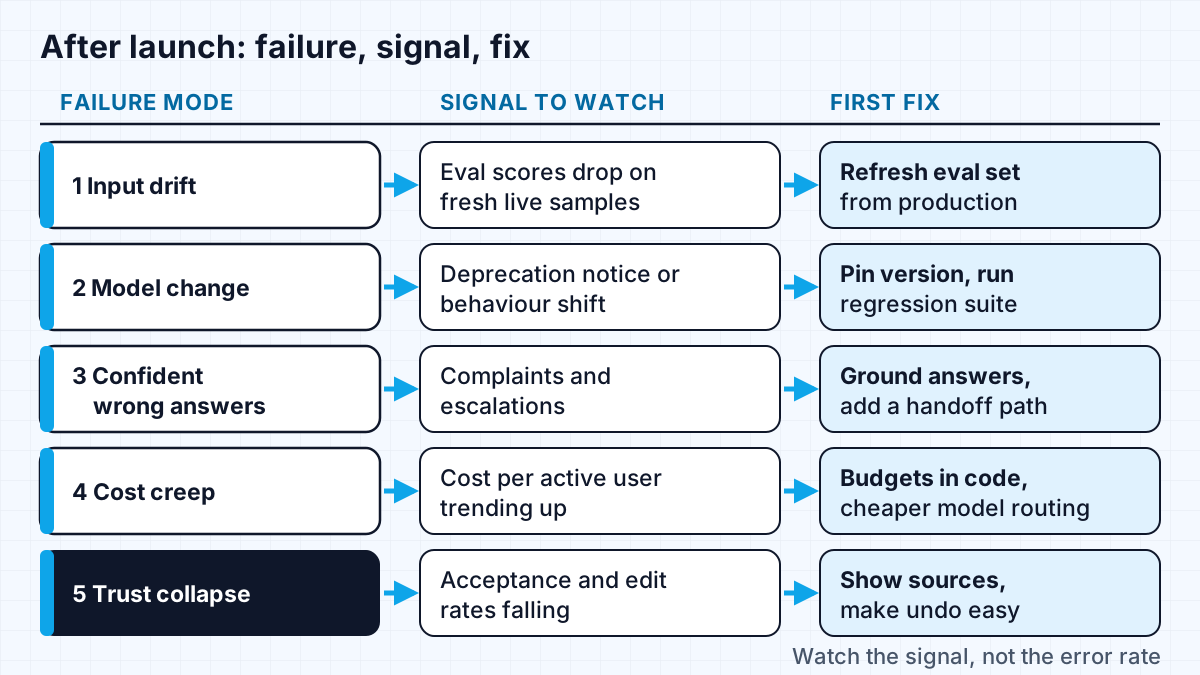
Failure 1: the inputs drift away from your test set
Input drift means the real requests no longer look like the ones you tested. Users phrase things differently, paste in longer documents, switch languages, or find uses you never intended. A classifier tuned on last quarter's support tickets meets a new product line; an extraction step built on clean PDFs meets phone photos of crumpled receipts.
The signal is a gap between your offline eval scores and what you see when you sample live traffic. If you only ever score the original test set, you will never see it, because that set does not change.
The fix is to treat your eval set as a living thing:
- Sample a small slice of real production inputs every week, with personal data stripped, and review them by hand.
- Add the interesting ones, especially failures, to the eval set with the correct expected output.
- Re-run the full set on every prompt or model change and compare against the last run.
Hamel Husain's advice on evaluating AI products is blunt about this: "You must remove all friction from the process of looking at data." I set up that review loop before launch on client projects, because it is much harder to add once the feature is live and everyone is busy. My post on AI agent evaluation covers how to build the set itself.
Failure 2: the model changes underneath you
Model change failures happen when the model you built on is updated, deprecated or retired, and its replacement behaves differently. This is not hypothetical. Anthropic's model deprecations page says it "regularly retires older ones" and that it provides "at least 60 days' notice before model retirement for publicly released models". The same page shows claude-sonnet-4-5-20250929 deprecated on 30 September 2026 with retirement set for 30 November 2026, after which "requests to models past the retirement date will fail."
Sixty days is enough to migrate a feature that has a regression suite. It is not enough for one whose quality lives in someone's head. The signal is usually an email you nearly missed, or a support ticket that says the feature "feels different".
The fix:
- Pin an exact model version in configuration, never a floating alias, so changes happen when you choose.
- Keep a regression suite of real inputs with expected outputs, as above.
- When a replacement is announced, run the suite against it the same week, read the diffs, and adjust prompts before the deadline rather than after.
The same page recommends you "test your applications with newer models well before the retirement date". That advice is easy to agree with and hard to follow without a suite to run.
Failure 3: confident wrong answers on edge cases
Edge-case failures are the ones that make the news: the model answers a question it should have refused or escalated, and states something false with full confidence. The best-known public example is Air Canada. According to CBS News, the airline's website chatbot told a customer he could apply for a bereavement refund within 90 days of buying his ticket, which did not match the airline's policy. Air Canada argued the chatbot was "a separate legal entity that is responsible for its own actions"; the tribunal member rejected that, writing that "it should be obvious to Air Canada that it is responsible for all the information on its website," and ordered it to pay the customer $812 CAD in damages and fees.
The lesson is not "chatbots are dangerous". It is that a feature answering policy questions needs to know where its knowledge ends. The fixes:
- Ground answers in a source and return the source with the answer, so a person can check it.
- Write refusal paths deliberately. "I'm not sure, here is the policy page and a way to reach a person" is a valid output, and it should be in your eval set as an expected answer.
- Route high-stakes topics to a human, such as refunds, legal terms and medical questions, rather than letting the model improvise.
- Validate outputs in code where the answer has a structure, so impossible values never reach the user.
Failure 4: cost grows faster than usage
Cost creep happens when cost per user rises over time even though nothing obvious changed. Conversations get longer, users discover the feature works on big documents, a retry loop fires more than expected, or an agent starts taking more steps per task. Usage doubles and the bill quadruples.
The signal is cost per active user or cost per successful task trending upward. Total spend alone hides it, because total spend is supposed to grow with adoption.
The fix is to track cost per unit of value from the first week and to put budgets in code: per-user limits, maximum steps per agent run, and routing of simple requests to cheaper models. My guide to reducing LLM costs covers the techniques, so I will not repeat them here. The short version is that cost is a product metric, not an invoice you look at once a month.
Failure 5: users stop trusting it
Trust collapse is the quietest failure: nobody complains, they just stop using the feature. One bad answer in a visible place, or a few that cost the user time, teaches people to skip the AI button and do the work by hand. Your error rate stays at zero because nobody is calling the feature any more.
The signal is behavioural. Watch acceptance rate (how often a suggestion is used as is), edit rate (how much people change it), and repeat usage per user. A falling acceptance rate is the earliest warning you will get.
The fixes are mostly product design:
- Show where an answer came from, so people can verify instead of guess.
- Make undo cheap and obvious, so trying the feature carries no risk.
- Let users flag a bad output in one click, and route those flags into your eval set.
- Be honest in the interface about what the feature can and cannot do.
How do you diagnose a failing AI feature quickly?
Start from the symptom and work back to the cause. This table is the triage sheet I use when someone tells me an AI feature "isn't working any more".
| Symptom | Likely cause | First thing to check | First fix |
|---|---|---|---|
| Quality complaints rising, error rate flat | Input drift | Sample 50 recent inputs by hand | Add failures to the eval set |
| Behaviour changed overnight | Model update or retirement | Model version in logs and deprecation notices | Pin the version, run the regression suite |
| One embarrassing answer, widely shared | Missing refusal path | Was there a source for the answer? | Ground, refuse, or hand off |
| Bill growing faster than users | Longer contexts, retries, agent loops | Cost per user and steps per task | Budgets in code, model routing |
| Usage falling, no complaints | Lost trust | Acceptance and edit rates | Sources, undo, one-click feedback |
Most failing features have more than one of these at once. Fix the one with the clearest signal first, because a working measurement loop makes the others easier to see.
What should be in place before you launch?
A short pre-launch checklist prevents most of the failures above. Before an AI feature ships, I want to see:
- A written definition of success with a number attached, ideally in the feature brief.
- An eval set built from realistic inputs, including the ugly ones, with a way to re-run it in minutes.
- A pinned model version and a named person who reads deprecation emails.
- Logging of inputs, outputs, model version, tokens and cost for every call, with personal data handled properly.
- Refusal and handoff paths for anything high stakes.
- Per-user and per-task cost limits enforced in code.
- Acceptance, edit and feedback metrics on a dashboard someone looks at weekly.
None of this is exotic. It is the same discipline you would apply to a payments integration, adjusted for a component that can be wrong without raising an error.
Work with me
If an AI feature of yours demoed well and is now slipping, I can review it, set up the eval and monitoring loop, and fix the causes in order. See AI integration and full-stack development, browse my work, and book a scoping call.
Frequently asked
What is the most common reason AI features fail after launch?
The most common reason is that nobody is measuring output quality on live traffic, so drift and regressions go unnoticed for weeks. The underlying cause varies, but the lack of a quality signal is what turns a small problem into a failed feature.
How often should you re-evaluate an AI feature in production?
Re-run your eval set on every prompt change, every model change, and on a regular schedule even when nothing changed, because the inputs change. A weekly hand review of a small sample of real traffic is a good baseline for most features.
Can a model provider change behaviour without warning?
Providers publish deprecation and retirement schedules for model versions, and Anthropic, for example, commits to at least 60 days' notice before retiring a publicly released model. Pinning an exact version means behaviour changes only when you switch, and a regression suite tells you what the switch will change.
Is a company liable for what its AI chatbot says?
In the Air Canada case, a Canadian tribunal held the airline responsible for its chatbot's incorrect answer and rejected the argument that the bot was a separate entity. That was a small-claims decision, not a universal rule, but it is a good reason to treat chatbot answers as statements your company makes.
Sources
Related services
Building something like this?
Naman Gundaniya takes on full-stack and AI projects fixed quote after a free 30-minute scoping call, replies within 24 hours.
Get in touch