 By Naman Gundaniya
How to Cap LLM Costs Per User in a SaaS Product
To cap LLM costs per user, record the cost of every model call against the user who made it, give each plan a budget in money rather than in messages, and check that budget in your own server code before each call. Reserve an estimated cost up front, settle the real cost from the response's token usage, and show users how much they have left.
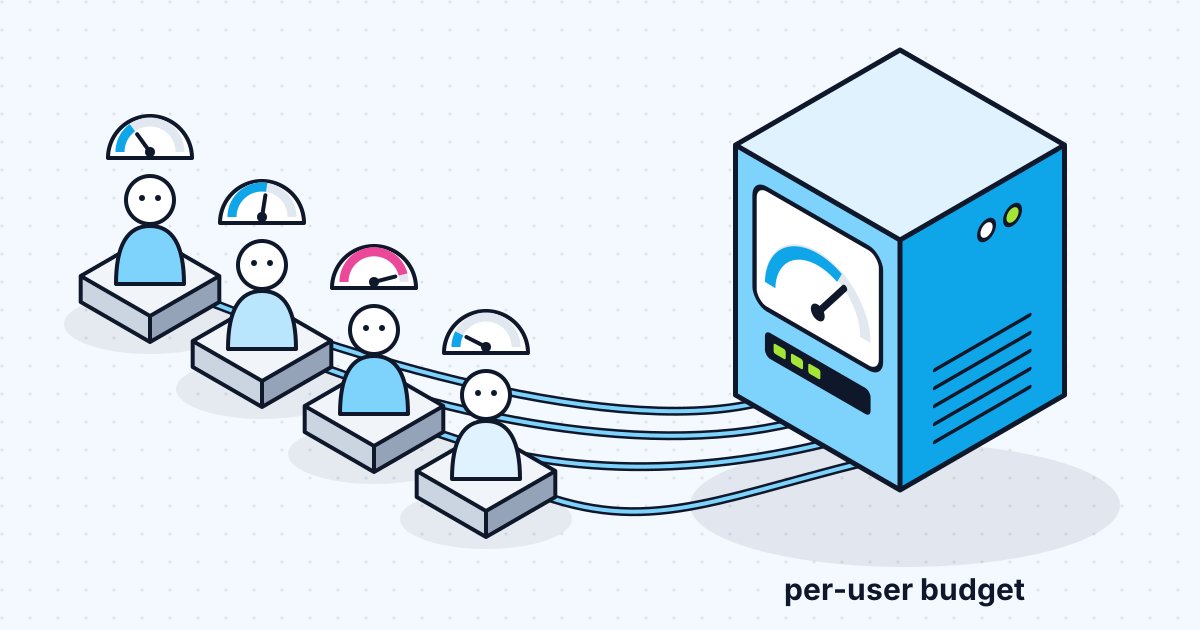
Provider spend limits protect your account, not your margins. If one customer on a fixed monthly plan scripts your AI feature, a provider limit either does nothing or stops every customer at once. Per-user caps have to live in your app. This is the design I use, with the parts that are easy to get wrong.
Why aren't provider spend limits enough?
Provider limits work at the account level, so they cannot tell a heavy user from a healthy month. Anthropic's rate limits page describes spend limits as "a maximum monthly cost an organization can incur", with optional lower limits per workspace. When a limit is reached, requests fail for everything using that organisation or workspace, until it resets or you raise it.
Keep those limits switched on as a last line of defence. OpenAI's API key safety guidance makes a similar point about spend: alerts alone do not stop traffic, so set a hard monthly limit. But per-user fairness and per-plan margins need a meter you control.
What should you meter?
Meter cost in money, per request, from the token usage the provider returns. Every Claude response carries a usage object, and the rate limits page explains how to read it when caching is on: total input is cache_read_input_tokens plus cache_creation_input_tokens plus input_tokens, because input_tokens alone only counts tokens after the last cache breakpoint.
Each kind of token has its own price, so store them separately and compute cost from a price table you keep in code:
- uncached input tokens,
- cache write tokens,
- cache read tokens,
- output tokens.
A worked example with the published prices for Claude Sonnet 5.5 as of late 2026 ($2 per million input tokens, $10 per million output tokens): a request with 2,000 input tokens and 500 output tokens costs $0.004 plus $0.005, or $0.009. Output tokens cost five times as much as input on that model, which is why long answers, not long questions, usually drive the bill.
I store one row per model call in a usage ledger: user ID, account ID, plan, feature, model, the four token counts, computed cost in micro-dollars as an integer, the provider's request ID and a timestamp. Integers avoid floating-point drift when you sum millions of rows. The ledger is the source of truth for caps, dashboards and any usage-based billing later.
Where do you enforce the cap?
Enforce it in the server route that calls the model, at three points: before the call, during it, and after it.
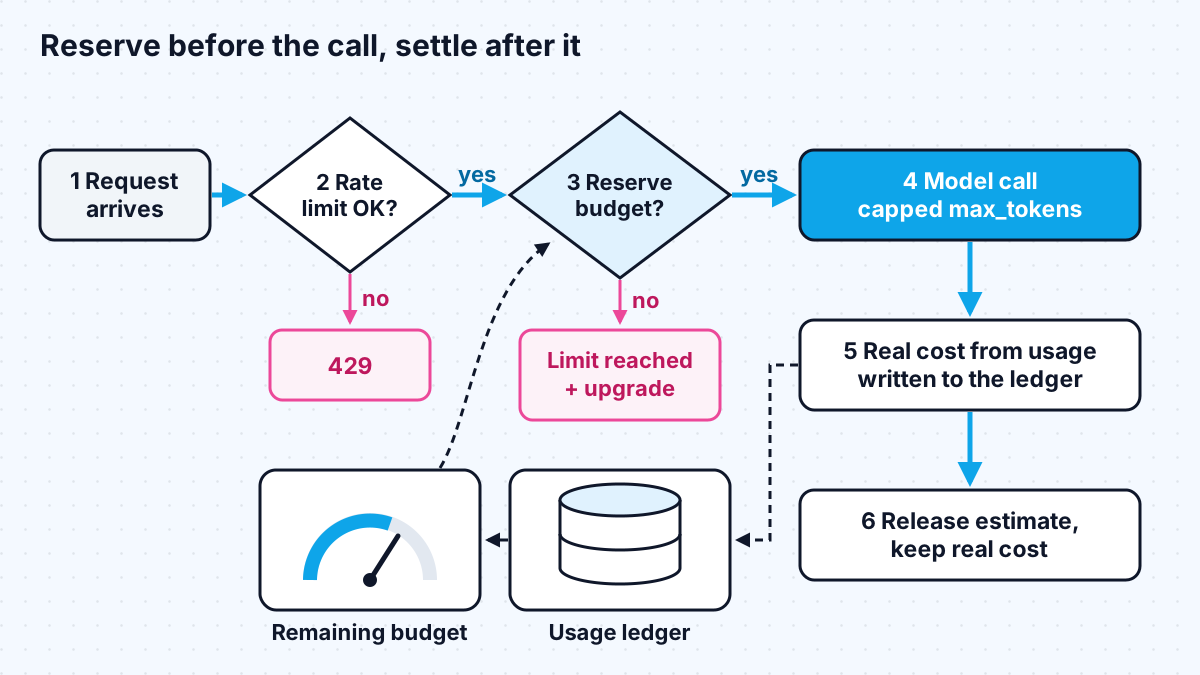
- Before: rate limit, then budget. A request-rate limit stops bursts and scripts. Upstash's rate limiting SDK, for example, takes a sliding window such as 10 requests per 10 seconds and an identifier that can be a user ID. Then check the money budget.
- During: cap the size of the call. Set max_tokens to what the feature needs, and limit conversation length or retrieved context so input cannot grow without bound.
- After: settle the real cost. Read the usage from the response, or from the last message_delta event in a stream, and write the ledger row. If a stream is aborted, record what was used up to that point; my post on streaming LLM responses in Next.js covers how.
Never enforce the cap only in the UI. A hidden button is still a reachable endpoint.
Agent features need one more rule. A single user request can trigger several model calls as the agent uses tools and loops (the loop I walk through in building an AI agent with MCP and Claude), so the cost of one click is not fixed. Give each run its own ceiling: a maximum number of steps and a maximum spend, checked before every model call inside the loop, not only at the start. When the run hits either ceiling, stop and return what the agent has so far with a clear note, rather than failing silently. Record every step in the ledger under the same run ID, so you can see which tasks are expensive and fix the prompt or tools behind them.
Reserve, then settle, to survive concurrency
A simple "check remaining budget, then call" has a race: a user who fires ten requests at once passes ten checks before any cost is recorded. The fix is to reserve an estimate atomically before the call and settle afterwards.
- Estimate the maximum cost: input tokens (counted or approximated) at the input price, plus max_tokens at the output price.
- Atomically subtract that estimate from the user's remaining budget, in Redis with a single increment or in Postgres with a conditional update. If the result would go below zero, refuse.
- Call the model.
- Add back the estimate and subtract the real cost, from the response usage.
For a precise input count, Anthropic's token counting endpoint is free to use, with its own requests-per-minute limit, and returns an estimate that can differ "by a small amount" from the billed figure. For most caps, a character-based approximation plus max_tokens is close enough, and it saves a round trip.
How should limits map to pricing plans?
Set each plan's AI budget as a share of what that plan earns, then decide what happens at the limit. The right numbers depend on your prices and margins, so the table shows the shape rather than figures.
| Plan | Budget basis | At 80% | At 100% |
|---|---|---|---|
| Free | Small fixed monthly budget | In-app notice | Hard stop with upgrade prompt |
| Paid | Share of plan price you are willing to spend on models | Email and in-app notice | Switch to a cheaper model, or hard stop |
| Team | Pooled budget per account, optional per-seat limit | Notify the account admin | Admin chooses: stop or buy more |
| Usage-based | Prepaid credits | Low-balance notice | Stop until topped up |
Two design choices save trouble later. Budget per account as well as per user, so a team cannot multiply its allowance by adding seats. And keep the limit check separate from billing, so you can change plan sizes without touching the model code. If you later bill for usage, Stripe now recommends Metronome for new usage-based integrations, including prepaid credits; your ledger is what feeds it.
Show users what they have used
A cap users cannot see feels like a bug. Show a simple meter in settings: used this period, remaining, and the reset date. Express it in units users understand, such as a percentage of the monthly allowance, rather than tokens. When a request is refused, say why and what to do next, in the same response: "You have used this month's AI allowance. It resets on the 1st, or you can upgrade."
Lower the cost so caps rarely bite
The best cap is one most users never hit. The levers, from the models overview: Batch API requests are 50% off, and prompt cache reads cost a fraction of the base input price. Use a smaller model for simple steps such as classification, keep system prompts stable so they cache, and trim retrieved context to what the answer needs. I cover the request side of this in how to integrate Claude into a Next.js app.
Cost control is one of the five layers in what an AI full stack developer does, and it is far cheaper to design in before launch than to bolt on after the first surprising invoice.
Work with me
I design and build usage metering, per-plan limits and cost dashboards for AI SaaS products. See SaaS MVP development and AI integration, or browse my work and book a scoping call.
Frequently asked
How do I limit LLM cost per user?
Record the cost of every model call against the user from the response's token usage, give each user or plan a monthly budget in money, and check and reserve that budget in your server route before calling the model. Add a request-rate limit for bursts and cap max_tokens on every call.
Should AI usage limits be in tokens, messages or money?
Money. Token prices differ between input, output and cached tokens and between models, so a token or message cap does not track your real cost. Store cost per request, enforce budgets in money, and show users a simple percentage.
Can I use OpenAI or Anthropic spend limits per user?
Not directly. Provider spend limits apply to your organisation or workspace, so hitting them stops every user. Keep them on as a safety net and build per-user budgets in your own app.
What happens when a user hits their AI limit?
That is a product decision. Common options are a hard stop with an upgrade prompt, a switch to a cheaper model, or a prompt to buy more credits. Whatever you choose, tell the user why the request was refused and when the allowance resets.
Sources
Related services
Building something like this?
Naman Gundaniya takes on full-stack and AI projects fixed quote after a free 30-minute scoping call, replies within 24 hours.
Get in touch