 By Naman Gundaniya
Streaming LLM Responses in Next.js: Production Lessons
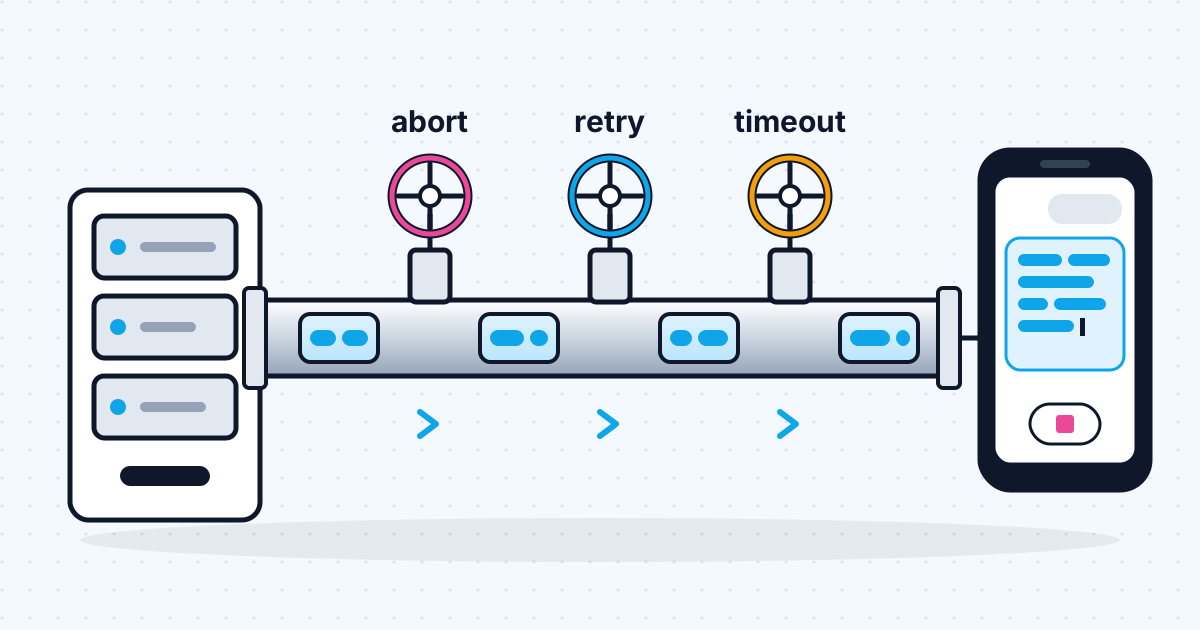
Streaming an LLM response in Next.js works in a demo with a route handler that returns a ReadableStream. In production you also need to line up three timeouts, forward the user's abort to the model call, send errors inside the stream because the 200 status is already gone, stop proxies from buffering, and give the UI clear states for waiting, streaming, stopped and failed.
The basic pattern is in my guide to integrating Claude into a Next.js app. This post is about what happens after launch: the spinner that never ends, the reply that stops mid-sentence with no error, the bill for answers nobody read. Each section is a failure I plan for on client projects, with the fix.
What goes wrong when you stream LLM output?
Streaming changes the shape of failure. A normal request either succeeds or returns an error code. A stream starts successfully, sends half an answer, and can then fail in ways the browser cannot see unless you design for it.
| Failure | What the user sees | Fix |
|---|---|---|
| A timeout cuts the function off | Reply stops mid-sentence, no error | Align the three timeouts; mark the stream complete explicitly |
| User leaves or presses Stop | Nothing, but you keep paying | Forward the abort signal to the model call |
| Provider error after the first tokens | Frozen text | Send an error event inside the stream |
| A proxy buffers the response | Whole answer appears at once, late | Disable buffering for the route |
| Slow first token | Blank screen, user clicks again | A "thinking" state and a first-token watchdog |
Line up the three timeouts
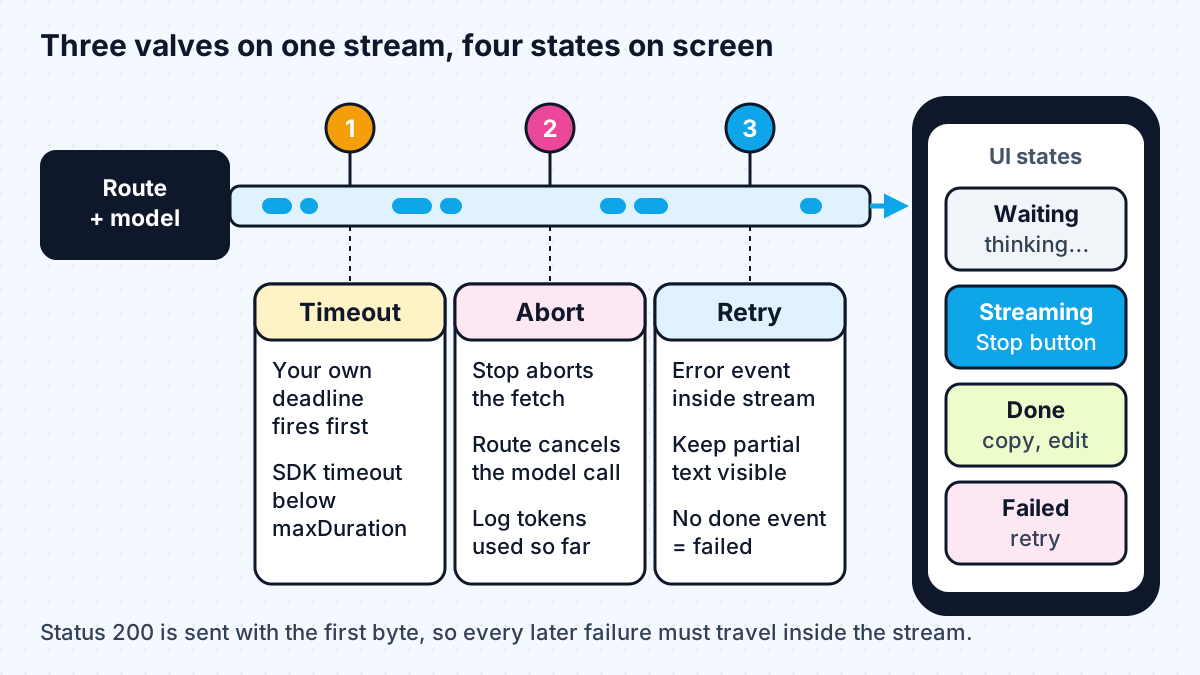
There are at least three clocks on every streamed reply, and the shortest one wins whether you planned it or not.
- The SDK timeout. The Anthropic TypeScript SDK's default timeout is 10 minutes, and timed-out requests are retried twice by default.
- The function's maximum duration. On Vercel, the duration docs list a 300-second default with fluid compute, configurable up to 800 seconds on Pro and Enterprise. In the App Router you set it with export const maxDuration in the route file.
- Idle timeouts between you and the user. The same Vercel page notes that HTTP/1.1 clients and intermediate network layers "may still close idle connections" and suggests streaming progress or heartbeat data while work runs. On AWS, the load balancer's idle timeout plays the same role, which I cover in deploying a Next.js AI app on AWS Bedrock.
The rule I use: the app's own deadline should fire first, so the app decides what the user sees. Set the SDK timeout below maxDuration, and when it fires, send a clear error event rather than letting the host kill the function mid-sentence. If a model thinks for a long time before its first token, send a small heartbeat so idle connections stay open.
Forward the abort, or keep paying
When a user presses Stop or closes the tab, the browser aborts its fetch. That does not automatically stop your server from generating the rest of the reply, and output tokens cost money whether anyone reads them or not.
The fix has three parts:
- On the client, create an AbortController per request, pass its signal to fetch, and call abort() from the Stop button.
- In the route handler, listen for the incoming request's signal: req.signal.addEventListener("abort", ...) and cancel the model stream there. With the Anthropic SDK you can "break from the loop or call stream.controller.abort()", per its docs; the AI SDK accepts the signal directly as abortSignal on streamText.
- Test it on your real host, not only locally. The AI SDK's stopping streams guide says that on Vercel you add supportsCancellation to the function's configuration in vercel.json, and a Vercel community thread describes abort listeners that worked under next dev and next start but not when deployed.
Record the tokens used up to the abort. The usage in Anthropic's message_delta events is cumulative, per the streaming docs, so the last one you saw is the bill for that partial reply.
Send errors inside the stream
Once the first byte is sent, the HTTP status is fixed at 200. Any failure after that has to travel inside the stream. Anthropic's streaming docs warn that the API "might occasionally send errors in the event stream", for example an overloaded_error during high usage.
A plain text stream cannot say "this ended badly". So for anything beyond a demo I stream small typed events, as server-sent events or newline-delimited JSON:
- a text event for each delta,
- an error event with a safe, user-facing message and a retryable flag,
- a done event with the stop reason and token usage.
The client then treats any stream that closes without a done event as a failure, even if no error event arrived. That one rule catches timeouts, crashed functions and dropped connections.
For recovery, the streaming docs describe capturing the partial response and sending a continuation request. For Claude 4.6 and later models, the continuation is a user message that contains the partial response and asks the model to continue. Tool use and thinking blocks "cannot be partially recovered", so only resume from a text block. In practice I usually offer a plain retry button and keep the partial text visible until the new answer replaces it.
Stop proxies from buffering the stream
If the whole answer appears at once after a long pause, something between your function and the browser is buffering. Nginx is the classic case: its proxy_buffering directive is on by default, and it can be turned off per response by sending an X-Accel-Buffering: no header.
On a self-hosted Next.js app behind Nginx or a similar proxy, I set that header on streaming routes, use text/event-stream for server-sent events, and check that compression middleware is not holding chunks. On a managed host, test with a slow response and watch the network tab: chunks should arrive over time, not in one block.
Give the UI the states users expect
Users judge streaming by how it feels, and the feel comes from clear states. The AI SDK's useChat hook models them as submitted, streaming, ready and error, per its chatbot docs, and I use the same four whether or not I use the hook.
- Submitted: show the user's message immediately and a "thinking" indicator. Disable the send button so a slow first token does not cause double submits.
- Streaming: render text as it arrives, show a Stop button, and only auto-scroll if the user is already at the bottom.
- Ready: swap Stop for copy, retry and edit controls.
- Error: keep the partial text, mark it as interrupted, and offer retry. A generic message is fine; log the detail on the server.
Render Markdown carefully while streaming. Half a code block or table is normal mid-stream, so use a renderer that tolerates unclosed syntax, or render plain text until the block closes.
Watch it after launch
Streaming bugs are intermittent, so log the things that let you find them: time to first token, total duration, stop reason, whether the stream ended with done, error or nothing, and tokens used. A rising share of streams that end with nothing usually means a timeout or proxy problem. Those numbers belong on the same dashboard as your quality checks, which I describe in evaluating AI agents.
This is the UI and API layer work that I describe in what an AI full stack developer does: it never shows up in a demo, and it decides whether users trust the feature.
Work with me
I build AI chat and streaming features that hold up in production, including the timeout, abort and error handling covered here. See full-stack development and AI chatbot development, or browse my work and book a scoping call.
Frequently asked
How do I stream an LLM response in Next.js?
Call the model's streaming API inside an App Router route handler, forward each text chunk into a web ReadableStream, and return it in a Response. On the client, read the response body with a reader and a TextDecoder, or use a hook such as the AI SDK's useChat.
Why does my LLM stream stop halfway in production?
Usually a timeout. The function's maximum duration, the SDK timeout or a proxy's idle timeout cut the connection before the model finished. Align the timeouts so your own deadline fires first, send heartbeats during long pauses, and send an explicit done event so the client can tell a finished reply from a cut one.
Does stopping a stream in the browser stop the LLM call?
Not automatically. The browser aborts its fetch, but your route must forward the request's abort signal to the model call to stop generation. Some hosts need extra configuration for this, so test cancellation on your deployed app.
Should I use server-sent events or a plain text stream?
A plain text stream is fine for a prototype. For production, a typed event format such as server-sent events lets you send errors and a completion event inside the stream, which a plain text stream cannot express.
Sources
Related services
Building something like this?
Naman Gundaniya takes on full-stack and AI projects fixed quote after a free 30-minute scoping call, replies within 24 hours.
Get in touch