 By Naman Gundaniya
Protecting API Keys and Rate Limits in AI Web Apps
To protect an OpenAI or Claude API key in a web app, keep it only on your server and call the model through your own authenticated route. Then rate-limit that route per user, cap spend per user and per account, use separate scoped keys per environment, keep keys out of git, and monitor usage. If a key leaks, revoke it first and investigate second.
A leaked model key is an open tab on your credit card. Unlike most leaked credentials, it does not need to reach your data to hurt you: anyone holding it can run their own workload on your bill. The fixes are not complicated, but each one closes a different hole, so I apply all of them on every AI project.
Why is a key in the browser always a leak?
Anything you send to the browser can be read by whoever is using it. That includes environment variables you thought were private. The Next.js environment variables guide explains that variables prefixed with NEXT_PUBLIC_ are inlined at build time "into any JavaScript sent to the browser". A key named NEXT_PUBLIC_OPENAI_API_KEY is published, not hidden.
The providers say the same. OpenAI's API key safety guide says "never deploy your key in client-side environments like browsers or mobile apps" and recommends routing requests through your own backend. Anthropic's TypeScript SDK disables browser use by default, and the option to enable it is called dangerouslyAllowBrowser; its docs warn that it "exposes your secret API credentials in the client-side code".
Mobile apps are not safer. A key compiled into an app binary can be extracted. Route mobile traffic through your server too.
Proxy through your server, but do not build an open relay
The first fix is a server route that holds the key and calls the model, such as a Next.js route handler. The trap is building a route that forwards anything to the model for anyone. Then you have moved the leak, not closed it: your endpoint becomes a free model API.
A safe proxy route does these things before calling the model:
- Authenticate. Require a signed-in session, or for anonymous features a short-lived token tied to the page view. Origin and referrer checks help against casual misuse but are easy to fake, so they are not authentication.
- Fix the prompt and model on the server. The client sends the user's input, not the system prompt, model name or max_tokens. Otherwise an attacker can turn your feature into a general-purpose model.
- Limit input size. Cap message length, turn count and uploaded file size.
- Mark the module server-only. Next.js documents an import "server-only" line that makes the build fail if a client component imports the module holding the key, per its server and client components guide.
The full route pattern, including streaming, is in my guide to integrating Claude into a Next.js app.
Rate-limit and cap spend per user
Even with authentication, one account can abuse your feature, by script or by accident. Two different limits handle this.
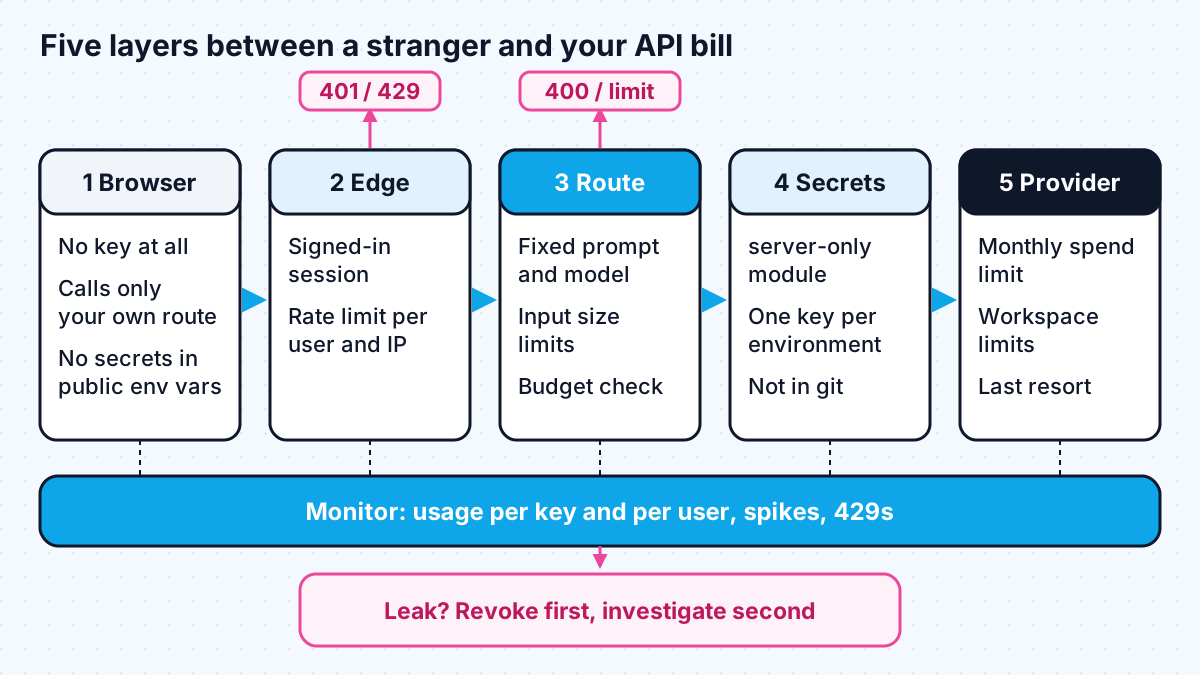
- Request-rate limits stop bursts: for example, a sliding window of a few requests per few seconds per user ID, and per IP address for anonymous traffic. Upstash's rate limiting SDK is one option built for serverless functions; it takes an identifier such as a user ID and returns whether the request may proceed.
- Cost budgets stop slow, steady abuse that stays under the rate limit. I meter cost per request from token usage and enforce a monthly budget per user and per account, as described in how to cap LLM costs per user.
Then set provider-level limits as a backstop. Anthropic lets you set your own monthly spend limit and lower limits per workspace, according to its rate limits page. OpenAI's guidance recommends hard monthly limits, noting that alerts alone do not stop traffic.
Scope keys and keep them out of git
Limit how much damage any one key can do, and how likely it is to escape. On AWS you can avoid a stored model key altogether by calling Bedrock with a least-privilege IAM role.
| Control | Why it helps | Source |
|---|---|---|
| Separate keys per environment and purpose | A leaked dev key does not touch production, and you can revoke one without an outage | Anthropic API key best practices |
| Key expiry and rotation | A forgotten key stops working on its own | OpenAI API key safety guide |
| IP allowlisting where offered | A stolen key fails from other networks | OpenAI API key safety guide |
| Environment variables or a secret manager | Keys never sit in source code | Both providers' guides |
| .env files in .gitignore | The create-next-app template does this by default | Next.js environment variables guide |
| Secret scanning and push protection | Blocks or flags keys before or after they reach GitHub | GitHub push protection docs |
Two details are worth knowing. GitHub's user-level push protection "is enabled by default" and stops you pushing secrets to public repositories. And Anthropic's key best practices page explains that it works with GitHub's secret scanning partner programme: when a Claude key turns up in a public repository, Anthropic deactivates it automatically and emails the owner. Treat these as nets, not plans; private repositories, logs, screenshots and support tickets leak keys too.
Monitor for the signs of a leak
Most leaks are discovered on the invoice. Find them sooner by watching the same numbers you use for cost control.
- Usage per key, per day, against a normal baseline. Alert on sharp jumps.
- Requests at hours or from regions where your users are not active.
- Spend per user from your own ledger, compared with provider usage. If the provider total is much higher than your ledger, something is calling the API without going through your app.
- Repeated 429 responses from your own rate limiter for one user or IP.
That last comparison is the most useful single check. It only works if you log usage per request, which is another reason to build the ledger early.
The mistakes I check for in a review
When I review an existing AI app, the same few gaps come up again and again. None of them needs a clever attacker; each one just needs someone curious enough to open the browser's developer tools.
- A key, or a variable that holds one, read inside a client component or a shared utility file.
- A proxy route that accepts the model name, system prompt or max_tokens from the request body.
- An AI endpoint that skips the session check because "only the app calls it".
- One key shared by development, staging and production, so nobody dares rotate it.
- Rate limits keyed on IP address only, which a signed-in user on a shared network hits by accident and a script avoids easily.
- No usage logging per user, so a spike shows up only on the monthly invoice.
What to do if your API key leaks
Revoke first, investigate second. Both providers say to act immediately: Anthropic's guide says "revoke the key immediately", and OpenAI's says to rotate it straight away from the API keys page.
- Revoke or rotate the key in the provider console. Do not wait to find out how it leaked.
- Deploy a new key to the server environment that needs it, and only that one.
- Check usage and spend for the leaked key's lifetime, and set or lower a hard spend limit while you investigate.
- Find the source: the client bundle, git history, CI logs, error tracking, screenshots or a shared document.
- Remove it from where it leaked. Cleaning git history is good hygiene, but the rotation in step 1 is what protects you.
- Contact provider support if you see usage you did not make.
- Close the gap: add the control from this post that would have stopped it, and write it down for the team.
Work with me
I build AI features with the key handling, rate limits and monitoring in place from the first release, and I review existing apps for these gaps. See AI integration and full-stack development, or browse my work and book a scoping call.
Frequently asked
How do I protect my OpenAI API key in a web app?
Keep the key only on your server, in an environment variable or secret manager, and never in client code or a NEXT_PUBLIC_ variable. Call the model from an authenticated server route that fixes the prompt and model, rate-limit it per user, cap spend, and monitor usage for spikes.
Is it safe to put an API key in a Next.js environment variable?
Yes, as long as the variable is not prefixed with NEXT_PUBLIC_ and is only read in server code such as route handlers. Public variables are inlined into the JavaScript sent to browsers, so anyone can read them.
What should I do if my OpenAI or Claude API key is leaked?
Revoke or rotate it immediately in the provider console, deploy a new key to your server, then check usage, set a hard spend limit, and find out how it leaked. Revoking comes first; deleting the key from git history does not stop someone who already copied it.
Can rate limiting alone protect my AI endpoint?
No. Rate limits stop bursts, but a determined user can stay under them and still run up costs. Combine authentication, per-user rate limits, per-user cost budgets and provider spend limits.
Sources
- environment variables guide (nextjs.org)
- API key safety guide (help.openai.com)
- docs (platform.claude.com)
- server and client components guide (nextjs.org)
- rate limiting SDK (upstash.com)
- rate limits page (platform.claude.com)
- Anthropic API key best practices (support.claude.com)
- GitHub push protection docs (docs.github.com)
Related services
Building something like this?
Naman Gundaniya takes on full-stack and AI projects fixed quote after a free 30-minute scoping call, replies within 24 hours.
Get in touch