 By Naman Gundaniya
Prompt Caching Explained: The Cheapest AI Cost Win
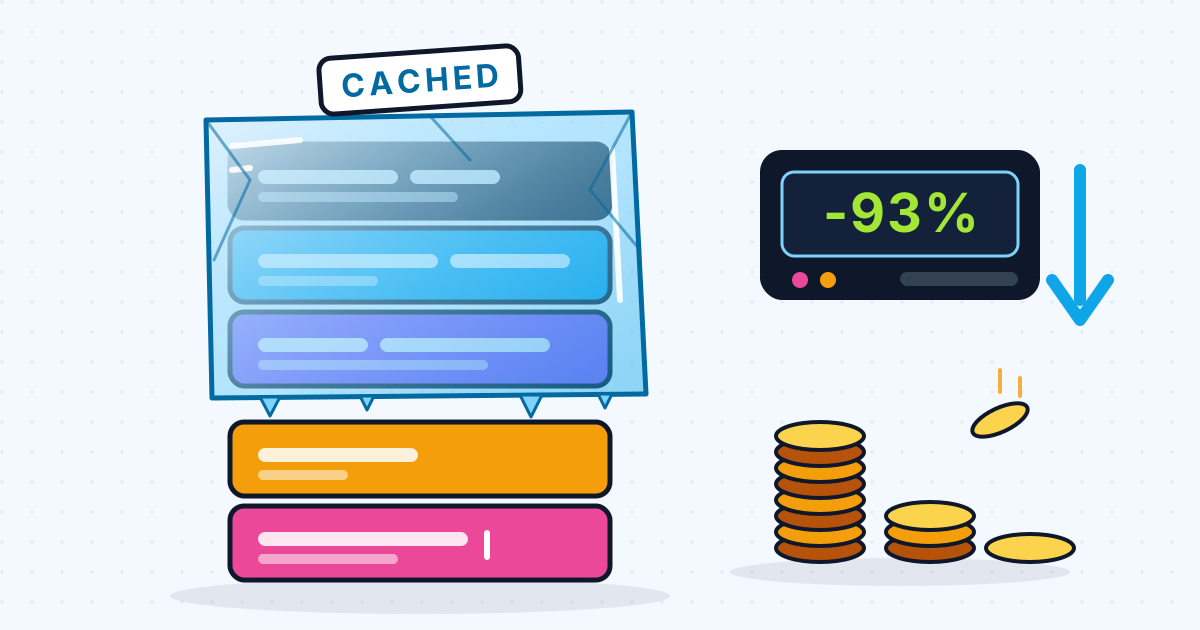
Prompt caching lets a model provider reuse the processed start of a prompt that you send again, and bills those repeated tokens at a fraction of the normal input price: 0.1x on most Claude and newer OpenAI models, and 0.05x on some. It only works when the start of the prompt is identical across requests, so put stable instructions, tools and documents first and anything that changes last.
If your app sends the same long system prompt, tool list or reference document with every request, you are paying to process those tokens again and again. Prompt caching is the fix with the best effort-to-saving ratio I know: often a few lines of code and a reordering of the prompt. This post explains how it works, what each provider charges, and how to structure prompts so the cache actually hits. Prices and rules are from each provider's documentation as of late 2026; check them again before you budget.
How does prompt caching work?
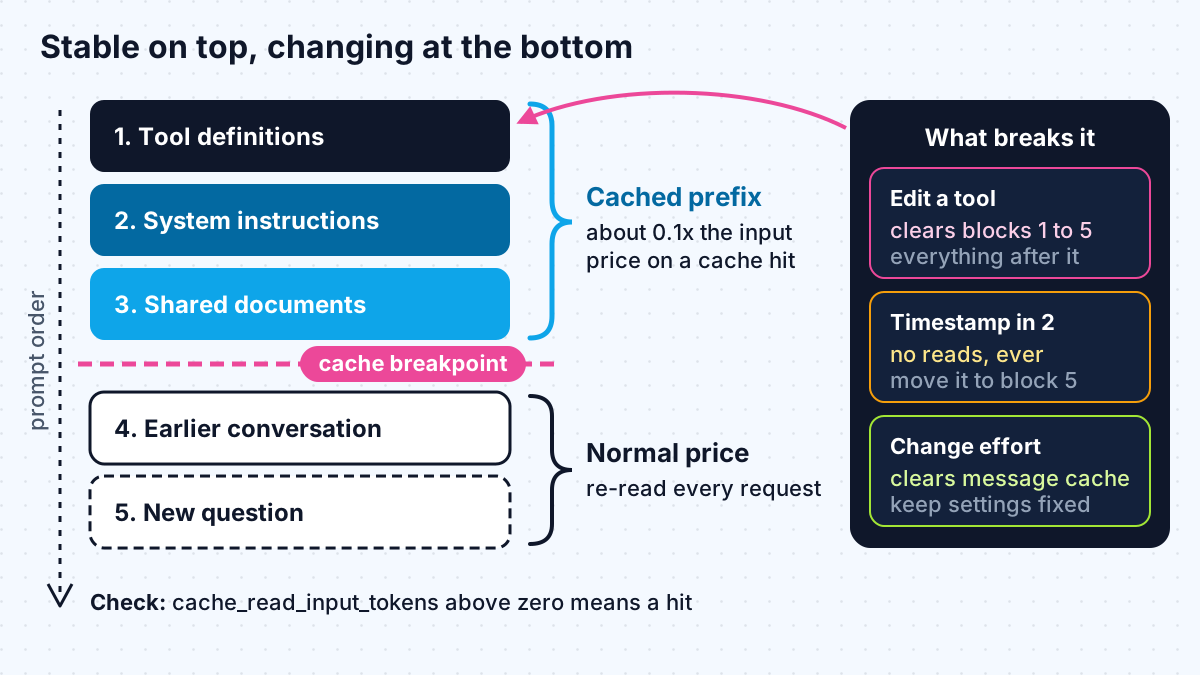
Prompt caching stores the model's processed state for a prefix of your prompt and reuses it when a later request starts with exactly the same tokens. It caches the beginning of the prompt, never a piece in the middle.
Anthropic's prompt caching docs describe the order precisely: the cache covers "tools, system, and messages (in that order), up to and including the block designated with cache_control". Change something early, such as a tool definition, and everything after it is invalidated too. OpenAI's guide says the same thing in one line: "Cache reuse requires the entire rendered prefix to match."
Three rules follow from this, and they hold on every provider:
- Minimum length. Short prefixes are not cached at all. Claude's newest models need 512 tokens, older ones 1,024 to 4,096; OpenAI's GPT-5.6 and later need 1,024; Google lists 2,048 to 4,096 for Gemini models.
- Limited lifetime. Claude's default cache lives 5 minutes and refreshes each time it is read, with a 1-hour option. OpenAI's GPT-5.6 and later default to at least 30 minutes.
- No error when it misses. A prompt that is too short, or that changed, is simply processed at full price. You only find out by reading the cache fields in the usage data.
How much does prompt caching save on each provider?
Every major provider now discounts cached input heavily, but they differ on whether you opt in and on whether writing to the cache costs extra.
| Provider | How you turn it on | Cache read price | Cache write price | Source |
|---|---|---|---|---|
| Claude API | Automatic (one top-level field) or explicit breakpoints | 0.1x input; 0.05x on Opus 5.5 and Sonnet 5.5; 0.025x on Fable 5.1 | 1.25x for 5 minutes, 2x for 1 hour | Claude pricing |
| OpenAI API | On by default; explicit breakpoints on GPT-5.6 and later | 0.1x on GPT-5.6 and later; 0.05x on GPT-6.1 Sol and Terra | Not charged extra on earlier models | OpenAI prompt caching |
| Gemini API | Implicit by default on Gemini 2.5 and newer; explicit caches on some models | Explicit cache on Gemini 3.8 Flash priced at 10% of input | Explicit caches add an hourly storage charge | Gemini caching, Gemini pricing |
| Amazon Bedrock | Implicit on some models; explicit checkpoints for Claude | Model's cache-read rate | Model's cache-write rate; 1.25x for GPT-5.6 and later on Bedrock | Bedrock prompt caching |
Anthropic's pricing page spells out the break-even for Claude: with a 0.1x read price, a 5-minute cache "pays off after one cache read", and a 1-hour cache after two. Bedrock adds one practical bonus: for Claude, cache hits are not deducted from your rate limit, according to its caching guide.
Note that Claude models on Bedrock only cache when you ask. Bedrock's page says Anthropic models there support explicit caching and "Requests without cache controls aren't cached."
A worked example with real prices
Here is the arithmetic for a common case: an assistant with a 20,000-token system prompt and reference document, a 500-token question, and 1,000 requests that arrive steadily enough to keep a 5-minute cache warm. It uses Claude Sonnet 5.5's listed prices of $2 per million input tokens, $2.50 for 5-minute cache writes and $0.10 for cache reads.
| Without caching | With caching | |
|---|---|---|
| Stable 20,000-token prefix | 1,000 x 20,000 = 20M tokens at $2/M = $40.00 | 1 write at $2.50/M = $0.05, plus 999 reads at $0.10/M = $2.00 |
| Variable 500-token question | 0.5M tokens at $2/M = $1.00 | 0.5M tokens at $2/M = $1.00 |
| Input cost | $41.00 | $3.05 |
That is about 93 percent off the input bill. On a model with the standard 0.1x read price the cached reads would cost $4.00 instead of $2.00, still close to 88 percent off. Output tokens are not affected by caching at all, so if your responses are long, the total saving is smaller. I come back to output costs in a later post on the other cost levers.
Two assumptions carry this example. Traffic has to be steady enough that the cache does not expire between requests; for bursty traffic, the 1-hour cache at 2x write cost is often the better deal. And the prefix must be byte-for-byte identical every time.
How to structure prompts so the cache hits
Put everything stable at the top, in a fixed order, and everything per-request at the bottom. In practice:
- Tools first, and frozen. Define tools in a fixed order with fixed descriptions. Anthropic's docs say changing tool definitions invalidates the entire cache.
- System prompt next, with no dynamic values. The classic mistake is a timestamp or a user's name at the top of the system prompt. Anthropic's docs walk through exactly this case: a changing timestamp means "You pay for a fresh cache write on every request and never get a read." Move such values into the final user message.
- Shared documents after that. Product docs, policies or a retrieved knowledge base that many users share go next, with the breakpoint after them.
- Conversation history, then the new question. In a chat, the history grows but its earlier part does not change, so a breakpoint at the end of the conversation keeps working turn after turn.
- Keep request settings constant. On Claude, changing the effort or thinking settings between requests invalidates cached message blocks, according to the same docs.
If one customer's documents differ from another's, place a breakpoint after the shared instructions and a second after the customer's documents. Claude allows up to four breakpoints per request, and OpenAI's prompt_cache_key can help route a customer's requests to the same cache.
This is also why retrieval design matters. If your RAG pipeline sticks retrieved chunks in front of the instructions, nothing after them can be cached. My post on agentic RAG covers retrieval patterns that keep the stable part of the prompt stable.
When prompt caching does not help
Caching is not free money in every case, and on Claude it can cost more if you get it wrong, because writes are billed above the normal input price.
- Prompts below the minimum. A 300-token system prompt will never cache on any provider listed above.
- Low or bursty traffic. If requests arrive further apart than the cache lifetime, every request writes and none reads. At 1.25x per write, that raises your input cost by a quarter instead of lowering it. Use the 1-hour cache, or leave caching off for that feature.
- Prefixes that differ per request. If every user gets a unique system prompt, only the shared part before the first difference can be cached. Restructure so the shared part comes first.
- Output-heavy work. When most of the bill is output tokens, such as long reports, caching trims only the smaller line.
- Explicit caches you forget about. Gemini's explicit caches add a storage charge per million tokens per hour, so delete caches you no longer use.
For agents that loop many times over the same tools and instructions, caching is close to ideal: the prefix is long, identical and reused within seconds. That is where I see it pay off most clearly.
How to check that caching is working
Read the usage fields on every response and log them. On the Claude API, look at cache_creation_input_tokens and cache_read_input_tokens; if both are zero, nothing was cached. OpenAI reports cached tokens under input_tokens_details.cached_tokens, and Bedrock's Converse API returns cacheReadInputTokens and cacheWriteInputTokens.
I track one number per feature, from the same usage ledger I use for per-user cost caps: the share of input tokens served from cache. If it drops after a deploy, someone has changed the top of a prompt. The same logging tells you whether a cloud route behaves differently from the provider's own API; if you are choosing between them, see Claude on AWS, Azure or Google Cloud.
Work with me
I add AI features with cost built into the design, including prompt structure, caching and monitoring of cache hit rates. See AI integration and AI agent development, look through my work, and book a scoping call.
Frequently asked
What is prompt caching?
Prompt caching is a provider feature that stores the processed start of a prompt and reuses it when a later request begins with the same tokens. Reused tokens are billed at a fraction of the normal input price, often a tenth, and responses start faster.
How much does prompt caching save?
On repeated input, a lot: cache reads cost 0.1x the input price on most Claude models and on OpenAI's GPT-5.6 and later, and 0.05x on some newer models. In my worked example with a 20,000-token prefix, input cost fell by about 93 percent. Output costs do not change.
Is OpenAI prompt caching automatic?
Yes. OpenAI says prompt caching is enabled by default for supported models. GPT-5.6 and later also accept explicit breakpoints, and the minimum cacheable prompt for those models is 1,024 tokens.
Why is my prompt not being cached?
The usual causes are a prefix below the model's minimum length, something that changes near the top of the prompt such as a timestamp or reordered tools, a cache that expired between requests, or, on Bedrock with Claude, no cache controls in the request. Check the cache fields in the response usage data.
Does prompt caching affect the model's answers?
No. Caching changes how the provider processes and bills the repeated part of the prompt, not what the model sees. The response should be the same as without caching, only cheaper and usually faster to start.
Sources
Related services
Building something like this?
Naman Gundaniya takes on full-stack and AI projects fixed quote after a free 30-minute scoping call, replies within 24 hours.
Get in touch