 By Naman Gundaniya
WhatsApp AI Agents for Small Business: A Build Guide
A WhatsApp AI agent is a business-specific assistant connected to the WhatsApp Business Platform that answers customer messages, takes bookings and sends follow-ups. It is allowed when the AI supports your business rather than being the product itself. The build is a webhook, a model with tools, your booking or CRM system, approved templates and a clear path to a human.
WhatsApp is where a lot of customers already are. In India, the UAE and much of the world, people message a business on WhatsApp before they think of filling in a web form. That makes it the obvious place for a small business to put an AI assistant, and also the place where getting the rules wrong costs the most, because the account belongs to a platform with strict terms.
This guide covers what these agents are good for, the rules Meta sets, how I structure the build, and what drives the running cost. Policy and prices are from Meta's official pages as of late 2026; check them again before you launch, because both have changed several times.
What can a WhatsApp AI agent do for a small business?
A WhatsApp AI agent handles the repetitive messages that arrive all day: questions about hours and prices, booking and rescheduling, order status, and reminders. The best first use cases share three traits: high volume, a clear right answer, and a system the agent can check. If customers mostly reach you through your site instead, the same build ideas apply to a website chatbot.
| Use case | What the agent does | What it needs access to |
|---|---|---|
| FAQs | Answers hours, prices, location, policies | A short, maintained knowledge base |
| Bookings | Offers free slots, books, reschedules, cancels | Calendar or booking system |
| Order status | Looks up an order and replies with its state | Shop or order database |
| Lead capture | Asks qualifying questions, logs the lead | CRM or a spreadsheet |
| Reminders and follow-ups | Sends approved template messages at the right time | Booking data plus approved templates |
| Triage | Collects details, then hands complex cases to staff | Shared inbox or helpdesk |
What it should not do on day one: give medical, legal or financial advice, negotiate prices, or take payments without a person confirming. Those are the conversations where a wrong answer costs more than the time saved. My broader take on picking first automations is in AI automation for small business.
What are WhatsApp's rules for AI agents?
WhatsApp allows AI agents that serve your own customers but bans businesses whose main product is a general-purpose AI assistant. Section 4.7 of the Meta Terms for WhatsApp Business Platform says providers of AI technologies are "strictly prohibited" from using the platform "when such technologies are the primary (rather than incidental or ancillary) functionality being made available." A salon's booking assistant is ancillary to the salon. A "chat with an AI about anything" number is not.
The same section lets you "retain an AI Provider as your Solution Provider", but says WhatsApp Business Platform data may not be used to train or improve AI models, except fine-tuning a model for your exclusive use. In practice that means checking your model provider's data terms before you connect them.
Four more rules shape every build, all from the WhatsApp Business Messaging Policy:
- Opt-in first. You may only contact people who have given you their number and have "received opt-in permission from the recipient confirming that they wish to receive subsequent messages."
- Templates to start conversations. "You may only initiate conversations using an approved Message Template." Reminders and follow-ups are templates, so they need approval before launch.
- Automation inside the window. "You may use automation when responding during the 24-hour window", but you "must also have available prompt, clear, and direct escalation paths", such as an in-chat transfer to a human, a phone number or an email.
- Opt-out. The policy recommends clear instructions for opting out of each category of message. I build "stop" handling into every agent.
The escalation rule is the one I see skipped most. An agent that cannot hand over to a person breaks the policy and annoys customers at the same time.
How does the 24-hour window affect the design?
The 24-hour customer service window decides what your agent is allowed to send. Meta's pricing documentation says the window starts when a user messages or calls the business, and each new message from the user resets it. While it is open, the agent can send ordinary free-form replies. Once it closes, it can only send approved templates.
So the design splits into two halves:
- Reactive conversation, inside the window. The customer writes; the agent answers, asks follow-up questions and calls tools. This is where the AI does most of its work.
- Proactive messages, outside the window. Appointment reminders, "your order has shipped", "we have a slot tomorrow". These are fixed templates with variables, triggered by your systems, not composed freely by the model.
Keeping the model out of proactive messages is deliberate. Templates are approved text, so the model filling in a date and a name is safe; the model inventing a promotional message to send cold is a policy problem.
What does the architecture of a WhatsApp AI agent look like?
The architecture is a webhook service that receives each message, a model that decides what to do, a small set of tools that touch your systems, and a handoff route to a person. Everything else is detail.
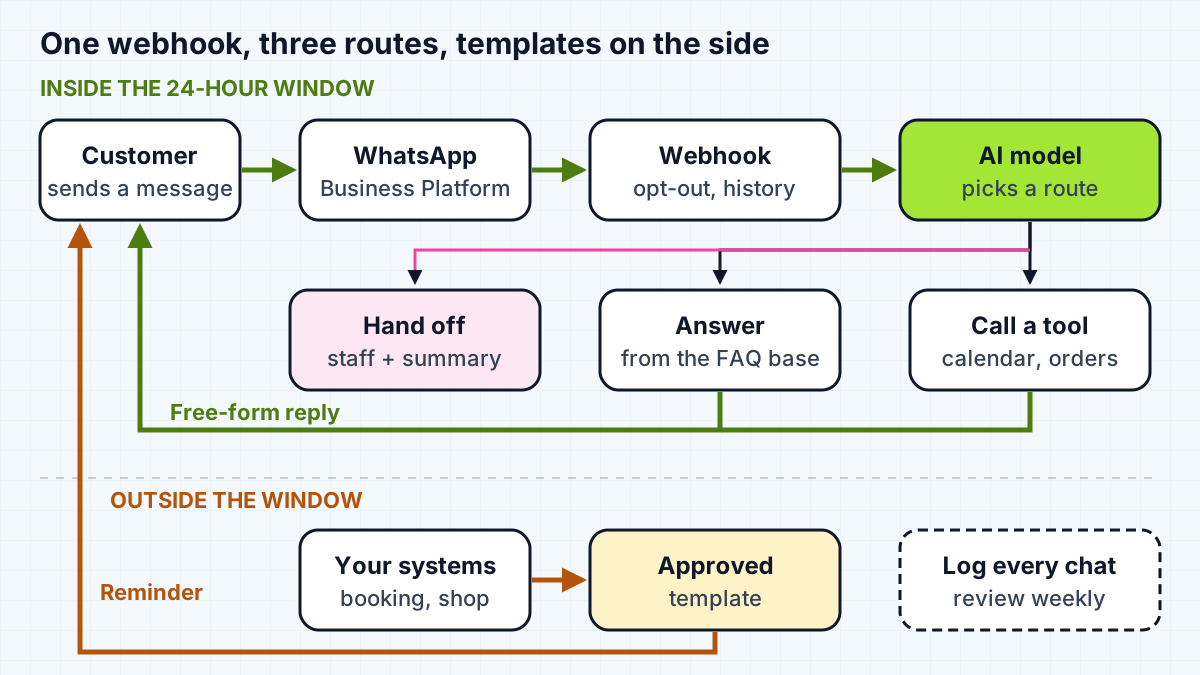
The pieces, in the order I build them:
- Access to the platform. Either Meta's Cloud API directly or a business solution provider that resells it with an inbox attached. A provider is quicker to start; going direct gives more control. Either way, set up the business account and phone number in the client's name, for the reasons in who owns your automations.
- Webhook service. A small server that receives messages, deduplicates them, groups bursts of short messages into one turn, and stores the conversation.
- The model and its instructions. A system prompt scoped to this business only: what it can answer, what it must hand over, and the tone. Keep it short and specific.
- Tools. Narrow functions such as
check_slots,book_slotandlookup_order. Each one validates its input, so the model cannot book a slot that does not exist. - Handoff. A tool that flags the conversation for staff, posts a summary to the shared inbox and tells the customer a person will reply.
- Templates and triggers. Approved templates for reminders and follow-ups, fired by the booking system rather than by the model.
- Logging. Every conversation stored so someone can read a sample each week.
For voice notes, images and locations, decide early. The simplest honest answer is often "I can't listen to voice notes yet, could you type it?" plus a handoff option.
What does a WhatsApp AI agent cost to run?
The running cost has two parts: Meta's per-message charges and the model's token usage, plus any provider or hosting fees. Meta has charged per delivered message since July 1, 2025, with rates that depend on the message category (marketing, utility, authentication or service) and the recipient's country. Messages from users to the business are not charged.
Two changes from October 1, 2026 matter for small businesses, per the same page:
- Each business phone number gets "one free tier of 1,000 delivered service messages per month", and Meta charges from the 1,001st service message.
- Utility messages sent inside an open customer service window, which used to be free, are now charged at the regular rate.
So a small business answering a few hundred conversations a month may pay Meta very little for replies, while reminders and other templates are charged per message. Look up your own country's rates on Meta's rate card rather than relying on anyone's summary, including mine.
Model costs depend on how long the conversations are and which model you use. Short FAQ and booking chats are cheap; long conversations with a large knowledge base in every prompt are not, and my guide to cutting LLM app costs covers the levers. Measure a week of real conversations during a pilot before forecasting a year. Costs for build work vary too much to quote here; that belongs in a scoping call.
How do you launch without upsetting customers?
Launch to a small slice of conversations first, with a person watching, and widen it once the transcripts look right. Before that, run a scripted test set: bookings, changes of mind, bursts of messages, voice notes, a request for a human, and a tool that is switched off. I wrote the full checklist in testing voice and WhatsApp agents before go-live.
Three habits keep an agent healthy after launch:
- Tell customers they are talking to an automated assistant and how to reach a person.
- Read a sample of conversations every week and turn each failure into a new test.
- Review templates and opt-out handling whenever Meta updates its policy.
Work with me
I build WhatsApp agents for small businesses, from the template plan and booking tools to the handoff and the go-live test set, set up in your own accounts. See AI chatbot development and workflow automation, or look at my work, including the Loop messenger chatbot, and book a scoping call.
Frequently asked
Are AI chatbots allowed on WhatsApp Business?
Yes, if the AI supports your own business, such as a booking or support assistant. Meta's WhatsApp Business Platform terms prohibit providers whose primary offering is the AI itself, such as a general-purpose assistant, and require that platform data is not used to train AI models beyond fine-tuning for your own use.
Can a WhatsApp AI agent message customers first?
Only with an approved message template, and only to people who have opted in to receive messages from you. Free-form AI replies are allowed only inside the 24-hour customer service window that opens when the customer messages you.
How much does a WhatsApp AI agent cost?
It depends on message volume, country and model. As of late 2026, Meta charges per delivered message by category and country, gives each number 1,000 free service messages a month, and charges for templates. Model token costs come on top, so measure real conversations in a pilot before forecasting.
Does a WhatsApp AI agent need a human handoff?
Yes. WhatsApp's Business Messaging Policy says businesses using automation must have prompt, clear and direct escalation paths, such as an in-chat transfer to a human agent, a phone number or an email. It is also what keeps customers from feeling trapped.
Do I need the WhatsApp Business API or the WhatsApp Business app?
For an AI agent you need the WhatsApp Business Platform (the API), either directly through Meta's Cloud API or through a business solution provider. The WhatsApp Business app is built for staff replying by hand on a phone, while an agent needs the API to receive and send messages from your own server.
Sources
Related services
Building something like this?
Naman Gundaniya takes on full-stack and AI projects fixed quote after a free 30-minute scoping call, replies within 24 hours.
Get in touch