 By Naman Gundaniya
Agentic Browsers: When AI Does Your Clicking
An agentic browser is a web browser with an AI agent built in that can read pages, click, type and fill in forms for you. Products such as ChatGPT Atlas, Perplexity Comet and Claude in Chrome already handle research, forms and shopping carts, but they still fail on complex workflows and are exposed to prompt injection hidden in web pages, so they need close supervision.
For thirty years a browser has been a window you look through. An agentic browser is closer to an assistant sitting at your keyboard. That changes what you can delegate, and it changes the web itself, because a growing share of visits will come from software acting for a person rather than the person directly.
What is an agentic browser?
An agentic browser combines a normal browser with a language model that can see the page and take actions in it. You describe a goal, such as "find three flights under this price and put the best one in the basket", and the agent opens tabs, scrolls, clicks and types until it is done or needs you.
The main products, as of late 2026:
- ChatGPT Atlas. OpenAI's browser. Its agent mode launched in preview for paid ChatGPT plans and can open tabs, scroll and click to handle reservations, research and shopping carts.
- Claude in Chrome. Anthropic's Chrome extension, which lets Claude see the page, click buttons and fill in forms. It started as a pilot with 1,000 Max plan users in August 2025 and was extended to Pro, Team and Enterprise plans that December.
- Perplexity Comet. Perplexity's AI browser, which became the first well-known case study in agentic browser security, covered below.
The underlying idea is the same "computer use" capability that agents already have on desktops, narrowed to the browser, where most office work now happens anyway.
What can AI browser agents actually do today?
They are good at short, well-defined tasks on ordinary websites, and unreliable on long or unusual ones. Going by the vendors' own descriptions and their stated limits, the split looks like this:
| Works reasonably well | Still fragile |
|---|---|
| Gathering information across several tabs | Long workflows with many steps and branches |
| Filling in forms from data you provide | Sites with unusual widgets, pop-ups or captchas |
| Building a shopping basket or booking draft | Anything needing judgement about money or contracts |
| Summarising and comparing pages | Logging in and handling two-factor codes safely |
The vendors are candid about the limits. OpenAI said at launch that Atlas agent mode "may still fail on complex workflows", and that it cannot run code, download files or access your system. It pauses for confirmation on sensitive sites such as banks.
Independent benchmarks also urge caution. A 2025 study built a live benchmark, Online-Mind2Web, of 300 realistic tasks across 136 websites, and found a much less favourable picture of web agents than earlier results, "suggesting over-optimism in previously reported results." My view: treat demo videos as the best case, not the typical one.
Why is prompt injection the biggest risk?
Prompt injection is the biggest risk because an agentic browser reads untrusted text from every page it visits, and a model cannot reliably tell the difference between your instructions and instructions hidden in that text. When the agent is logged in to your email and accounts, a successful injection acts with your privileges.
Brave's security team demonstrated this in August 2025. Hidden text in a Reddit comment, processed when a user asked Comet to summarise the page, instructed the agent to find the user's email address, trigger a login code, read it from Gmail and post both back as a reply, enough to take over the account. Brave pointed out that normal web protections such as the same-origin policy do not help, because the agent is acting as the user, across every site the user is logged in to.
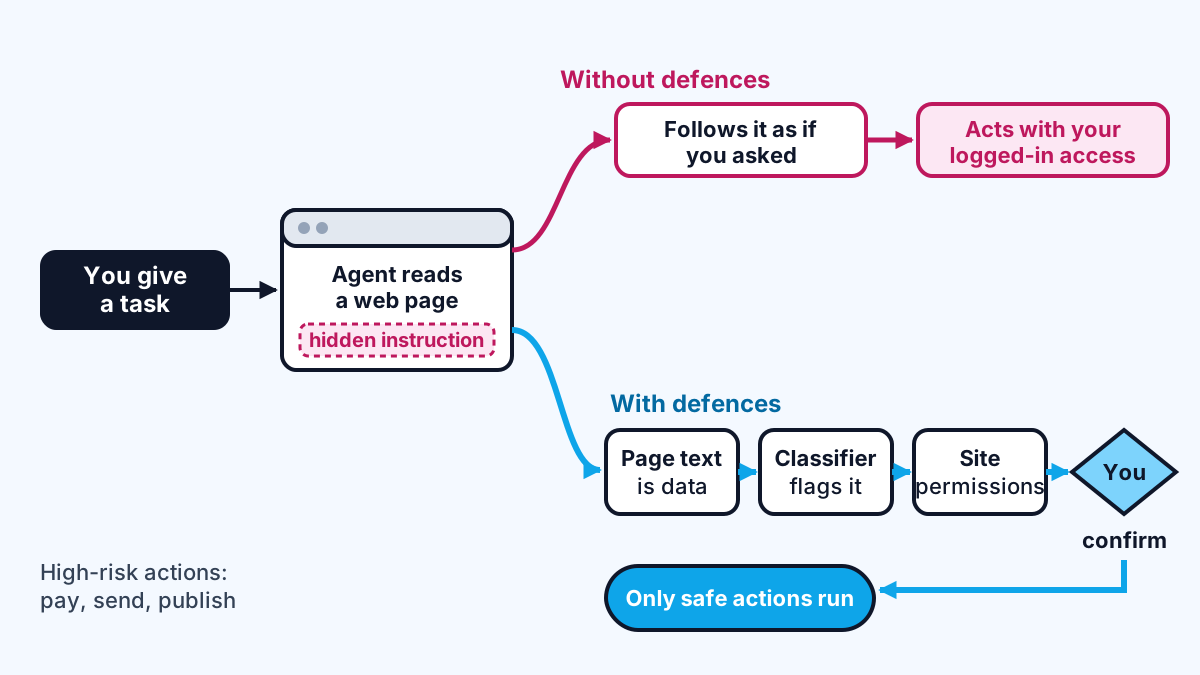
The vendors have published how they defend against this, and their numbers show it is a hard problem rather than a solved one:
- Anthropic tested Claude in Chrome against 123 adversarial cases across 29 attack scenarios. Without its mitigations, attacks succeeded 23.6% of the time; with them, 11.2% in autonomous mode. It also blocks whole categories of sites, including financial services, and asks before high-risk actions like publishing, purchasing or sharing personal data.
- OpenAI compared prompt injection to "ever-evolving online scams" and built an automated attacker, trained with reinforcement learning, to find new injection routes against Atlas so it can harden the agent against them.
- Gartner went further: in a report titled "Cybersecurity Must Block AI Browsers for Now", its analysts advised organisations to block the use of AI browsers entirely, citing prompt injection, credential abuse and unapproved data sharing.
A one-in-ten success rate for a determined attacker is not acceptable for an agent logged in to your bank. It may be fine for an agent comparing laptop prices in a logged-out window.
What do agentic browsers mean for websites?
Websites will increasingly be visited by agents acting for people, and site owners need to decide how to recognise and serve them. Cloudflare's position is that "websites need to know what tools are interacting with them": it introduced a "signed agents" category and Web Bot Auth, which uses cryptographic signatures so a site can tell a legitimate user-directed agent from a malicious bot.
My view on what this means in practice, building sites for clients:
- Semantic HTML matters again. Agents read the page structure. Real buttons, labelled form fields and predictable flows make your site usable by agents as well as screen readers.
- Separate browsing from buying. Expect agents to fill baskets and draft bookings, and keep a clear human confirmation step for payment.
- Offer a better door than the browser. If agents are a meaningful share of your users, an API or an MCP server gives them a structured way in, with your rules attached. I showed how that works in building an AI agent with MCP and Claude.
- Assume your content may be read, not visited. This is the same shift I described in what AI search changes for websites, one step further: the visitor is now software.
How should you use AI browser agents today?
You should use them for low-risk, logged-out or easily checked tasks, and keep sensitive accounts out of reach. My own rules, which I also give clients:
- Start logged out. Atlas offers a logged-out mode for exactly this reason. Research and comparison rarely need your accounts.
- Give narrow tasks. "Compare these three pages" is safer and more reliable than "sort out my travel".
- Never skip confirmations on payments, emails or anything that publishes.
- Keep work and personal profiles separate, and follow your organisation's policy: many companies will follow Gartner's advice and block these tools on managed devices for now.
- Check the output. The agent's summary of what it did is not proof that it did it correctly.
Agents that act for people at work need the same thinking as any other delegated work: clear goals, limited permissions and review. That is the broader shift I described in every employee having an AI agent.
Work with me
I build AI agents that act on the web and in business systems with narrow permissions and human approval where it matters, and websites that work for both people and agents. See AI agent development and full-stack development, or browse my work and book a scoping call.
Frequently asked
What is an AI browser agent?
An AI browser agent is a language model that can operate a web browser for you, reading pages and clicking, typing and filling in forms to complete a task you describe. It is available built into browsers such as ChatGPT Atlas and Perplexity Comet, or as an extension such as Claude in Chrome.
Are agentic browsers safe to use?
They carry real risk because hidden text on a web page can instruct the agent, a technique called prompt injection. Anthropic measured an 11.2% attack success rate even with its mitigations in place, and Gartner has advised organisations to block AI browsers for now. Use them logged out for low-risk tasks and always confirm sensitive actions yourself.
Can an AI browser agent make purchases for me?
It can build a basket or fill in a booking, and some can complete checkout, but the major products ask for confirmation before high-risk actions such as purchases. Atlas pauses on sensitive sites like banks, and Claude in Chrome blocks financial services sites entirely.
How do websites know if a visitor is an AI agent?
Often they cannot tell, because agentic browsers drive a real browser. Cloudflare has introduced Web Bot Auth and a signed agents category so legitimate agents can identify themselves with cryptographic signatures, letting sites allow user-directed agents while still blocking malicious bots.
Sources
- can open tabs, scroll and click (thejournal.com)
- lets Claude see the page, click buttons and fill in forms (claude.com)
- 300 realistic tasks across 136 websites (arxiv.org)
- brave.com
- "ever-evolving online scams" (techinformed.com)
- block the use of AI browsers entirely (forcepoint.com)
- "websites need to know what tools are interacting with them" (blog.cloudflare.com)
Related services
Building something like this?
Naman Gundaniya takes on full-stack and AI projects fixed quote after a free 30-minute scoping call, replies within 24 hours.
Get in touch