 By Naman Gundaniya
Who Owns Your Automations When the Freelancer Leaves?
Your business owns its automations only if four things sit in its name: the workflow tool accounts, the API keys and credentials, the workflow definitions and code, and the data and logs they produce. Put all four in your accounts from day one, give the freelancer access rather than ownership, and agree in writing that the work is assigned to you.
The failure mode is common enough that it has a shape. A freelancer builds a set of automations quickly, in their own Zapier or n8n workspace, using API keys on their own card. Everything works. Months later they move on, and the business discovers it cannot see, edit or even switch off the workflows that run its lead routing or invoicing.
None of this needs a dispute to go wrong. It only needs someone to be busy, or unreachable, on the day you need a change. Here is how to avoid it, written from the builder's side of the table.
What does it mean to own an automation?
Owning an automation means you can see it, change it, switch it off and rebuild it without asking anyone. That breaks down into five layers, and you need all of them.
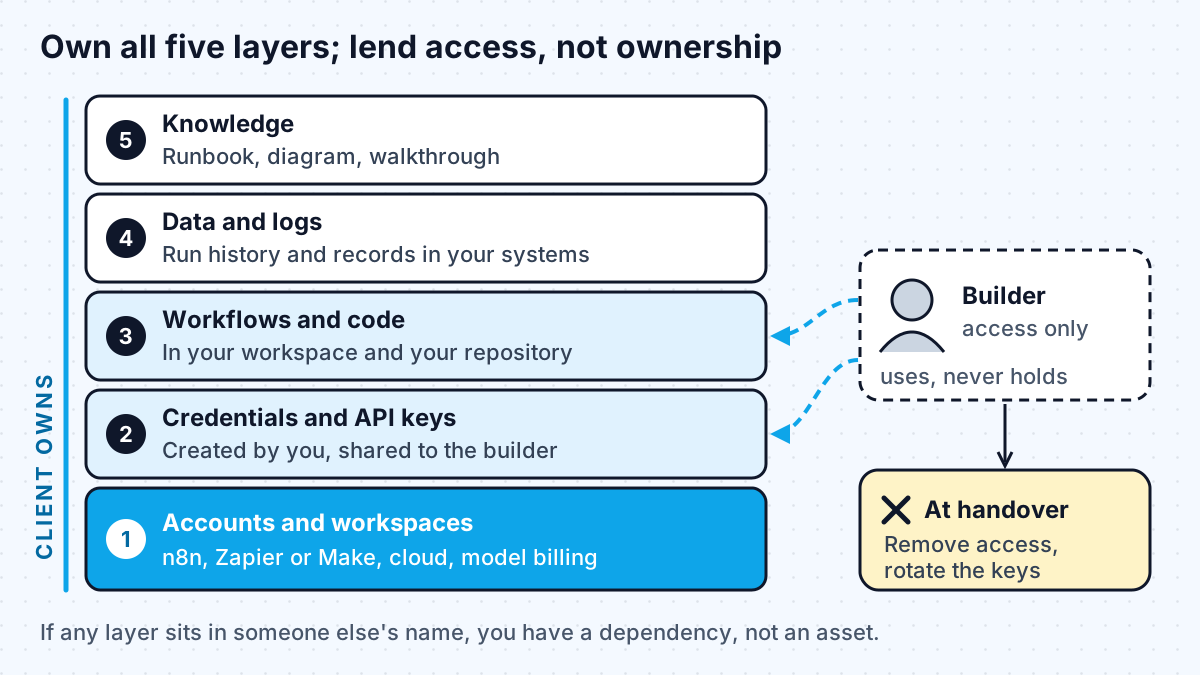
- Accounts and workspaces. The n8n instance, Zapier or Make organisation, cloud project and model provider account are registered to your business, on your billing.
- Credentials and API keys. Keys for your CRM, email, accounting and model provider are created in your accounts. The builder uses them; they do not hold the only copy.
- Workflows and code. The workflows live in your workspace. Any custom code lives in a repository your business owns.
- Data and logs. Run history, stored records and any vector index sit in systems you control.
- Knowledge. A runbook explaining what each workflow does, what it touches and how to switch it off.
If any layer sits in someone else's name, you have a dependency, not an asset.
Why "built in my account" causes problems with each tool
Each workflow tool handles moving work between accounts differently, and none of them makes it effortless. That is the practical reason to start in the client's account rather than plan a transfer later.
| Tool | What the docs say | What it means for you |
|---|---|---|
| Zapier | Change owner "transfers ownership of the Zap to another user in your account"; when you remove a user, their Zaps transfer to an owner you designate | Easy if the builder is a member of your account. The page does not describe moving Zaps between separate accounts, so do not rely on it |
| Make | A scenario blueprint exports modules, settings and mapped values as JSON, but "users still need to create connections for their accounts after importing" | Workflows can move; every connection must be rebuilt and retested |
| n8n | Workflows export as JSON that "include credential names and IDs"; the docs warn that HTTP Request nodes imported from cURL may carry authentication headers | Exports are portable, but check them for secrets before sharing, and recreate credentials on your instance |
| n8n | With credential sharing, "Any users using a shared credential won't be able to view or edit the credential details" | You can let a builder use a key without ever handing it over |
The n8n point is worth dwelling on. Credential sharing means the cleanest arrangement is possible: you create the credential, share it, and the builder runs workflows with it without seeing the secret. Most tools have some version of this; ask for it.
What should the contract say about ownership?
The contract should say, in plain words, that the work is yours, where it will live, and what you receive when the engagement ends. This is not legal advice, and you should have a lawyer review terms for your jurisdiction, but these are the points I expect a sensible agreement to cover.
Assignment of rights. Do not assume that paying for work means owning it. The US Copyright Office's circular on works made for hire explains that a work is "made for hire" in two situations: when an employee creates it as part of their regular duties, or when "a certain type of work is created as a result of an express written agreement" between the creator and the commissioning party. Freelance automation work often falls outside those, so agreements usually include an explicit written assignment of rights to the client. Other countries have their own rules, which is another reason to put it in writing.
Pre-existing tools. A freelancer may reuse their own templates, libraries or snippets. That is normal and saves you money. The contract should give you a permanent licence to use them as part of your automations, so you are never blocked from running what you paid for.
Accounts and credentials. State that all accounts, workspaces, keys and repositories are created in the client's name and billed to the client, and that the builder works through access the client grants. The same rule applies when you hire a freelance forward deployed engineer for a larger build.
Handover deliverables. List them: exported workflows, code, a runbook, an architecture diagram, and a walkthrough session.
Exit and access removal. Agree that at the end of the engagement the builder returns or deletes any copies of credentials and data, and the client revokes their access.
Transition support. A notice period and a few hours of handover support if either side ends the work early.
The handover checklist I use
A good handover means someone else could take over tomorrow. This is the list I work through at the end of automation projects, and it is what you should ask any builder to deliver.
- Every account, workspace and repository confirmed as owned by the client, with the client as admin.
- A list of every credential and API key, where it lives, who created it and when it should be rotated.
- Exported copies of every workflow (JSON for n8n or Make), stored in the client's repository or drive.
- A runbook per workflow: trigger, systems touched, what the model step does, known failure modes, and how to switch it off.
- A one-page diagram of how the workflows connect.
- Monitoring and error alerts sent to a client inbox or channel, not the builder's.
- Model provider usage limits and billing alerts set on the client's account.
- The builder's access removed or reduced, and any keys they could have seen rotated.
The last item is the one people skip. Rotating keys after a handover is routine hygiene, not an accusation.
How to fix it if the freelancer already built in their own account
If the work already lives in someone else's account, ask for a planned migration now, while relations are good. Start by listing what runs where, then recreate the accounts in your name and move workflows one at a time.
- Ask for an inventory: every workflow, the account it runs in, and every credential it uses.
- Create your own accounts and credentials, and share them to the builder.
- Move or rebuild each workflow, test it against real inputs, then switch off the old copy.
- Rotate any keys that were created or seen outside your accounts.
If you are planning new work, this is also a good moment to rerun an AI automation audit and decide which workflows are worth migrating at all. Some will not be.
Work with me
I build automations inside the client's own accounts, share credentials rather than hold them, and finish every project with a written handover. See workflow automation and AI agent development, read how I compare as a freelancer against an agency, or browse my work and book a scoping call.
Frequently asked
Who owns automations built by a freelancer?
It depends on your contract and where the work lives. Copyright in commissioned work does not automatically pass to the client in many cases, so a written assignment matters. In practice, ownership also depends on control: if the workflows, accounts and keys sit in the freelancer's name, you depend on them even with a good contract.
Should a freelancer build automations in my Zapier, Make or n8n account?
Yes. Invite them to your workspace with the access they need, and create the credentials yourself. Zapier lets you change a Zap's owner within one account, and Make and n8n can export workflows, but moving between separate accounts means rebuilding connections and retesting.
What should an automation handover include?
Exported workflows, any custom code in your repository, a list of credentials and where they live, a runbook for each workflow, a diagram of how they connect, alerts routed to your team, and the builder's access removed. Rotate any keys the builder could have seen.
Can a freelancer reuse my automations for other clients?
They can reuse their own general templates and know-how, which is normal. They should not reuse your data, credentials or anything specific to your business. Put both points in the contract: a licence for you to use their pre-existing tools, and confidentiality for what is yours.
What happens to my automations if I stop paying the freelancer?
If everything is in your accounts, nothing stops; the workflows keep running and you can hire someone else to maintain them. If anything runs in the freelancer's account or on their API keys, it may stop when they cancel it. That is the strongest reason to set up ownership before the first workflow is built.
Sources
Related services
Building something like this?
Naman Gundaniya takes on full-stack and AI projects fixed quote after a free 30-minute scoping call, replies within 24 hours.
Get in touch