 By Naman Gundaniya
AI Automation Audit: Find Your First Five Workflows
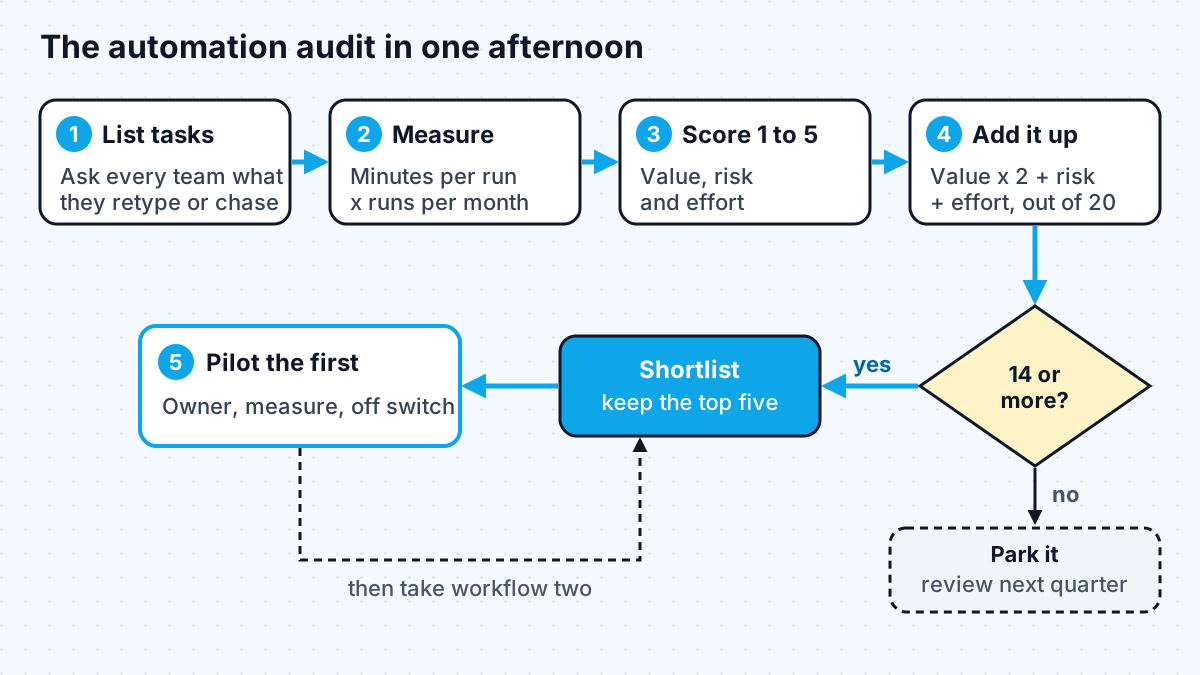
An AI automation audit is a short, structured review of the repetitive work in your business: list the tasks, measure how much time each takes per month, score each one for value, risk and effort, and shortlist the five with the best balance. You can run it yourself in an afternoon with a spreadsheet, before you spend anything on tools or builders.
Most businesses I talk to know they want "some AI automation" but not where to point it. The usual result is a pilot chosen because it sounded impressive, not because it saved anyone time. An audit fixes that by putting numbers next to the options before anyone builds anything.
This is the worksheet I use at the start of automation work, simplified so you can run it without me.
What is an AI automation audit, and what do you get from it?
An AI automation audit produces a ranked list of workflows with an estimate of hours saved, a risk rating and an effort rating for each. The output is a one-page shortlist you can act on, not a strategy deck.
It is worth separating two kinds of automation while you do it. Many good candidates need no AI at all: moving a form submission into a CRM is plain integration. AI earns its place at steps that need reading, classifying or writing, such as sorting emails or pulling fields out of a PDF. Anthropic's guide to building effective agents makes the same point from the engineering side, recommending "finding the simplest solution possible, and only increasing complexity when needed." Your audit should reward the simple options, not penalise them.
If you are still deciding who would build the results, I compared the roles in AI automation engineer vs RPA developer vs AI engineer. If you would rather pay for help with the audit itself, see what an AI consultant costs.
Step 1: list the repetitive work, team by team
Ask each team one question: "What do you copy, paste, retype, chase or check every week?" Write every answer down as a row, with the person who does it. Do not filter yet.
Good prompts for the conversation:
- Which emails do you answer with nearly the same reply?
- What do you retype from one system into another?
- What do you check by eye against a list or a rule?
- Which reports do you build by hand every week or month?
- What do customers wait on because someone has to get to it?
Expect twenty to forty rows from a small business. That is fine; the scoring step will cut them down.
Step 2: measure time, frequency and who waits
For each row, estimate minutes per occurrence and occurrences per month, then multiply. Rough numbers from the person who does the work are good enough; precision does not change the ranking much.
An illustrative example: if replying to a supplier invoice query takes 3 minutes and happens 400 times a month, that is 1,200 minutes, or 20 hours a month. A task that takes an hour but happens twice a month is 2 hours. The frequent small task usually wins.
The xkcd chart Is It Worth the Time? puts the same idea in a grid: over five years, shaving 1 minute off a daily task is worth up to a day of effort to automate, while the same saving on a yearly task is worth only 5 minutes. Frequency is what makes automation pay.
Note one more column: does a customer or colleague wait on this task? Speed can matter more than hours. A lead that gets a reply in minutes instead of the next morning has value the hours column misses.
Step 3: score value, risk and effort
Score every row from 1 to 5 on three factors, then combine them. I weight value double, because a safe, easy automation that saves nobody time is not worth building.
| Factor | 1 | 3 | 5 |
|---|---|---|---|
| Value (hours saved or waiting removed) | Under 2 hours a month | 5 to 15 hours a month, or customers wait | Over 20 hours a month, or a bottleneck |
| Risk (5 = safest) | A mistake reaches customers, money or legal records directly | A mistake is caught by a human review step | A mistake is harmless or obvious |
| Effort (5 = easiest) | Systems with no API, messy data, unclear rules | One API missing, some cleanup needed | All systems have APIs, rules are clear |
Score = (value x 2) + risk + effort, out of 20. In my worksheet, anything at 14 or above goes on the shortlist. Keep the top five.
Two rules keep the risk score honest. First, if a mistake would send money, delete data or contact a customer without review, score risk at 1 or 2 unless you add a human approval step. OWASP's guidance on excessive agency recommends exactly that: "human-in-the-loop control to require a human to approve high-impact actions before they are taken." Second, decisions about people, such as hiring or credit, deserve extra caution regardless of score, because the consequences of a wrong answer are serious and regulated in many places.
What do good first workflows look like by department?
The best first workflows share a shape: high volume, a clear input, and a human who can glance at the output. These are common examples by team, with the score drivers to check for your business.
| Department | Workflow | Where AI helps | Typical risk control |
|---|---|---|---|
| Sales | New lead enrichment and routing | Classify the enquiry, summarise the company | Rep sees the summary before contact |
| Support | Ticket triage and draft replies | Categorise, draft an answer from help docs | Agent edits and sends |
| Finance | Invoice data entry | Extract supplier, amount, due date from PDFs | Code checks against the purchase order |
| Operations | Booking confirmations and reminders | Read free-text requests into a booking | Unclear requests go to a person |
| Marketing | Repurposing long content | Draft social posts from an article | Human approves before posting |
| HR | Answering policy questions | Answer from the handbook with sources | Sensitive topics routed to HR |
Notice what is missing: fully autonomous agents. Those come later, once the simpler workflows have shown how your data and your team behave.
Step 4: pick the first one and define success
From the five, choose the one with the highest score that a single person owns and cares about. An owner matters more than a perfect score, because someone has to review outputs during the pilot and say whether it works.
Before building, write down three things:
- The success measure. Hours saved per month, response time, or error rate, measured before and after.
- The review step. Who checks outputs, and for how long, before the automation runs unattended.
- The off switch. How to stop the workflow and fall back to the manual process.
My post on AI automation ROI covers how to measure the result properly once the pilot is live. Then go back to the list: the second and third workflows are usually cheaper, because the accounts, integrations and review habits already exist.
Work with me
If you have run the audit and want a second opinion on the shortlist, or want the first workflow built properly with review steps and an off switch, see workflow automation and AI integration. You can also browse my work and book a scoping call.
Frequently asked
What is an AI automation audit?
An AI automation audit is a structured review of repetitive work in a business to find the tasks most worth automating. You list tasks, estimate time spent per month, score each for value, risk and effort, and shortlist the best few. It should come before choosing tools or hiring a builder.
How long does an AI automation audit take?
A self-serve version can be done in an afternoon for a small team: an hour of conversations to list tasks, an hour of estimating time, and an hour of scoring. Larger organisations take longer because more teams need to be interviewed, but the method is the same.
What should I automate first with AI?
Automate a frequent, well-defined task where a person can easily check the output, such as triaging support tickets, extracting invoice data or drafting routine replies. Avoid starting with anything that sends money, deletes data or contacts customers without a review step.
Do I need AI for every workflow on the list?
No. Many high-scoring workflows only move data between systems on fixed rules, and a plain workflow tool handles them without a model. Use AI only for steps that need reading, classifying or writing, and keep the rest as simple integration.
Can I do an AI automation audit without a consultant?
Yes. The worksheet in this post is designed to be run by the business itself. A consultant or engineer adds most value afterwards, checking effort estimates against your actual systems and designing the review steps for the workflows you choose.
Sources
Related services
Building something like this?
Naman Gundaniya takes on full-stack and AI projects fixed quote after a free 30-minute scoping call, replies within 24 hours.
Get in touch