 By Naman Gundaniya
How to Add AI to Your Existing App Without a Rewrite
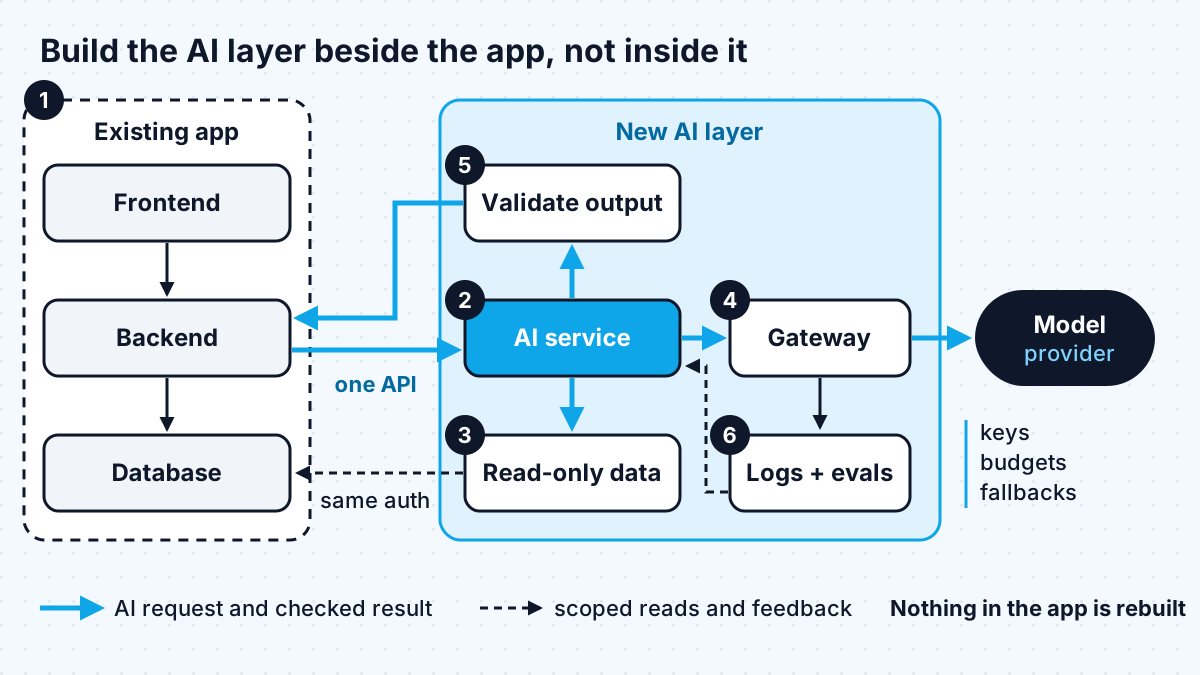
You add AI to an existing app by building it beside the app, not inside it. Pick one feature tied to a task users already do, put the model calls behind a small AI service your app calls through an API, give that service read-only access to the data it needs, validate everything it returns in code, and measure cost and quality before you expand.
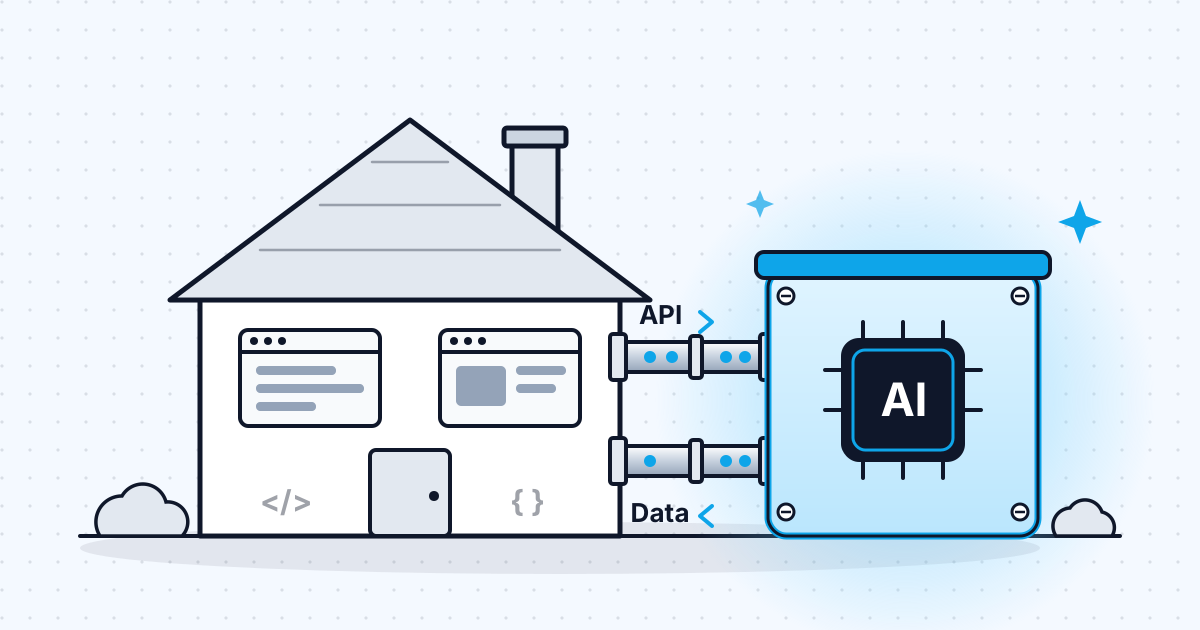
Most teams that ask me about AI assume the first step is a rebuild: new stack, new data layer, "AI-native" from scratch. It almost never is. The app you already have holds the users, the data and the workflows that make an AI feature useful. The job is to attach a well-bounded AI capability to it, prove it earns its keep, and grow from there.
This is the approach I use on client projects, in the order I use it.
Why you should not rewrite your app to add AI
A rewrite delays the AI feature by the length of the rewrite and adds risk that has nothing to do with AI. Martin Fowler's writing on the strangler fig pattern makes the general point well: in his experience, plans to replace a serious system in one go have "gone down in flames most of the time", while building new capability alongside the old one lets investment and returns arrive gradually and visibly.
AI features fit that pattern neatly. A model call is just another dependency: something your app sends a request to and gets a response from. You do not need to change your framework, your database or your hosting to make one. What you do need is a clear seam where the AI part plugs in, so it can be tested, monitored and switched off without touching the rest of the product.
Step 1: pick one feature users already need
The first AI feature should remove effort from a task people already do in your product, not invent a new one. Good first candidates share three traits: the input already exists in your system, a wrong answer is cheap to spot and fix, and you can tell whether it worked.
| Feature type | Example | Risk if wrong | Good first feature? |
|---|---|---|---|
| Summarise | Summarise a long ticket, call or document | Low, user reads the source | Yes |
| Extract | Pull fields from an uploaded invoice into a form | Low to medium, user reviews the form | Yes |
| Search and answer | Answer questions over your help docs or records | Medium, needs citations | Yes, with sources shown |
| Draft | Draft a reply the user edits before sending | Low, human sends it | Yes |
| Act | Agent that updates records or emails customers | High, changes real data | Not first |
Notice the pattern: in every safe option a person sees the output before it changes anything. Autonomous actions can come later, once you have evidence the model behaves.
Step 2: put the AI behind one internal API
Your existing backend should call one internal endpoint, such as "summarise this ticket", and never talk to a model provider directly. That AI service owns the prompts, the model choice, retries and output parsing. The rest of your app only knows the contract: what goes in, what comes out, and what an error looks like.
This gives you three practical benefits:
- you can change models or providers without touching product code,
- you can add caching, rate limits and logging in one place,
- you can turn the feature off with a flag if something goes wrong.
The service can live in your current codebase as a module or run as a small separate deployment. If your app is a monolith in a language with weak AI tooling, a small TypeScript or Python service next to it is usually the cleanest choice. It is the same "beside, not inside" idea at the deployment level.
Between the AI service and the provider, consider a gateway. Vercel's AI Gateway, for example, records latency, token usage and cost per request, supports provider and model fallbacks and budgets, and can be called from any infrastructure, not only apps hosted on Vercel. Whether you use a managed gateway or a thin wrapper of your own, centralise keys, logging and spend limits rather than scattering them across the codebase.
Step 3: give the AI read-only access to the right data
Most of the value comes from your data, and most of the risk does too. The AI service should read through a narrow data access layer that returns only the records the current user is allowed to see, already shaped for the prompt.
- Reuse your existing authorisation checks. The AI layer should never see more than the user could see in the UI.
- Start read-only. Writing back to your database is a separate, later decision.
- Keep personal data out of prompts unless the feature truly needs it, and check your provider's data retention terms.
If the feature needs to answer questions over documents, you will need retrieval. I compare the options in RAG vs fine-tuning; for most existing apps, retrieval over your current data is the right starting point, and fine-tuning is rarely needed for a first feature.
Step 4: guard the edges in code
Treat the model as an untrusted input, because that is how security guidance treats it. OWASP's entry on prompt injection recommends specifying expected output formats and using "deterministic code to validate adherence to these formats", restricting the model's privileges "to the minimum necessary", and adding human-in-the-loop controls for privileged operations.
In practice that means:
- ask for structured output (JSON with a schema) and validate it before your app uses it,
- give tools and data access only what the feature needs,
- keep a human approval step for anything that sends, deletes, pays or publishes,
- mark content from users, emails or the web as untrusted when you put it in a prompt,
- log inputs and outputs so you can investigate problems.
When you are ready to let the AI take actions through tools, my guide to building an AI agent with MCP and Claude covers how to expose those tools in a controlled way.
Step 5: measure quality and running cost before you expand
An AI feature is not done when it demos well; it is done when you know how often it is right and what it costs per use. Before launch I build a small test set of real examples with expected results, run every prompt or model change against it, and keep tracking after launch with user feedback such as thumbs up or down, edits and retries. It is the same discipline I describe in the evals that keep AI agent projects from failing.
Running cost is mostly tokens, and there are well-documented levers for it. With Claude, for example:
| Lever | What it does | Source |
|---|---|---|
| Prompt caching | Cached input is read at 0.1x the base input price on most models; cache writes cost 1.25x for the default 5-minute lifetime | Anthropic prompt caching docs |
| Batch processing | Requests that do not need an instant answer cost 50% less; most batches finish within an hour | Anthropic batch processing docs |
| Smaller model for simple steps | Classification and extraction often do not need the largest model | Test on your own examples |
| Budgets per project or key | Stops runaway spend from a bug or abuse | Vercel AI Gateway docs |
Prices change, so check the current pricing pages when you plan. The structure matters more than any one figure: a long, stable system prompt plus a short user input is the shape caching rewards, and overnight jobs such as tagging or summarising backlogs are a natural fit for batches.
What a sensible first rollout looks like
Ship to a small group behind a feature flag, watch the logs and the evaluation scores, and widen access in steps. A typical sequence on my projects:
- Internal users only, with logging of every request.
- A small share of customers, with a visible way to give feedback.
- Everyone, with budgets and alerts in place.
- The next feature, reusing the same AI service, data layer and guardrails.
The fourth step is where the approach pays off. The second and third features are much cheaper than the first, because the seam, the gateway, the evaluation set and the guardrails already exist.
Work with me
I add AI features to existing products: scoping the first feature, building the AI service beside your app, and setting up the evaluation and cost controls that keep it reliable. See AI integration and full-stack development, or browse my work and book a scoping call.
Frequently asked
Can I add AI to my app without rebuilding it?
Yes. In most cases you add a separate AI service that your existing backend calls through one internal API. Your frontend, database and hosting stay as they are, and the AI part can be tested, monitored and switched off on its own.
What is the best first AI feature to add?
A feature that saves effort on a task users already do and where a human sees the output first: summarising, extracting fields into a form, drafting a reply, or answering questions with sources. Leave autonomous actions until you have evidence the model behaves.
How much does it cost to add AI to an existing app?
There are two costs: building the feature and running it. Build cost depends on the feature and your codebase, which is why I scope it on a call. Running cost is mostly model tokens, which you can reduce with prompt caching, batch processing for non-urgent work and smaller models for simple steps. For market rates on the build side, see how much it costs to hire an AI developer.
Is it safe to send my app's data to an AI model?
It can be, if you limit what you send. Reuse your existing permission checks so the AI only sees what the user could see, keep personal data out of prompts unless the feature needs it, read your provider's data retention terms, and validate everything the model returns before your app acts on it.
Do I need to fine-tune a model to add AI to my app?
Usually not. Most first features work with a hosted model, a good prompt and retrieval over your own data. Fine-tuning is worth considering later for narrow, high-volume tasks where you have plenty of labelled examples.
Sources
Related services
Building something like this?
Naman Gundaniya takes on full-stack and AI projects fixed quote after a free 30-minute scoping call, replies within 24 hours.
Get in touch