 By Naman Gundaniya
Running AI Agents on Vercel: Limits, Costs, Workarounds
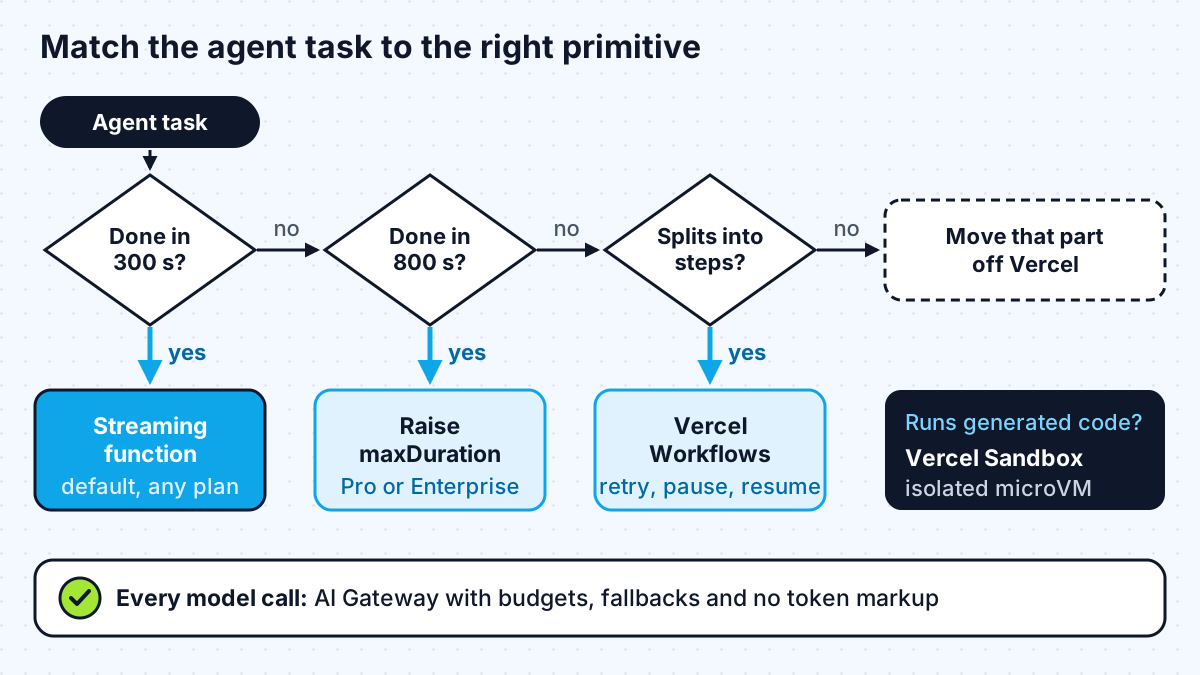
You can run AI agents on Vercel if each request finishes inside the function time limit: 300 seconds by default, up to 800 seconds on Pro and Enterprise, or 30 minutes in beta. Agent loops that run longer, wait for people or must survive crashes belong in Vercel Workflows. Run untrusted generated code in Vercel Sandbox, and route model calls through the AI Gateway for budgets.
Many AI apps start life on Vercel because the Next.js side is effortless. Then someone adds an agent that calls six tools, reads a long document and drafts a report, and the first 504 arrives. The limits are documented and the workarounds are good; you just need to plan for them before you build the agent, not after. Everything below comes from Vercel's documentation as of mid-2027.
What are Vercel's limits for AI agents?
The limits that matter for agents are duration, payload size and memory. With Fluid compute, which Vercel has enabled by default for new projects since 23 April 2025, the Functions limits page lists:
| Limit | Hobby | Pro and Enterprise |
|---|---|---|
| Default duration | 300 s | 300 s |
| Maximum duration | 300 s | 800 s |
| Extended maximum (beta) | Not available | 1,800 s, set per function |
| Memory | 2 GB, 1 vCPU | Up to 4 GB, 2 vCPU |
| Request or response body | 4.5 MB | 4.5 MB (streamed responses exempt) |
| Concurrency | Up to 30,000 | Up to 30,000 (Pro), 100,000+ (Enterprise) |
Two details are easy to miss. First, the duration limit covers "time spent processing the request and sending the response, including streamed responses", so streaming does not extend it. When the limit hits, the user gets a 504 FUNCTION_INVOCATION_TIMEOUT. Second, background work you schedule with waitUntil, or after() in Next.js, has "the same timeout as the function itself", per the functions API reference. It is not a way around the limit.
How much does it cost to run agents on Vercel?
Agents spend most of their time waiting for model responses, and on Fluid compute that waiting is cheap. Vercel bills active CPU time and provisioned memory time, and its limits page says "Waiting for I/O (e.g. calling AI models, database queries) does not count towards active CPU time". Memory is still billed while the instance runs, so a function that waits 10 minutes for a slow agent is not free, but you are not paying for CPU you are not using.
Fluid compute also lets several invocations share one instance, which Vercel's Fluid compute page calls "especially valuable for AI applications" with I/O-bound work. For a chat agent with many users waiting on models at once, that is a real saving.
The model bill is separate and usually larger. The AI Gateway charges "no markup and no platform fee on tokens", and lets you set budgets per team, project, API key or member. One catch: Vercel says gateway budgets exclude bring-your-own-key spend, so if you use your own provider keys, set spending limits with the provider too. Neither replaces per-user cost caps inside your own app.
Workaround 1: stream, cap and checkpoint short agents
Most agent interactions in a product are short: a few tool calls and an answer within a minute or two. For those, a normal route handler that streams is the right tool, and three habits keep it inside the limit.
- Stream from the first second. Users see progress, and you see where time goes. I covered the client side of this in my post on building an AI agent with MCP and Claude.
- Cap the loop. Set a maximum number of steps and a maximum output length on every model call, so a confused agent stops rather than burning the whole duration.
- Watch the deadline. The getDeadline helper in the @vercel/functions package returns when Vercel will stop the invocation. Vercel's own example checks it in a loop and returns a "resume from here" marker when fewer than two seconds remain. The same pattern works for agents: save state, return, and let the client or a job continue.
Raise maxDuration only for the routes that need it, not as a project default. That keeps a runaway bug in a quick endpoint from running for 13 minutes.
Workaround 2: move long agents into Vercel Workflows
When an agent needs more than one function's lifetime, the right move is durable execution, not a longer timeout. Vercel Workflows runs multi-step code that "can retry failed steps, wait for external events, and resume across crashes and deployments", and the docs say workflows can pause "for minutes or months".
You mark the orchestrating function with "use workflow" and each unit of work with "use step". For an agent, the natural mapping is:
- One step per model call or tool call, so a failed call retries on its own instead of restarting the run.
- A sleep or hook when the agent needs a human approval or a webhook, so nothing runs while it waits.
- Streams to send progress to the UI while steps run in the background.
Vercel also documents WorkflowAgent, which runs an AI SDK agent loop inside a workflow. Pricing is usage based on events, data written and data retained, so check the Workflows pricing page against your expected step count before you commit. This is the pattern I reach for when an agent's job looks more like a back-office process than a chat reply; my post on when you need multi-agent systems covers how to keep those processes simple.
Workaround 3: run generated code in Vercel Sandbox
If your agent writes and runs code, that code must not run inside your app's function. Vercel Sandbox runs "untrusted or agent-generated code in isolated Linux microVMs", each in a Firecracker microVM with its own filesystem and network.
Sandbox also uses active CPU pricing, so a sandbox waiting on an LLM call costs little CPU. Vercel's example puts an idle 1 vCPU, 2 GB sandbox in the iad1 region at $1.05 a day, against $4.09 for one busy all day. The lesson from those figures is to stop sandboxes when the work ends; a forgotten idle sandbox still adds up over a month.
Failure modes I check for before launch
A handful of limits cause most of the production errors I would expect from an agent on Vercel, and each has a simple guard.
- Timeouts on the default duration. A route that worked in testing hits 300 seconds under real load. Set maxDuration deliberately on agent routes and log how close runs get to it.
- Background work cancelled mid-way. Logging or follow-up calls scheduled with after() or waitUntil die with the function. Anything that must happen goes into a workflow step or a queue.
- Large uploads rejected. Request bodies above 4.5 MB return a 413 error, so let users upload documents straight to storage and pass the agent a reference.
- Connection exhaustion. Vercel allows 1,024 file descriptors shared across concurrent executions, and Fluid compute runs many requests per instance. Pool database connections and release them; Vercel provides attachDatabasePool for this.
When should you move agent work off Vercel?
Move a piece of the agent elsewhere when the work does not fit the shape of a function, a workflow step or a sandbox. In practice that means:
- a process that must stay up continuously, such as a worker holding a long-lived connection to a third-party system,
- work that needs GPUs or more memory than a function offers,
- jobs where a single uninterrupted computation runs longer than the extended maximum and cannot be split into steps,
- strict network or residency requirements your Vercel plan cannot meet.
You rarely need to move the whole app. The usual split is to keep the Next.js front end, the chat routes and the AI Gateway on Vercel, and run the heavy worker on a container platform. If that platform is AWS, my guide to deploying a Next.js AI app on AWS Bedrock shows the container side.
Work with me
I build AI agents that fit the platform they run on, including the step design, sandboxing and budgets that keep them reliable on Vercel or elsewhere. See AI agent development and full-stack development, browse my work, and book a scoping call.
Frequently asked
What is the maximum function duration on Vercel?
With Fluid compute, functions default to 300 seconds on all plans. Pro and Enterprise can raise this to 800 seconds, and to 1,800 seconds in beta for supported runtimes when set per function. Hobby stays at 300 seconds.
Does streaming extend Vercel's function timeout?
No. Vercel counts time spent sending the response, including streamed responses, toward the maximum duration. Streaming improves the user experience and avoids the 4.5 MB response limit, but the function still has to finish within its configured duration.
Can I run a long-running AI agent on Vercel?
Yes, by running it as a Vercel Workflow rather than inside one function. Workflows split the agent into steps that retry independently, can pause for minutes or months, and resume after crashes and deployments.
Is Vercel expensive for AI apps?
Function compute is usually a small part of the bill because Fluid compute does not charge active CPU while you wait on model calls. The model tokens dominate. The AI Gateway passes provider prices through without markup and supports budgets, which is the main control for that larger cost.
Do I need the Vercel AI Gateway to use AI on Vercel?
No. You can call any provider directly. The gateway is useful because it adds budgets, provider fallbacks and per-request cost logging in one place without a token markup, but your own keys and code work fine without it.
Sources
Related services
Building something like this?
Naman Gundaniya takes on full-stack and AI projects fixed quote after a free 30-minute scoping call, replies within 24 hours.
Get in touch