 By Naman Gundaniya
The FDE Handover Checklist: Leave No Black Boxes
A good AI project handover leaves the client owning every account, key and repository, with a runbook for common failures, an evaluation suite they can rerun, a clear monthly cost, and people trained to change it. If anything still depends on the engineer's login or memory, the handover is not finished.
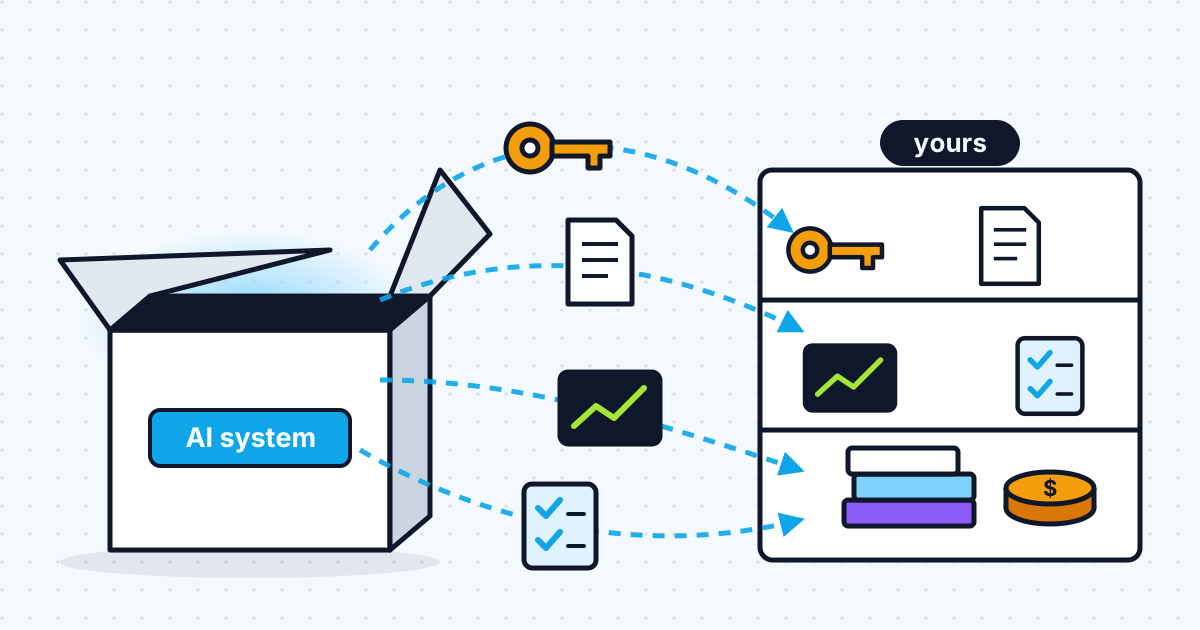
Lock-in is a common worry when you bring in outside help for AI work, and a fair one. A system built in someone else's cloud account, with their API keys and their undocumented prompts, is a system you rent rather than own. The answer is not a promise; it is a checklist both sides can tick off.
This is the checklist I use for handovers on forward deployed engagements. Copy it into your contract or your project tracker, and ask any engineer you hire, including me, to sign off each line.
Why AI handovers go wrong
AI handovers fail when the system works but nobody else can see why, change it safely or pay for it knowingly. AI systems have more hidden parts than ordinary software: prompts, model versions, evaluation sets, retrieval indexes, tool permissions and usage costs that change with traffic. Each is easy to leave in someone's head.
The cost of that shows up in the first incident. Google's SRE book makes the general point well: thinking through and recording best practices ahead of time in a playbook produces roughly a 3x improvement in mean time to repair compared with improvising. A handover is where that playbook gets written.
1. Accounts and ownership
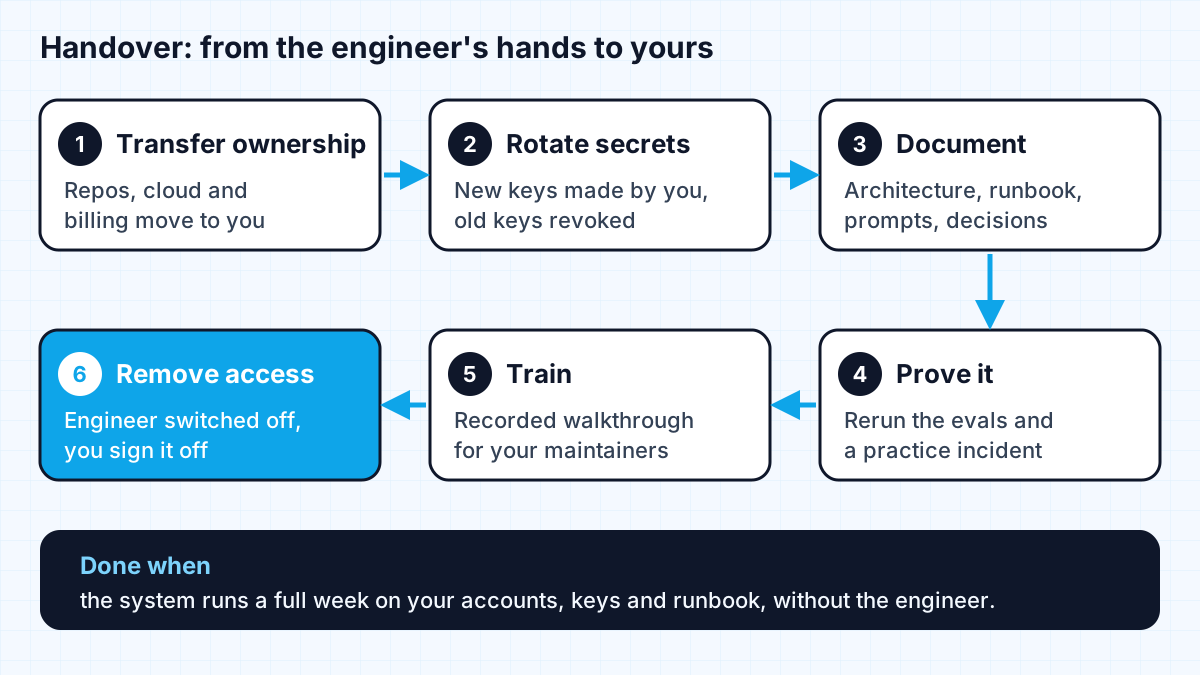
Every account the system depends on should belong to the client's organisation, with the engineer as a removable member, not the owner. The same rule applies to workflow tools, as I explain in who owns your automations.
- Code repositories live in the client's organisation. If they started elsewhere, transfer them: on GitHub, a transfer moves issues, pull requests, wiki, stars and watchers and redirects old links, and it needs administrator access to the repository.
- Cloud projects, databases, storage buckets and domains are owned and billed by the client.
- Model provider accounts (Anthropic, OpenAI, a cloud AI platform) are in the client's organisation with the client's payment method.
- Third-party services such as vector databases, logging, voice or messaging providers: same rule.
- A list of every account, its owner and its admin users, kept in the repository.
2. Keys and secrets
Assume every secret the engineer has seen should be replaced at handover. The wider controls for model keys are in protecting API keys in AI web apps.
- New API keys are created by the client in their own accounts and stored in their secrets manager, not in code or chat.
- Old keys used during the build are revoked, not just left unused.
- For cloud access, follow your provider's guidance. AWS, for example, recommends updating access keys when needed, such as when an employee leaves, and regularly reviewing and removing unused users, roles and credentials.
- Model provider access is reviewed too. Anthropic's Admin API, for instance, lists automating onboarding and offboarding, managing workspace access, and auditing API keys among its common uses.
- Repository secrets and webhooks are checked after any repository transfer, since GitHub notes they remain associated with the repository.
3. Documentation that someone else can use
Documentation is finished when a developer who was not on the project can make a small change and deploy it without asking anyone.
- A one-page architecture overview: components, data flow, where each part runs.
- A setup guide that gets a new developer from clone to running locally.
- A runbook for the failures you expect: the model provider is down, costs spike, output quality drops, an integration's credentials expire.
- Prompts and model settings under version control, with a note on why each important choice was made.
- A decisions log: what was tried, what was rejected and why.
- A list of known limitations and the cases the system should not be trusted with.
4. Evaluations and monitoring
The client should be able to tell, without the engineer, whether the system is still working and whether a change made it better or worse.
- The evaluation set and the script that runs it, in the repository, with instructions.
- The last evaluation results, so there is a baseline to compare against.
- Dashboards or logs showing volume, errors, latency and quality signals such as user corrections.
- Alerts routed to someone on the client's side.
I explain how to build an evaluation suite in the evals that stop AI agent projects failing.
5. Costs and budgets
The client should know what the system costs to run each month, what drives that cost, and where the controls are.
- A cost breakdown by provider, with the cost per task or per conversation.
- Spend limits or budget alerts set in each provider account.
- The levers for reducing cost, such as prompt caching, batching or a smaller model for simple steps, noted in the runbook.
- Renewal dates and plan limits for any paid tools.
For how running costs fit into the original pilot budget, see what an FDE pilot costs.
6. People and training
A handover is complete when named people on the client's side can run the system and know who to call if they cannot.
- A named technical owner and a named business owner.
- A recorded walkthrough of the architecture, the runbook and a deployment.
- A practice incident: the client's developer follows the runbook for one failure while the engineer watches and stays silent.
- An agreed support window after handover, if any, with what it covers and when it ends.
- Finally, the engineer's own access is removed and the client confirms it in writing.
That last line matters. Ending with the engineer's access switched off proves the system runs without them. If something breaks that week, you have found a gap in the handover while help is still close at hand.
When to start the handover
Start the handover on day one, not in the final week. If the work happens in your accounts from the start, keys are created by you, and the runbook grows as the system does, the final handover is a walkthrough rather than a migration. This is one of the five gates I describe in why AI pilots stall: pilots without a credible path to the client running them tend to stay pilots.
Work with me
I plan engagements to end with this checklist signed off and my access removed. See AI agent development and workflow automation, browse my work, and book a scoping call if you want a system you own outright.
Frequently asked
What should an AI project handover include?
Ownership of every account and repository, new API keys created by the client and the old ones revoked, a runbook for expected failures, versioned prompts, an evaluation suite the client can rerun, a monthly cost breakdown with spend limits, a recorded training session, and removal of the engineer's access.
How do I avoid lock-in with a freelance AI developer?
Make sure the work happens in your accounts from day one: your repositories, your cloud, your model provider account and your payment method. Put a handover checklist in the contract and require the engineer's access to be removed at the end as proof that the system runs without them.
Who should own the API keys for an AI system?
The client. Keys should be created in the client's own provider accounts, stored in the client's secrets manager, and rotated at handover so that no key the external engineer has seen is still active.
What is a runbook for an AI system?
A short document that tells whoever is on call what to do when something specific goes wrong: the model provider is unavailable, output quality drops, costs spike or an integration's credentials expire. It turns an incident from improvisation into following steps.
When should the handover start on an AI project?
On the first day. Building in the client's accounts, writing the runbook as the system grows and keeping the evaluation suite in the repository make the final handover a short walkthrough instead of a rushed migration.
Sources
Related services
Building something like this?
Naman Gundaniya takes on full-stack and AI projects fixed quote after a free 30-minute scoping call, replies within 24 hours.
Get in touch