 By Naman Gundaniya
Debugging With AI: A Systematic Method That Works
Debugging with AI works when you make the model reason from evidence instead of guessing from an error message. Use four steps: reproduce the bug with a failing test, isolate where it happens, have the AI propose ranked hypotheses with predictions, then verify the cause before any fix lands. The AI does real work at every step, but never skips one.
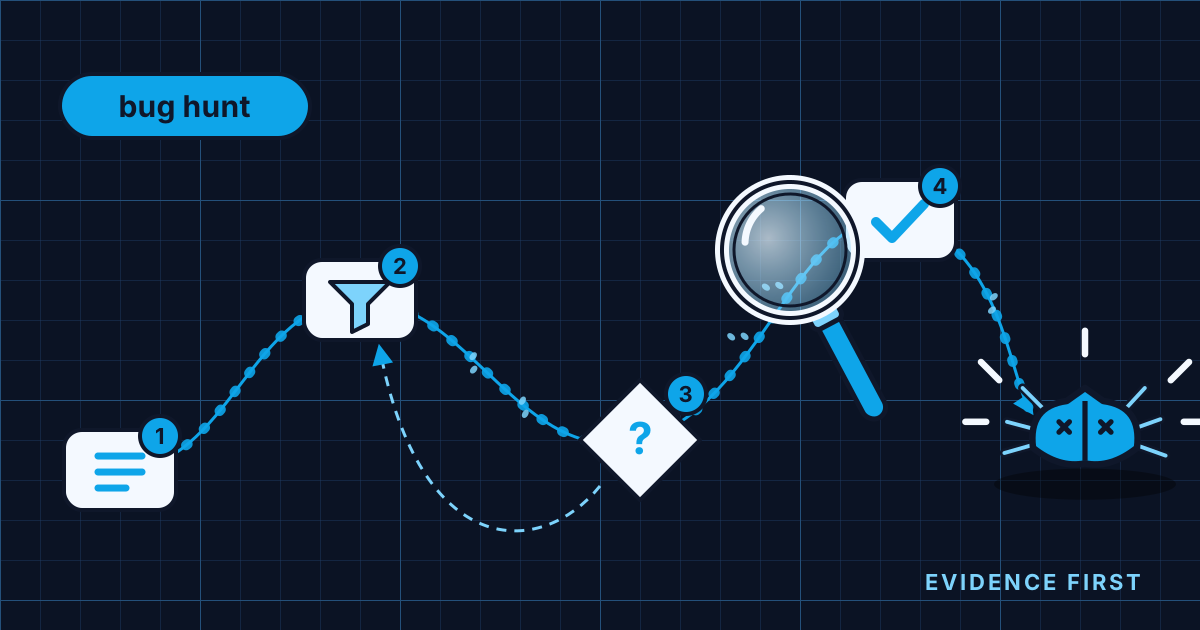
Most AI debugging I see is a loop of paste, patch, paste. The error goes into a chat, a plausible fix comes back, the error changes shape, and the loop starts again. Sometimes it works. When it does not, an hour disappears and the code ends up with three half-fixes layered on top of the original bug.
The problem is not the model. It is that nobody asked it to debug. This post is the method I use instead, on my own code and on client codebases I am still learning.
Why does pasting errors into a chatbot fail?
Because an error message is a symptom, and a model given only a symptom will produce the most plausible patch for that symptom. It cannot see your data, your runtime state or the change you made yesterday, so it fills the gap with a guess that sounds confident.
Andreas Zeller's Debugging Book warns about exactly this: if a change makes a failure go away without explaining why, "your 'fix' may apply only to the symptom rather than the source." His rule is that you should start fixing your code "if and only if" you have a diagnosis showing what caused the failure and why it was wrong. That rule applies to AI just as much as to people. More, perhaps, because a model will happily write the fix before the diagnosis exists.
The cost shows up in surveys. In the Stack Overflow 2025 Developer Survey, 45.2% of developers said debugging AI-generated code is more time-consuming, the second biggest frustration after code that is almost right. Guess-and-patch debugging is a big part of how that time gets spent.
What is a systematic method for debugging with AI?
It is the scientific method applied to code, with the AI as a fast and tireless lab assistant. Zeller describes the classic loop: form a hypothesis that explains the behaviour, derive a prediction that could support or refute it, test the prediction in an experiment, and repeat until hypothesis and observations agree. I wrap that loop in four steps that each produce something you can check.
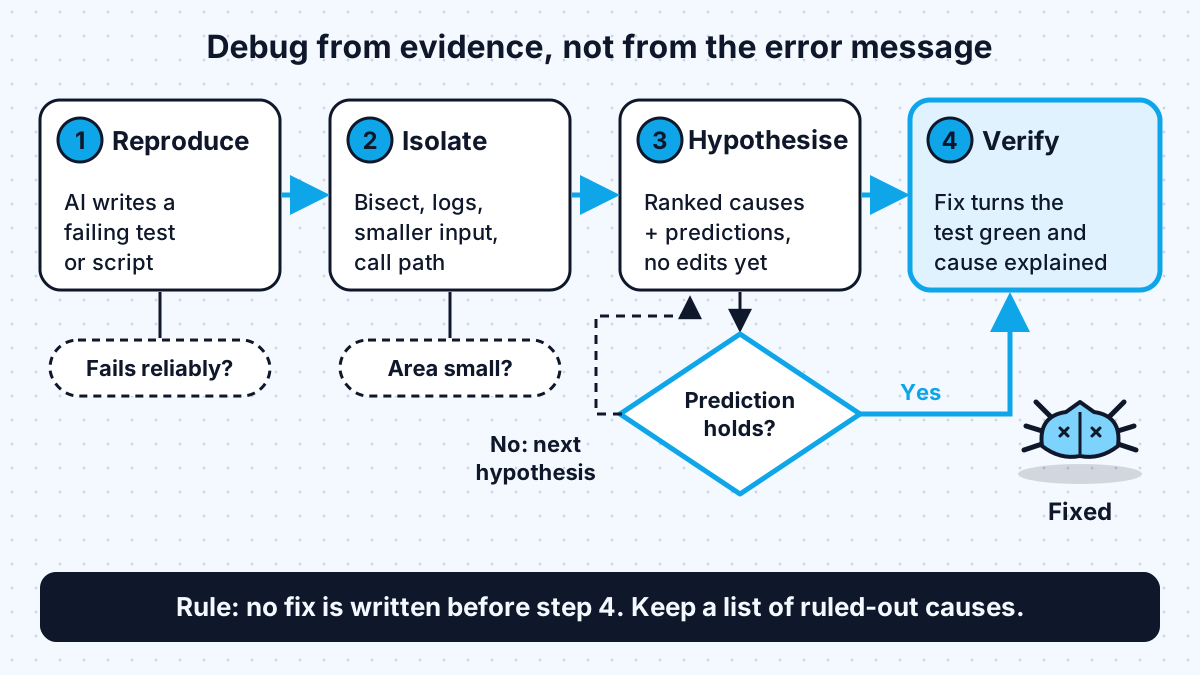
The steps are deliberately boring. The value is in refusing to skip any of them, especially when the AI is offering a fix in the first reply.
Step 1: reproduce the bug before anything else
A bug you cannot trigger on demand is a bug you cannot confirm you fixed. So the first job I give the AI is not "fix this" but "make this fail reliably": a failing test, a small script, or a curl command that shows the wrong behaviour every time.
Claude Code's best practices use this as their example of a good prompt. Instead of "fix the login bug", they suggest describing the symptom, naming where to look and asking the agent to "write a failing test that reproduces it, then fix it". The same page notes that naming the file, describing the symptom and saying what "fixed" looks like up front usually saves a round of corrections.
Reproducing is also where you hand over evidence, not just the error line:
- The full stack trace and the log lines around it, not a summary.
- The input that triggered it, or a sanitised copy.
- What changed recently: a deploy, a dependency bump, a config edit.
- Screenshots for UI and infrastructure problems. Anthropic's write-up of how its own teams use Claude Code describes a data infrastructure team feeding it dashboard screenshots to diagnose why Kubernetes clusters stopped scheduling pods.
If the AI cannot reproduce the bug, that is a finding. It usually means the bug depends on data, timing or environment, and the next prompt should be about which one.
Step 2: isolate where the bug lives
Once the bug is reproducible, shrink the search space before anyone theorises about it. Isolation turns "something in the checkout flow is wrong" into "this function returns the wrong total when the basket has a discounted item and a free one".
AI is good at the tedious parts of isolation:
- Bisecting history. `git bisect` uses binary search to find the commit that introduced a bug, and
git bisect runautomates it with a script that exits 0 for good and between 1 and 127 (except 125) for bad. Having the agent write that script from the failing test is one of the highest-value debugging prompts I know. - Shrinking the input. Ask the AI to cut the failing input down to the smallest case that still fails. Smaller inputs make every later step faster.
- Tracing control flow. In unfamiliar code, have the agent read the call path from the entry point to the failure and summarise it before suggesting anything. Anthropic's Security Engineering team does this during incidents, feeding stack traces and documentation in to trace control flow through the codebase.
- Adding targeted logging. Not a log line on every function, but the two or three values that would distinguish one explanation from another.
Step 3: make the AI hypothesise before it codes
This is the step that changes the quality of AI debugging most. Instead of asking for a fix, ask for a short list of possible causes, ranked by likelihood, each with a prediction: "if this is the cause, then this experiment will show that". Then run one experiment at a time.
A prompt I use is close to: "Do not change any code yet. Give me three hypotheses for why this test fails, ranked, and for each, one quick experiment that would confirm or rule it out." Separating thinking from editing stops the model from committing to its first idea, and the predictions give you something concrete to check rather than an explanation to believe.
There is research behind this shape. A paper on LLM-driven scientific debugging had the model generate hypotheses and use a debugger to interact with the buggy code before proposing a patch. It performed competitively with other repair approaches, could indicate when it was confident, and in a human study, 70% of participants said they wanted the explanations when using repair tools. The explanation is not decoration; it is what lets a person judge whether the fix is right.
Two rules keep this step honest:
- One variable per experiment. If the AI changes three things and the bug disappears, you have learned nothing about the cause.
- Refuted hypotheses get written down. Keep a running list in the session or a scratch file, so neither of you circles back to an idea already ruled out.
Step 4: verify the cause, then the fix
A fix is verified when three things are true: the failing test from step 1 now passes, the hypothesis that predicted it was confirmed by an experiment, and you can explain in one or two sentences why the old code was wrong. If any of the three is missing, you have a patch, not a fix.
Then finish the job properly. The reproduction test stays in the suite as a regression test. The debug logging comes out. And I check whether the same mistake exists elsewhere, because a cause found in one function is often copied into others. Asking the agent "where else does this pattern appear?" takes seconds.
| Step | What to give the AI | What to ask for | Warning sign |
|---|---|---|---|
| Reproduce | Full trace, input, recent changes, screenshots | A failing test or script | A fix in the first reply |
| Isolate | The failing test, the repository | Bisect script, smaller input, call path summary | Theories before the search space is small |
| Hypothesise | Isolated area, evidence so far | Ranked causes with predictions, no edits | One hypothesis stated as fact |
| Verify | Experiment results | Fix, green test, one-line explanation | Test passes but nobody can say why |
The verify step is also where review comes in. I covered how I triage AI-written changes in how I review AI-written code; a bug fix with a reproduction test and a written cause is about the easiest kind of change to review.
When should you stop and reset the AI session?
When the session has gone in a circle. The Claude Code best practices are direct: if you have corrected the same thing twice and it is still wrong, a third correction "mostly adds to a conversation that already contains two failed attempts" for the model to keep re-reading. Clearing the session and writing one new prompt that includes what you learned "works better almost every time."
For debugging, that new prompt should carry the evidence forward: the reproduction, the isolated area and the list of hypotheses already ruled out. The same page also suggests raising the effort setting for "a bug in code you didn't write" or a flaky test, where getting it right depends on cases that are easy to miss.
Some bugs are simply hard, and the method does not make them easy. What it does is keep each hour productive, so that even a long hunt narrows the problem rather than piling patches on it. The near-miss patterns that cause many of these bugs in the first place are in the almost-right problem, and giving the agent a check to run, as in give the agent a way to check its work, is what makes steps 1 and 4 possible.
Work with me
I build and maintain production web apps and AI agents, and I help teams set up the tests and workflows that make AI-assisted debugging reliable rather than lucky. See full-stack development and AI agent development, or look through my work and book a scoping call.
Frequently asked
Can AI debug code on its own?
AI coding agents can reproduce, isolate and fix many bugs on their own when they can run the code and a test that shows the failure. They struggle when the bug depends on data, timing or an environment they cannot see. Give them the evidence and a failing test, and review the stated cause before accepting the fix.
What is the best prompt for debugging with AI?
The most useful debugging prompt describes the symptom, names where to look and asks for a failing test before any fix. A second strong prompt asks for three ranked hypotheses with a quick experiment for each, without changing code. Both make the model reason from evidence instead of guessing.
Why does AI keep giving me fixes that don't work?
AI gives fixes that do not work when it is guessing from an error message without a reproduction or a diagnosis. Each failed attempt also stays in the conversation and can steer later answers. Reproduce the bug first, ask for hypotheses before code, and start a fresh session after two failed corrections.
Should I use git bisect with an AI agent?
Git bisect pairs well with an AI agent because the agent can write the script that git bisect run uses to mark each commit good or bad. Turn your failing test into that script, and the search for the commit that introduced the bug runs automatically. It works best when the test is fast and reliable.
Sources
Related services
Building something like this?
Naman Gundaniya takes on full-stack and AI projects fixed quote after a free 30-minute scoping call, replies within 24 hours.
Get in touch