 By Naman Gundaniya
AI Burnout: Why Faster Work Can Feel Worse, and the Fix
AI burnout happens when faster tools raise the amount of work instead of lowering it. Each task gets quicker, so more tasks get started, run in parallel and reviewed, breaks fill with prompts, and expectations reset to the new pace. The fix is not using less AI; it is setting limits on open threads, review load and hours so the speed stays sustainable.
This is the last post in a long series about working well with AI. Most of the series has been about doing more: better context, better checks, more delegation. It feels right to end on the cost of that, because I see it in how people around me talk about their work, and the research now names it.
What is AI burnout?
AI burnout is ordinary burnout with a new cause: workload that grows because AI makes each piece of work cheaper to start. The World Health Organization's ICD-11 definition describes burn-out as "a syndrome conceptualized as resulting from chronic workplace stress that has not been successfully managed," with three dimensions: exhaustion, mental distance or cynicism about the job, and reduced professional efficacy. The WHO is explicit that it is an occupational phenomenon, not a medical condition.
Nothing in that definition is about tools. What AI changes is the stress. It does not remove work so much as change its shape: less typing, more deciding, more checking, more switching. If you feel drained after a day that looked productive on paper, you are not imagining it. I am not a clinician, and if exhaustion is persistent, a doctor is the right person to talk to. What follows is about the work side, which is the part I can speak to.
Why does faster work feel worse?
Faster work feels worse because the time AI saves is rarely kept; it is spent on more work, and the new work is mostly attention. Researchers Aruna Ranganathan and Xingqi Maggie Ye of Berkeley Haas studied this inside a US tech company and published the result in Harvard Business Review as "AI Doesn't Reduce Work, It Intensifies It". As quoted by Simon Willison, they found that "AI introduced a new rhythm in which workers managed several active threads at once," including "running multiple agents in parallel," and that the reality was "a continual switching of attention, frequent checking of AI outputs, and a growing number of open tasks." That "created cognitive load and a sense of always juggling, even as the work felt productive."
Willison's own comment is the most honest line I have read on this: "the productivity boost these things can provide is exhausting." He describes his mental energy feeling "almost entirely depleted" after an hour or two of parallel work, and people "losing sleep" because "just one more prompt" is irresistible.
The pattern shows up in surveys too. A 2024 Upwork Research Institute study, reported by Fortune, found that 77% of employees using AI said it had added to their workload, 39% were spending more time reviewing or moderating AI-generated content, 71% of full-time employees were burnt out, and 47% did not know how to achieve the productivity gains their employers expected. It is a vendor survey of self-reported feelings, so treat the numbers as a signal rather than a measurement. The signal is consistent with the research, though.
And the measured speed-up is smaller than it feels. I covered the trials in does AI make developers faster: people reliably believe AI saves them more time than the clock shows. Put those together and you get the trap. Work feels faster, so expectations rise; the real gain is smaller, so the gap gets filled with longer hours and more switching.
Where does the extra load come from?
The extra load comes from five places, and each one has a matching boundary. Naming them is most of the fix, because none of them is obvious while it is happening.
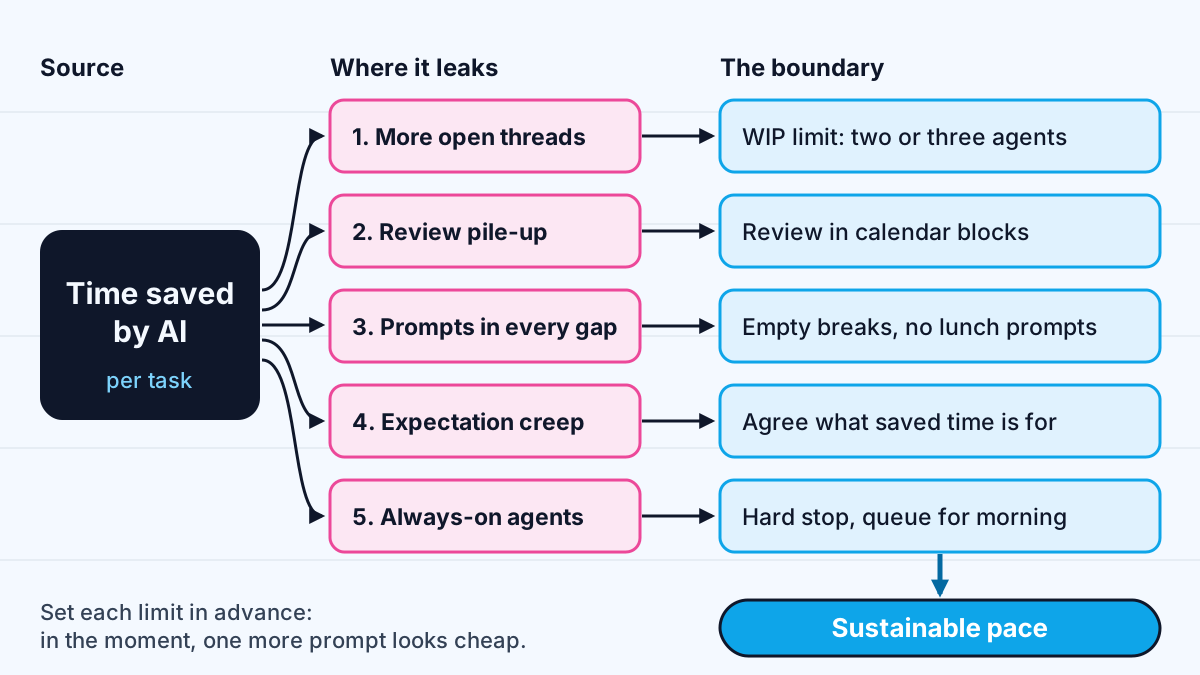
| Where the load comes from | What it feels like | The boundary |
|---|---|---|
| More open threads | Juggling, never finishing | A work-in-progress limit |
| Review pile-up | Reading output all day, writing none | Scheduled review blocks |
| Prompts in every gap | No real breaks | Protected pauses |
| Expectation creep | The new pace becomes the baseline | Agree what saved time is for |
| Always-on agents | Checking results at night | A hard stop, queued work |
What boundaries make AI speed sustainable?
Sustainable AI work needs limits that are set in advance, because in the moment another prompt always looks cheap. These are the boundaries I recommend and try to keep myself.
Limit work in progress. Running agents in parallel is useful; I wrote a whole guide to running parallel AI agents on one codebase. But every running agent is an open loop in your head. Pick a number, two or three, and do not start a new thread until one is merged or abandoned. Finishing is what produces relief, not starting.
Schedule review instead of reacting to it. Review is where AI work lands, and it is tiring in a way typing is not, because every line is a decision. Batch it into blocks rather than checking each result as it arrives. A triage system helps too: not every change deserves a deep read, which is the point of reviewing AI-written code by risk tier.
Keep breaks empty. The HBR researchers saw prompts sent during lunch, meetings and right before leaving the desk. A prompt sent at lunch is not rest; it is a decision you will have to check later. Their recommendation, as Willison summarises it, is an "AI practice": deliberate norms for how AI is used, including intentional pauses.
Decide what saved time is for. If nobody agrees what the time saving is for, it becomes more of the same work by default. On client projects I try to say it out loud at the start: the time we save goes to testing, documentation or a shorter week, not to an ever-longer backlog. Managers carry most of this one, because individuals rarely win a fight with a rising baseline alone.
Stop on purpose. Long-running agents make it tempting to check in all evening. End the day by queueing the next task with a clear brief, then close the laptop. The agent's work will still be there in the morning, and so will your judgement.
What can teams and managers do?
Teams can prevent most AI burnout by measuring outcomes rather than activity and by treating review as real work. If the dashboard counts pull requests opened or tasks started, AI will push those numbers up while the people behind them wear down. Count shipped, working changes instead.
- Budget review time. If AI multiplies output, review capacity has to grow with it, or the queue becomes one tired person's problem.
- Write down the norms. When prompting is fine, when it is not, how many parallel agents are reasonable, and when the day ends. Unwritten norms default to "always". A team AI policy is a good home for them.
- Delegate deliberately. Not everything should go to an agent. A clear delegation matrix cuts the low-value threads that create switching without creating value.
- Watch for the three WHO signs. Exhaustion, cynicism and a drop in confidence in one's own work are worth a conversation, whatever the velocity chart says.
Is the answer to use less AI?
No. The answer is to use AI with limits, the same way any powerful tool needs them. Nearly every post in this series has been about getting more from AI: better context, checks agents can run, specs, delegation, judgement. All of that still holds. But a tool that makes work cheaper to start will fill every hour you give it, and the only person who can set the boundary is you or your team.
The best AI users I described in what the top 1% of AI users do differently are not the ones who run the most agents. They are the ones who choose the right work, finish it and stop. Speed is only useful if you are still well enough to use it next month.
Work with me
I design AI agents and automations around people's real capacity, with approval steps, review queues and clear hand-offs so the speed helps the team rather than burying it. See workflow automation and AI agent development, or browse my work and book a scoping call.
Frequently asked
Can AI cause burnout?
AI does not cause burnout directly, but it can raise workload in ways that lead to it. Research published in Harvard Business Review found that AI use led to more parallel threads, more checking of outputs and work spilling into breaks, and an Upwork Research Institute survey found 77% of employees using AI said it added to their workload. Burnout comes from that chronic, unmanaged stress.
Why does using AI feel so tiring?
Using AI shifts work from producing to deciding: reading output, judging whether it is right and switching between several running tasks. Each decision costs attention, and AI makes them arrive faster than typing ever did. Many people also fill natural pauses with prompts, which removes the breaks that used to happen on their own.
How do I avoid burnout when using AI tools?
Set limits in advance: a cap on parallel tasks, fixed blocks for reviewing AI output, breaks with no prompting, and a hard stop at the end of the day. Agree with your manager or client what the saved time is for, so it does not turn into more of the same work. If exhaustion persists, talk to a doctor.
Is burnout a medical condition?
The World Health Organization does not classify burn-out as a medical condition. ICD-11 describes it as an occupational phenomenon resulting from chronic workplace stress that has not been successfully managed, marked by exhaustion, mental distance from the job and reduced professional efficacy. Anyone with persistent symptoms should still speak to a health professional.
Sources
Related services
Building something like this?
Naman Gundaniya takes on full-stack and AI projects fixed quote after a free 30-minute scoping call, replies within 24 hours.
Get in touch