 By Naman Gundaniya
Running Parallel AI Agents on One Codebase Safely
To run parallel AI agents on one codebase safely, give each agent its own git worktree and branch, split the work so no two agents own the same files, give every agent a check it can run, and merge the results back one at a time through a review queue. Isolation stops the collisions; the queue stops the chaos.
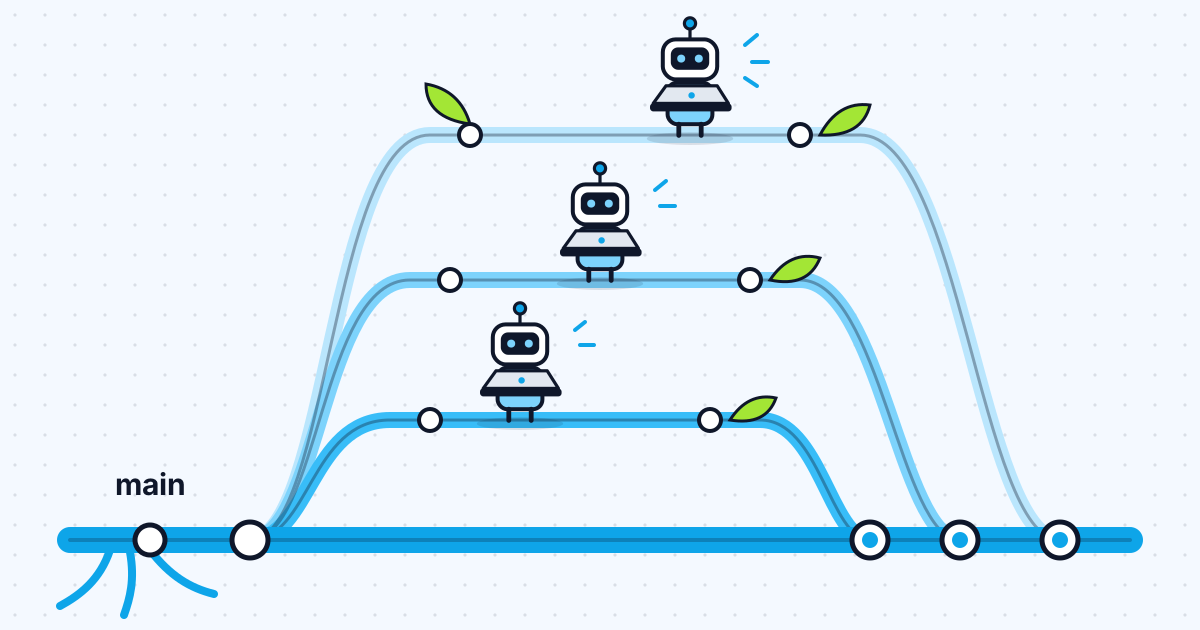
Running one coding agent is now ordinary. Running three at once is where things get interesting, and where most of the horror stories come from: two agents editing the same file, a dev server fighting over a port, a branch that cannot merge because its neighbour moved underneath it. All of it is avoidable with the right structure.
When is it worth running AI agents in parallel?
Parallel agents pay off when you have several pieces of work that do not depend on each other, and they cost you when you do not. That sounds obvious, but coding work is less parallel than it looks. In Anthropic's write-up of its multi-agent research system, the team notes that "most coding tasks involve fewer truly parallelizable tasks than research" and that agents "are not yet great at coordinating and delegating to other agents in real time." The same post reports that multi-agent systems used about 15 times more tokens than chats. I cover when that cost is worth paying in when you need multi-agent systems.
The Claude Code documentation on agent teams draws the line in a similar place: for "sequential tasks, same-file edits, or work with many dependencies, a single session or subagents are more effective."
Good candidates, in my experience on client projects:
- A bug fix and an unrelated feature in different parts of the app
- A new API endpoint and the documentation for an existing one
- A test-coverage pass on one module while a refactor happens in another
- Research and review jobs that read code but do not change it
Bad candidates are anything with a natural order: a schema change and the feature built on it, or a refactor and the work that depends on its new shape. Those should run one after another, even if that feels slower.
What goes wrong when agents share one checkout?
Everything two people editing one folder at once would get wrong, only faster. Two agents in one working directory edit the same files, overwrite each other's changes, run tests against a half-finished mix of both, and leave you a single tangled diff with two authors. The agent teams docs put it plainly: "Two teammates editing the same file leads to overwrites."
The less obvious collisions are outside the code:
- Ports. Two dev servers both want port 3000.
- Databases. Two agents running migrations or seeding the same local database.
- Generated files. Lockfiles, build output and caches written by both.
- Shared services. A sandbox payment account or a test inbox that both agents use at once.
Separate checkouts fix the first category. The second needs a little planning, which I cover below.
How do git worktrees keep parallel agents apart?
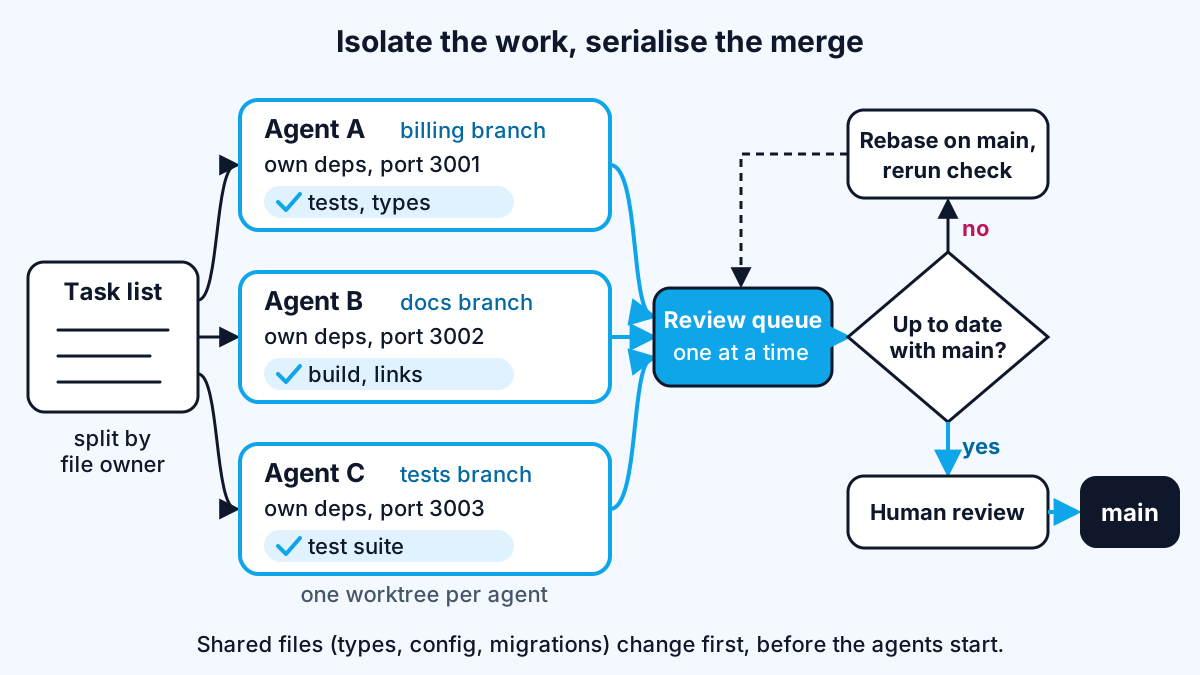
A git worktree gives each agent its own folder of files and its own branch while sharing one repository history. The git documentation describes it as a repository supporting "multiple working trees, allowing you to check out more than one branch at a time." Git also refuses, by default, to check out a branch that is already checked out in another worktree, which is a useful guard: two agents cannot quietly end up on the same branch.
You can create them by hand with git worktree add ../app-billing -b billing, list them with git worktree list and delete them with git worktree remove. Claude Code wraps this in a flag. Per its worktrees guide, claude --worktree feature-auth creates a worktree under .claude/worktrees/ on a new branch named worktree-feature-auth, and running the same command with another name in a second terminal starts a second isolated session. Subagents can get the same treatment with isolation: worktree in their definition.
Three practical details decide whether this works smoothly:
- A worktree is a fresh checkout. The docs warn that gitignored files like
.envare not there and dependencies are not installed. List small files such as.env.localin a.worktreeincludefile at the repository root so they are copied in, and put the install command in your project memory file so the agent runs it on arrival. - Pick the base on purpose. By default Claude Code branches new worktrees from the remote default branch. If the agents need your unpushed work, the
worktree.baseRefsetting can be set to"head"instead. - Clean up. Interactive sessions offer to remove the worktree on exit, but the best practices page notes that a
claude -p --worktreerun "is one you clean up yourself." I checkgit worktree listat the end of a day of parallel work.
Worktrees isolate files. They do not isolate ports or databases, so give each worktree its own port through an environment variable, and either a separate local database or a rule that only one agent touches migrations.
How do you split work so agents don't overlap?
Split by ownership, not by topic. Each agent gets a task, a list of files or directories it owns, and an explicit list of things it must not touch. Anthropic's research post says each subagent needs "an objective, an output format, guidance on the tools and sources to use, and clear task boundaries," and that without them agents "duplicate work, leave gaps, or fail to find necessary information." The same is true of coding agents in separate sessions.
A brief I would hand to each agent covers:
- The goal in two or three sentences, with what done means
- Owned paths, such as
app/billing/and its tests - Off-limits paths, especially shared types, config, migrations and the lockfile
- The check to run before finishing, and the evidence to show
- What to do if blocked: stop and report, rather than edit outside its lane
The shared files are where parallel work really goes wrong. If two tasks both need a change to a shared type or a new dependency, I do that change first, merge it, and only then start the parallel agents on top of it. If I cannot find a split where the owned paths do not overlap, the tasks are not independent, and they run in sequence. A short written spec for each task helps here too; I described the format in spec-driven development.
| Way to run agents in parallel | What isolates the edits | Best for | Watch out for |
|---|---|---|---|
| Separate sessions in worktrees | One worktree and branch per session | Independent features and fixes you steer yourself | You carry context between sessions |
| Subagents with worktree isolation | A temporary worktree per subagent | Fan-out work inside one task | Each subagent costs its own tokens |
| Agent teams (experimental in Claude Code) | Ownership rules you give the lead | Research, review and cross-layer work | Coordination overhead, same-file overwrites |
/batch in Claude Code | A worktree per unit, each opening a PR | One large mechanical change across many files | Many PRs arriving at once |
The /batch row comes from the best practices page, which says it splits a large change into 5 to 30 units, shows you the plan, and gives each unit its own worktree once you approve.
How do you merge parallel work without chaos?
Merge one branch at a time, and rerun the checks after every merge. Parallel work is fine; parallel merging is where branches that were each green turn red together. My review queue is simple:
- Each agent finishes green in its own worktree. It runs its check and shows the output. I covered why this matters in give the agent a way to check its work.
- Branches enter the queue in order of risk. Small, low-risk changes first, so later branches rebase onto them.
- Before each merge, update the branch from main and rerun the check. A conflict or a red test goes back to the agent that owns the branch, with the error as its next prompt.
- A human reviews each pull request on its own. Small diffs from separate branches are far easier to review than one combined change.
- Remove the worktree after merging. Old worktrees and branches pile up quickly.
A second session also makes a cheap independent reviewer. The best practices page suggests having one session write the code while another reviews it "without having watched it being written," then passing the findings back. When the reviewer's lane is read-only, it can run in parallel with everything else safely.
This is also why I keep human approval between stages in the systems I build. In AgentOps, each hand-off between agents passes through a human approval step, so an agent that is wrong early is caught before its mistake fans out into tickets and code.
How many agents should you run at once?
Fewer than you think, and no more than you can review. For agent teams, the docs recommend starting with three to five teammates, note that token costs "scale linearly" with each one, and observe that "three focused teammates often outperform five scattered ones." For separate sessions I steer myself, the limit is my own attention: every agent produces a diff that someone has to read before it merges.
The research on AI and developer speed is a useful warning here. Generating more code faster does not help if review becomes the bottleneck. I start with two agents on clearly separate work, add a third only when the first two run without needing me, and drop back to one when the tasks start touching the same files.
Work with me
I build agent systems and full-stack products with the isolation, checks and approval steps that keep parallel work safe, and I help teams set up the same workflow in their own repositories. See AI agent development and full-stack development, or browse my work and book a scoping call.
Frequently asked
Can two AI coding agents work on the same repository at the same time?
Yes, as long as each works in its own checkout and on its own branch. Git worktrees give each agent a separate folder of files that shares one repository history, so their edits cannot overwrite each other. The work then merges back through normal pull requests, one at a time.
What is a git worktree?
A git worktree is an extra working directory attached to the same repository, with its own branch checked out. It lets you have several branches open at once without cloning the repository again. Git refuses by default to check out a branch that another worktree already has, which keeps parallel work on separate branches.
How do I stop parallel agents from creating merge conflicts?
Give each agent a set of files it owns and a list it must not touch, and make shared changes such as types, configuration or new dependencies first, before the parallel work starts. Then merge branches one at a time, updating each from main and rerunning its checks before it merges.
Do parallel AI agents cost more?
Yes, each agent runs its own context and its own requests, so token use rises with the number of agents. Anthropic reported that its multi-agent research system used about 15 times more tokens than chat, and Claude Code's docs say agent team costs scale linearly with teammates. Run more agents only when the work is truly independent.
Sources
Related services
Building something like this?
Naman Gundaniya takes on full-stack and AI projects fixed quote after a free 30-minute scoping call, replies within 24 hours.
Get in touch