 By Naman Gundaniya
Give the Agent a Way to Check Its Work
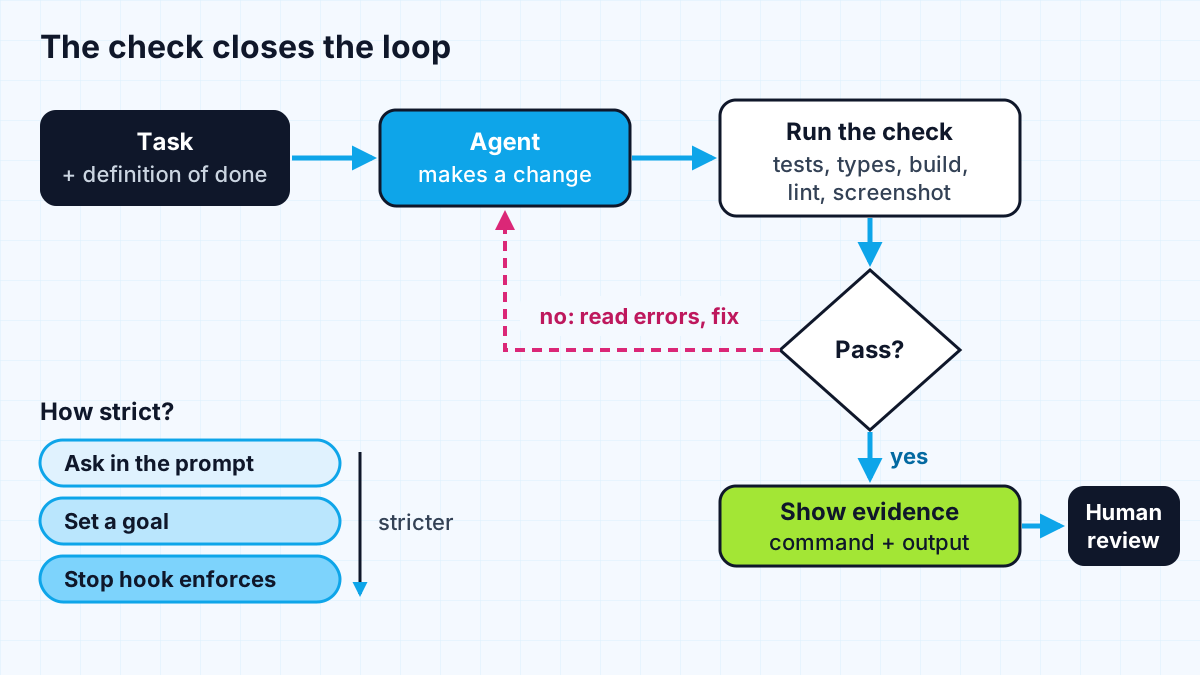
The most useful thing you can give an AI coding agent is a check it can run that comes back pass or fail: a test, a type check, a build, a linter or a screenshot compared with a design. With one, the agent loops on its own until the work is actually done. Without one, you become the test suite.
Of all the habits I use with coding agents, this is the one with the biggest effect on whether the output is usable. I mentioned it briefly in my AI productivity stack; this post goes deeper into which checks to use, how to wire them in, and how strict to make them.
Why do AI coding agents need a way to check their work?
Because an agent stops when the work looks done, and looking done is not the same as being done. Claude Code's best practices put it bluntly: if the agent has nothing to run that says whether the work is finished, "looks done" is all it has to go on, and "in practice that makes you the test suite."
Anthropic's guide to building effective agents makes the same point from the other direction. It says it is crucial for agents to gain "ground truth" from the environment at each step, and that coding suits agents well partly because "code solutions are verifiable through automated tests." A check is how the agent gets ground truth instead of its own opinion.
The payoff shows up at team level too. Google Cloud's 2025 DORA report announcement warns that "without robust control systems, like strong automated testing, mature version control practices, and fast feedback loops, an increase in change volume leads to instability." Agents increase change volume. Checks are the control system, and they are a large part of why DORA and METR found such different speed effects.
Which checks work best for coding agents?
Any check works if the agent can run it and read the result. The best ones are fast, deterministic and specific about what went wrong. The docs list the range: a test file, a build's exit code, a linter, a script that diffs output against a fixture, or a browser screenshot next to the mockup.
| Check | What it catches | Speed | Setup effort |
|---|---|---|---|
| Type check | Wrong shapes, invented methods, missing fields | Seconds | Low if the project is typed |
| Unit tests | Logic errors, edge cases, regressions | Seconds | Medium, write the important ones first |
| Build | Broken imports, config errors, bundling issues | Seconds to minutes | Low |
| Linter with security rules | Risky patterns, unused code, style drift | Seconds | Low |
| Fixture diff | Output that changed when it should not have | Seconds | Low for data transforms and reports |
| Screenshot against a design | Layout, spacing, visual regressions | Slower | Medium, needs a browser tool |
| Preview deployment | Real behaviour in a live environment | Minutes | Low on platforms that create them per branch |
On most of my client projects, the stack is TypeScript, a test runner and Vercel preview deployments. Vercel creates a preview deployment when you push to a branch that is not production or open a pull request, each with its own URL. That gives both the agent and the client something real to click.
How do you set up a check an agent will actually use?
Start by making the check easy to find and cheap to run, then decide how strictly to enforce it.
- Put the command where the agent will see it. The Claude Code docs say that if your repository already has a check, "the single most useful line in your CLAUDE.md is the command that runs it." Include how to run a single test file, so the agent does not run the whole suite for a one-line change.
- Make it fast. A check that takes ten minutes will be skipped or run once at the end; cheap verification is also what lets software teams scale coding agents. Split slow suites so the agent can run the relevant part on every change.
- Make failures readable. Error output is the agent's next prompt. Clear messages with file names and line numbers lead to good fixes; a bare "failed" leads to guessing.
- Write the important test first. For a bug, have the agent write a failing test that reproduces it, then fix it. For a feature, write the tests for the edge cases you care about before the code exists.
Then choose the strictness. The docs describe a range:
- In the prompt: "run the auth tests after, and keep going until they pass." Works today with no setup; the agent decides when it is satisfied.
- As a goal: a condition that a separate model checks after every turn, sending the agent back if it is not met. Useful for long background runs.
- As a Stop hook: a script that runs whenever the agent tries to finish and blocks it while the check fails. This one is enforced by the tool, not left to the model.
- As an independent review: a reviewer in a fresh context that did not see how the code was written, so it is not swayed by the reasoning behind it.
Why should the agent show evidence, not just say "done"?
Because a claim is not a result. The best practices page recommends asking for evidence: the command the agent ran and its output, or the screenshot. "All tests pass" on its own tells you very little, and reading the output is faster than rerunning the check yourself. For a session you were not watching, it is the only evidence you have.
I ask for this in the task description and look for it before I read the diff. If the evidence is missing or the output does not match the claim, that tells me more about the change than the code does.
How do you check UI work, not just logic?
Give the agent a way to see the result. Unit tests rarely catch a misaligned button or a broken mobile layout, so for interface work I add a visual check. The best practices page lists a browser screenshot next to the mockup as a valid check, and Claude Code offers a /verify command that has the agent build and run the app and look at the result, which the docs say catches the kind of problem tests and type checks miss.
On projects deployed to Vercel, the preview deployment is the human half of the same check. The agent compares screenshots against the design while it works; the client and I click through the preview URL before anything merges. Between them, layout regressions and broken flows get caught before production rather than reported by users.
What can a check not tell you?
A check only knows what it was written to test. It cannot tell you that the agent solved the wrong problem, that a test was weakened to pass, or that a change is correct but unsafe. I covered those near-miss patterns in the almost-right problem; the short version is that checks shrink human review, they do not replace it.
Two limits to keep in mind:
- Agents can game weak checks. If the only check is "the test passes", editing the test is one way to pass it. Review test diffs as carefully as code, and keep the tests that define correctness out of the agent's reach when it matters.
- Some quality is not checkable yet. Whether copy reads well or a design feels right still needs a person. A screenshot check catches layout regressions, not taste.
The same idea extends beyond coding. For AI features in a product, the equivalent of a test suite is an evaluation set, which I wrote about in the evals that prevent AI agent failures. Wherever an AI does work, give it a way to know whether the work is right.
Work with me
I build AI agents and full-stack products with feedback loops built in, and I help teams set up the tests, previews and hooks that make agent output trustworthy. See AI agent development and full-stack development, or browse my work and book a scoping call.
Frequently asked
How do I make an AI coding agent more reliable?
Give it a check it can run that returns pass or fail, such as a test suite, type check or build, and tell it the exact command in your project memory file. Ask it to keep going until the check passes and to show the command output as evidence. Keep tasks small and review the diff before merging.
What is a Stop hook in Claude Code?
A Stop hook is a script that Claude Code runs whenever the agent tries to end its turn. If the script fails with exit code 2, the agent is sent back to work with the script's error output as the reason. It turns a check like a type check from a request into a rule the tool enforces.
Can an AI agent test its own code?
Yes, an agent can write and run tests and fix failures in a loop, which is one of its most useful abilities. The risk is that it can also weaken a test to make it pass, so review test changes carefully and write the tests that define correctness yourself when the stakes are high.
What should I put in CLAUDE.md for testing?
Put the exact commands to run the full test suite, a single test file, the type check and the linter. Anthropic's documentation calls the command that runs your check the single most useful line in the file. Keep the rest of the file short so it stays easy to follow.
Sources
Related services
Building something like this?
Naman Gundaniya takes on full-stack and AI projects fixed quote after a free 30-minute scoping call, replies within 24 hours.
Get in touch