 By Naman Gundaniya
The AI Productivity Stack I Actually Use Every Day
My daily AI stack is small: a chat assistant for thinking, a coding agent that works across the repository, a short project memory file, a few tool connections, and fast checks such as types, tests and preview deployments. The tools matter less than the habits around them: give the AI context, give it a check it can run, and review what ships.

Lists of "50 AI tools" are easy to find and hard to use. What follows is the opposite: the handful of categories I rely on as a Forward Deployed Engineer building AI and full-stack products for clients, what each one is for, and the habits that make them worth having. I name the tools I use, but the categories carry over to whatever your team has chosen.
What does a working AI engineer's stack look like?
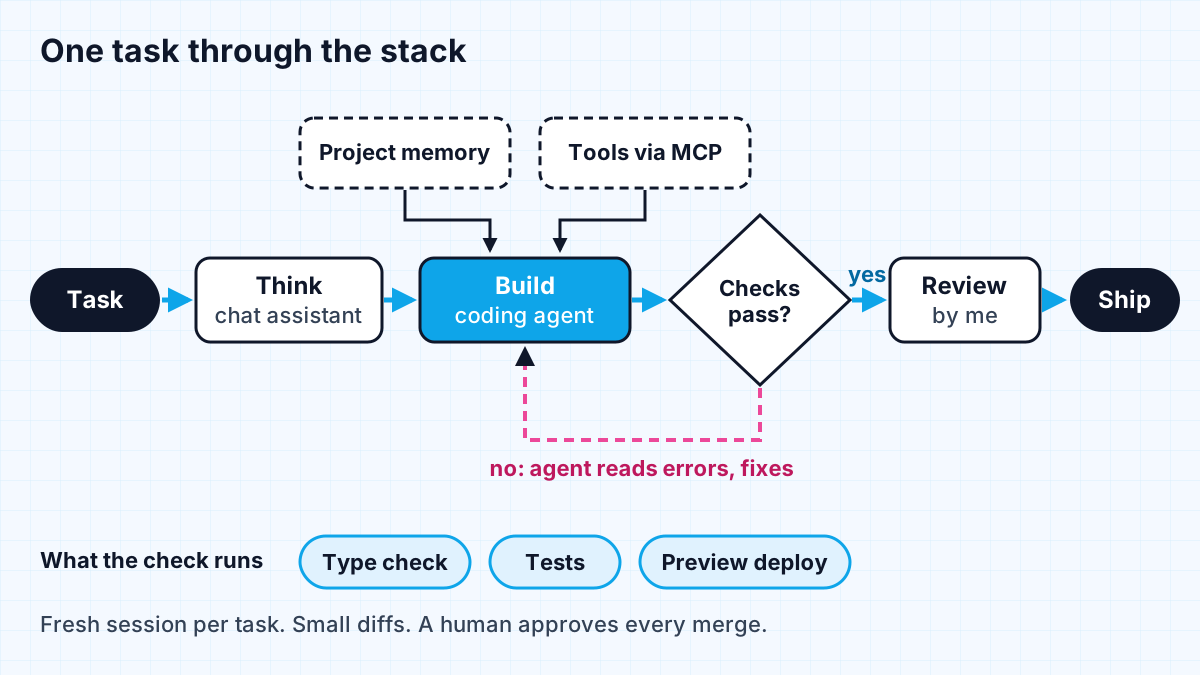
It is five layers, and each one exists to remove a specific kind of friction rather than to add another tab. The diagram shows how they fit together: a task comes in, I think it through, an agent does the bulk of the work with the right context, checks decide whether it is done, and I review before anything ships.
| Layer | What I use | What it is for |
|---|---|---|
| Thinking partner | Claude in a chat window | Clarifying a problem, comparing approaches, drafting specs and client notes |
| Coding agent | Claude Code in the terminal | Multi-file changes, running commands and tests, refactors, reviews |
| Project memory | A short CLAUDE.md per repository, plus skills | Telling the agent what it cannot see from the code |
| Tool connections | MCP servers | Giving the agent real data, such as a design system, instead of guesses |
| Fast checks | TypeScript, tests, Vercel preview deployments | Deciding whether a change is actually done |
I am not unusual in leaning on a coding agent. In Stack Overflow's 2026 Developer Survey, 66% of respondents use coding assistants or agents, 73% of those daily, and Claude Code (66%) and GitHub Copilot (59%) were the most used coding agents.
The thinking layer: a chat assistant before any code
I open a chat before I open an editor, because most wasted effort starts with an unclear task. I use the chat assistant to restate what a client asked for, list the questions I still need answered, sketch two or three approaches with their trade-offs, and draft the short spec I will hand to the coding agent.
This is also where I do quick research: reading an API's documentation through the assistant, or checking how a library handles an edge case. I treat those answers as leads, not facts, and follow the link to the source before I rely on it. That is a habit worth keeping even as models get better; the same survey found that 48% of developers trust AI when they can easily validate the answer, which is the right instinct.
The building layer: a coding agent with context and a check
The coding agent does the bulk of the typing, but its output depends almost entirely on two things: what it knows about the project and whether it can check its own work. Most of my projects are TypeScript and Next.js deployed on Vercel, which helps on both counts: the type checker and build give fast, unambiguous feedback.
Anthropic's own Claude Code best practices put the second point plainly: "Give Claude something it can run that comes back pass or fail." With a check in place, the agent makes a change, runs it, reads the failure and fixes it without me watching each step. The same page says that if a repository already has a check, "the single most useful line in your CLAUDE.md is the command that runs it."
My working loop with the agent looks like this:
- describe the task with the spec from the thinking step, including what "done" means,
- let the agent explore the relevant code before it edits,
- keep each task small enough that the diff is easy to review,
- run the checks, and let the agent loop until they pass,
- start a fresh session between unrelated tasks, which the docs note costs nothing and stops the next task paying for the last one's history.
The memory layer: tell the agent what it cannot see
A short project memory file is the cheapest productivity gain in the stack. Claude Code loads CLAUDE.md into every session, so, as the best practices page warns, every line costs a little attention on every task. Mine hold only what the agent cannot work out from the code: the commands to test and build, conventions that are not obvious, and the rules a client cares about.
Longer procedures go into skills, which the agent reads only when a task needs them, and hard rules with no exceptions go into hooks that the tool enforces rather than instructions it might forget. Anthropic's engineering team describes the general principle as finding the smallest possible set of high-signal tokens that maximise the chance of the outcome you want. More context is not better context.
The tool layer: connect agents to real systems
Connections through the Model Context Protocol let the agent read from real systems instead of guessing. The clearest example from my own work is the design system MCP server: coding agents connect to it and build UI with a team's real components and tokens, rather than inventing spacing and colours that someone has to clean up later.
I keep the list of connections short and read-only where possible. Each one adds tools the agent has to consider, and anything that can write to a live system needs an approval step. If you want to build your own, my guide to building an AI agent with MCP and Claude walks through it.
The checking layer: types, tests and previews
The checks are what turn "almost right" into "done". I lean on three:
- Types. TypeScript catches a large class of agent mistakes before anything runs.
- Tests. Even a small suite gives the agent a target and me a safety net.
- Preview deployments. Vercel creates a preview deployment with its own URL for each push to a non-production branch or pull request, so I can click through a change, and share it with a client, before it is merged.
Then I read the diff. A coding agent can write a lot of plausible code quickly, and plausible is not the same as correct. I look hardest at anything touching authentication, payments, data deletion or production configuration.
Habits I avoid because they waste time
Some habits feel productive and are not. These are the ones I steer clear of:
- Trusting the feeling of speed. METR's early-2025 study found experienced developers took 19% longer with AI while believing it had sped them up by 20%. Their 2026 follow-up with newer tools estimated a speedup instead, with wide uncertainty. I judge my process by what ships and holds up, not by how fast it felt.
- Huge tasks in one prompt. Large diffs are slow to review and hide mistakes. Small tasks are faster overall.
- Endless sessions. Long, mixed conversations collect stale context. A fresh session per task gives cleaner results.
- A bloated memory file. Every rule I add is read on every task. If a line rarely matters, it goes into a skill or gets deleted.
- Tool collecting. Trying every new assistant costs more than it saves. I re-evaluate occasionally, on real tasks, and otherwise keep the stack stable.
For a wider view of how teams are using these tools, see AI coding agents in 2027.
Work with me
I build AI and full-stack products with this workflow, and I help teams set up the context, checks and tool connections that make coding agents useful. See full-stack development and AI agent development, or look through my work and book a scoping call.
Frequently asked
What are the best AI productivity tools for developers?
The categories matter more than the brands: a chat assistant for thinking, a coding agent that can work across your repository, a short project memory file, tool connections such as MCP servers, and fast checks like types, tests and preview deployments. I use Claude and Claude Code; Stack Overflow's 2026 survey found Claude Code and GitHub Copilot were the most used coding agents.
Do AI tools actually make developers more productive?
Most developers report that they do, but controlled studies are more cautious. METR measured a slowdown in early 2025 and a probable but uncertain speedup with late-2025 tools. The gains depend on context, tests and review, so measure outcomes rather than relying on how fast the work feels.
What should go in a CLAUDE.md file?
Only what the agent cannot work out from the code: the commands that build and test the project, non-obvious conventions and project-specific rules. Claude Code loads the file into every session, so keep it short and move long procedures into skills and strict rules into hooks.
How do you stop AI-generated code from being almost right?
Give the agent a check that returns pass or fail, such as a type check or test suite, and let it loop until the check passes. Keep tasks small so diffs are easy to review, and read every diff before merging, especially anything touching security, payments or data.
Sources
Related services
Building something like this?
Naman Gundaniya takes on full-stack and AI projects fixed quote after a free 30-minute scoping call, replies within 24 hours.
Get in touch