 By Naman Gundaniya
The 1% Habit: Build Small Tools for Yourself With AI
Building small tools for yourself means using AI to write tiny, single-purpose programs for problems only you have: a converter, a checker, a formatter, a one-page dashboard. They take an hour, not a sprint, because AI writes most of the code. The skill is spotting which annoyances deserve a tool and keeping each tool small enough to finish.
In what the top 1% of AI users do differently I described turning repeated prompts into reusable tools. This post goes one step further. A saved prompt still needs you in a chat window. A small tool is a piece of software that does the job on its own, with buttons, inputs and outputs, built for an audience of one.
Why build tools for yourself when you can just ask AI each time?
Because a tool removes the step of explaining the problem every time, and it behaves the same way on every run. Asking a chatbot to reformat a file is fine once. Asking it every week, pasting the same instructions and checking the output by eye, is a chore that a fifty-line page could do in a click.
The idea is not new. Robin Sloan's essay an app can be a home-cooked meal describes a messaging app he built for his family, with a back end of one storage bucket and a couple of functions, and no plan for anyone else to use it. His line that "when you liberate programming from the requirement to be professional and scalable, it becomes a different activity altogether" is the best description of personal tools I know.
What has changed is the cost. Simon Willison wrote in December 2025 that he had built over 150 HTML tools in two years, almost all of them written by LLMs. Anthropic's write-up on how its own teams use Claude Code describes the legal team building prototype "phone tree" systems to help colleagues reach the right lawyer, as an example of departments building custom tools "without traditional development resources." When the person with the problem can build the fix, a lot of small problems stop being worth tolerating.
How do you spot a problem worth building a tool for?
Look for small, repeated friction that you currently handle by hand. The best candidates share a few signals:
- You do it at least weekly. Frequency is what turns minutes into a real cost.
- You copy and paste between two places. Moving data from one format or app to another is the classic tool job.
- You check something by eye. Scanning a list for duplicates, a log for errors or a page for broken links is work a script does better.
- You keep a note of the steps. If you have written instructions for yourself, those instructions are already a spec.
- The input and output are clear. "Paste this, get that" tools are easy to build and easy to trust.
There is an old way to sanity-check the trade-off. The xkcd comic Is It Worth the Time? charts how long you can spend making a routine task more efficient before you are spending more time than you save, across five years, based on how often you do it and how much time you shave off. My view is that AI moves you to a different part of that chart: when a first version takes an hour instead of a weekend, far more small tasks clear the bar.
Here are the kinds of tools that fit, as examples rather than a list of mine:
| Friction | Tool | Shape |
|---|---|---|
| Reformatting an export before pasting it into a report | CSV to Markdown table converter | Single HTML page |
| Checking a sitemap for broken links | Link checker that lists failures | Small script |
| Writing the same status update every Friday | Form that turns three fields into a formatted update | Single HTML page |
| Comparing two versions of a config or contract | Side-by-side diff viewer for pasted text | Single HTML page |
| Renaming a folder of files to a convention | Batch renamer with a preview step | Small script |
| Watching a value on a public API | Page that fetches and charts it on load | Single HTML page |
What shape should a personal tool take?
The smallest shape that works, which usually means one file. Willison's patterns for these tools are a good default: put the HTML, JavaScript and CSS in a single file, skip React and any build step, load well-known libraries from a CDN with a pinned version, and keep each tool to a few hundred lines so an LLM can read, fix or rewrite it in one go.
A few of his other patterns are worth copying because they make small tools pleasant to use:
- Paste in, copy out. Accept pasted text and offer a "copy to clipboard" button. It works on any device and needs no file handling.
- Keep state in the URL. A tool whose settings live in the URL can be bookmarked and shared.
- Process files in the browser. A file input lets the page read a local file without uploading it anywhere, which matters for anything private.
- Host it somewhere boring. A single file with no build step runs from your laptop, a static host or GitHub Pages, and keeps working when a chat platform's sandbox does not.
When the job touches your file system or runs on a schedule, a short script is the better shape. When it needs other people, it is no longer a personal tool, and it needs the testing, security and ownership of real software.
How do you build your first tool in an hour?
Timebox it, keep it to one file, and test it on real data before you call it done. The hour is a budget, not a promise: if the tool is not useful by the end of it, the problem was bigger than it looked, and that is worth knowing too.
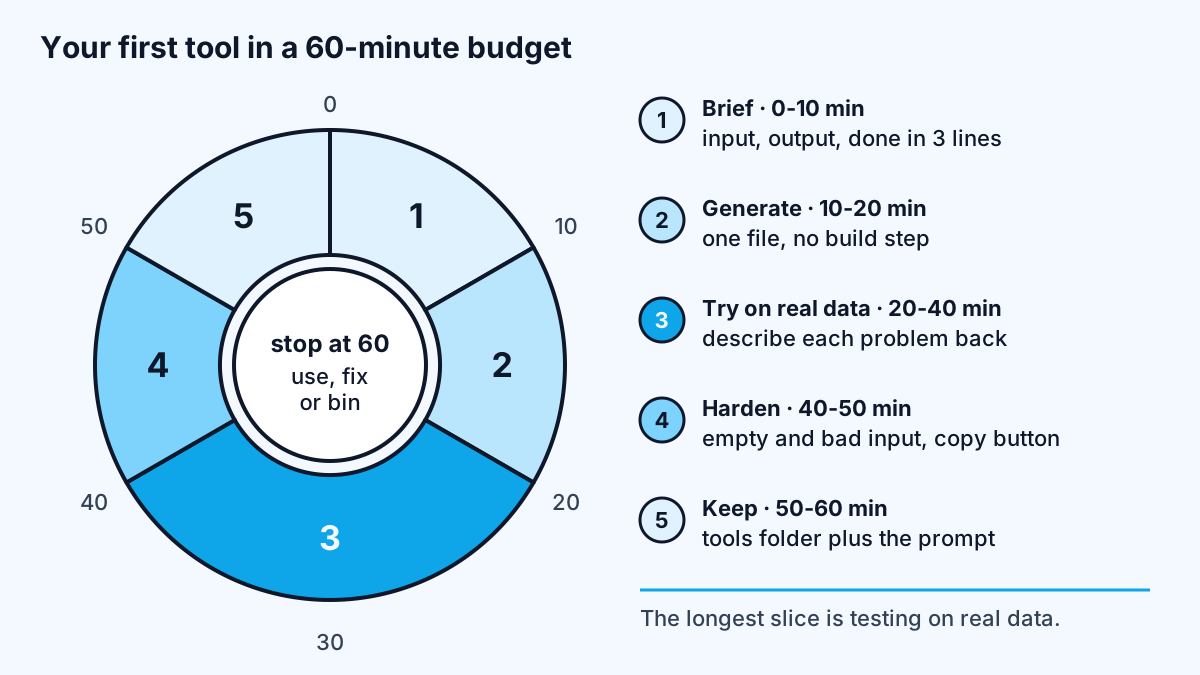
- Brief (10 minutes). Write three lines: what goes in, what comes out, and how you will know it worked. Use a real example of the input. This is the same discipline as a full spec, shrunk to fit; if you want the longer version, delegating to AI covers how to write a handoff the model cannot misread.
- Generate (10 minutes). Ask for a single self-contained HTML file, or a single script, with no framework and no build step. Paste in your example input so the model sees the real shape of the data.
- Try it on real data (20 minutes). Open it, use it on the actual thing you wanted to fix, and describe each problem back in plain words. Expect two or three rounds.
- Harden (10 minutes). Ask it to handle empty input, malformed input and very large input, and to show a clear message instead of failing silently.
- Keep it (10 minutes). Save the file in one folder where all your tools live, with the prompt that produced it. Willison recommends recording prompts and transcripts; next time, an earlier tool is the best example to hand the model.
Then stop and decide whether you will use it. A tool you do not open next week was a useful experiment, not a failure.
What should you watch out for with personal tools?
Mostly the same risks as any software, at a smaller scale. Small tools are easy to build carelessly, and a few habits keep them safe:
- Never hardcode API keys. If a tool calls a model or a paid API, keep the key out of the file. Willison keeps keys in the browser's local storage rather than in visible HTML; for anything shared, the key belongs on a server, as I explained in protecting API keys in AI web apps.
- Keep private data local. Prefer tools that process files in the browser or on your machine over tools that send data to a third-party service you have not checked.
- Judge the output like any AI output. A tool that produces a plausible wrong answer is worse than no tool, because you stop checking. Test it on an input where you know the right answer. I wrote about why that kind of judgment is the real AI skills gap.
- Retire tools you stop using. A folder of forty half-working tools is clutter. Delete the ones you have not opened in months.
The best sign a personal tool has outgrown itself is when someone else asks for it. At that point it needs proper hosting, authentication, error handling and an owner, which is ordinary product work rather than an hour's experiment.
Work with me
When a personal tool grows into something a whole team needs, I help turn it into dependable software or a proper automation. See workflow automation and full-stack development, or browse my work and book a scoping call.
Frequently asked
Can I build my own tools with AI if I cannot code?
Yes, for small single-purpose tools. Anthropic reports that its own legal team built prototype phone tree systems with Claude Code without traditional development resources. Start with a single HTML page that takes pasted input and shows an output, test it on real data, and keep it for your own use until someone who can review code has looked at it.
What is the easiest kind of personal tool to build with AI?
A single-file HTML page that takes pasted text or a local file and produces a formatted result is the easiest. It needs no installation, runs in any browser, and is small enough for an AI model to write and fix in one go. Converters, formatters, checkers and simple calculators all fit this shape.
Where should I keep the tools I build?
Keep them in one folder or one repository, with the prompt that produced each one. Single files with no build step can run from your computer or be published on a static host such as GitHub Pages. One location makes tools easy to find, reuse as examples and delete when you stop using them.
Is it safe to use AI-built tools at work?
It is safe for personal tools that handle non-sensitive data locally and keep API keys out of the code. Anything that touches customer data, credentials or shared systems should be reviewed like any other software, and should follow your company's policies on AI and data before other people rely on it.
Sources
Related services
Building something like this?
Naman Gundaniya takes on full-stack and AI projects fixed quote after a free 30-minute scoping call, replies within 24 hours.
Get in touch