 By Naman Gundaniya
How to Write an AI Policy Your Team Will Follow
An AI policy your team will follow fits on one page and answers five questions: which tools are approved, what data may go into them, what must never go in a prompt, who reviews AI output before it leaves the company, and who to ask. Short rules with a reason attached get followed; long legal documents get ignored.
Most small companies do not need a twenty-page AI governance framework. They need a page that people read once, remember, and can check in ten seconds when they are unsure. Below is the template I give clients, then the reasoning behind each rule, so you can adapt it rather than copy it blindly.
Why does a small company need an AI policy now?
Your staff are almost certainly using AI already, with or without permission. Microsoft and LinkedIn's 2024 Work Trend Index found that 75% of knowledge workers use AI at work and 78% of those users bring their own AI tools, rising to 80% at small and medium-sized companies. The same report found 52% of AI users are reluctant to admit using it for their most important tasks.
That combination is the real risk. Nobody is doing anything malicious; they are pasting a client email into a personal chat account to get a better reply. The policy's job is to make the safe way the easy way, and to make it normal to say "I used AI for this".
A ban does not solve it. Banning AI pushes use into personal accounts you cannot see. Approving a tool and setting a few rules brings it into the open.
The one-page AI policy template
Copy the sections below into a document, replace the bracketed parts, and keep it to one page. The five sections map to the five questions in the opening answer.
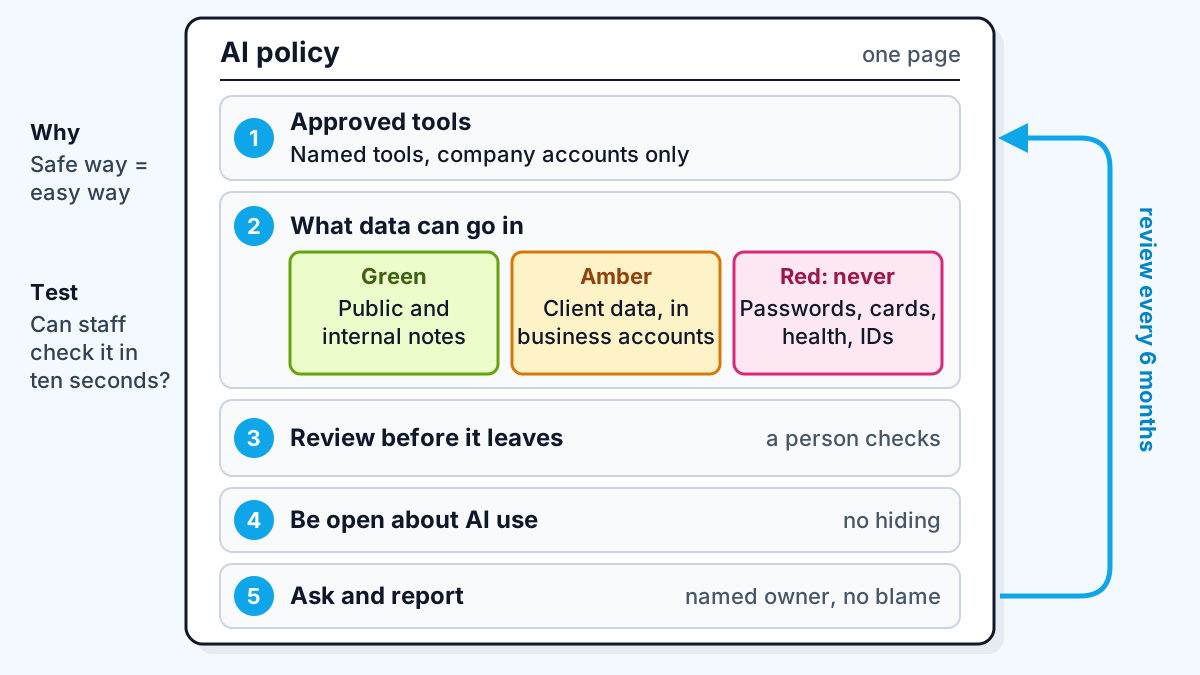
1. Approved tools
- You may use [Tool A] and [Tool B] through the company accounts we provide. Log in with your work email.
- Do not use personal AI accounts for company work.
- Want a new tool? Ask [owner]. We aim to answer within [one week].
2. What data can go in
- Green, any approved tool: public information, your own drafts, general questions, internal notes with no client or personal data.
- Amber, approved business accounts only: client documents, internal financials, unreleased product plans, code from our repositories.
- Red, never: passwords, API keys and access tokens; payment card or bank details; health information; passport, ID or national insurance numbers; anything a client contract says we must not share with third parties.
3. Review before it leaves
- A person reads and checks any AI output before it goes to a client, is published, or is used to make a decision about a person.
- You are responsible for work you send, however it was produced.
- Check facts, figures, names and links. AI tools can state wrong things confidently.
4. Be open about it
- Say when AI did substantial work on something you share internally. Nobody gets in trouble for using approved tools well.
- Follow client rules on AI use where a contract sets them.
5. Ask and report
- Questions go to [owner].
- If you put red data into a tool by mistake, tell [owner] the same day. We will not treat honest mistakes as disciplinary matters.
- This policy is reviewed every six months. Last reviewed: [date].
Why each rule is written that way
Each rule exists because of a specific failure, and telling people the reason is what makes them follow it.
Approved tools, through company accounts. The difference between personal and business accounts is not cosmetic. Anthropic, for example, states that by default it will not use inputs or outputs from its commercial products to train models, while for consumer Free, Pro and Max plans, users choose whether their chats are used to improve Claude, and data is kept for five years if they opt in. Other vendors have their own terms; check them for each tool you approve. The point for the policy is simple: company accounts give you settings and contracts you control.
A traffic light instead of a list of laws. Staff will not remember which data protection article applies; that detail belongs in how your systems are built, as in GDPR-safe LLM integration. They will remember red, amber and green. Put examples from your own business in each colour; the generic list above is a starting point.
Secrets in the red band. API keys pasted into prompts, chat logs and code are a common leak. If your team builds software, my guide to protecting API keys in AI web apps covers the technical side.
Human review before anything leaves. AI output that is almost right is the expensive kind, because it looks finished. A named person checking it is the cheapest control you have.
No-blame reporting. If people fear punishment, they hide mistakes, and you find out about a leak from a client instead of from your team.
How do you get people to actually follow it?
People follow a policy they helped shape, can find in ten seconds, and see their manager following. A few habits help:
- Launch it in a meeting, not an email. Fifteen minutes, with two or three real examples from your business in each traffic-light colour.
- Pin it where work happens. The top of the team chat channel and the first page of your wiki.
- Give the approved tool first. A policy that says "use the company account" before the company account exists will be ignored.
- Name one owner. Questions with no owner become guesses.
- Review it on a date. Tools and terms change. Put the next review in the calendar.
If you are writing a policy as part of a wider plan, the one-page AI strategy for a small business has a "risks and rules" box this policy slots into.
When does a one-page policy stop being enough?
A one-page policy is enough while AI is used as a personal assistant. It stops being enough when AI starts acting on behalf of the company: chatbots answering customers, agents changing records, or automated decisions about people. At that point you need per-system documentation, testing and monitoring as well.
Frameworks help here. The NIST AI Risk Management Framework, released in January 2023, is intended for voluntary use and organises the work into four functions: govern, map, measure and manage. NIST added a Generative AI Profile, NIST AI 600-1, in July 2024. If you sell into the EU, check where your systems fall under the EU AI Act.
Work with me
I help small teams set up approved AI tools, connect them to real business data and write the rules around them. See AI integration and workflow automation, browse my work, and book a call if you want help putting this into practice.
Frequently asked
What should an AI usage policy include?
An AI usage policy should include the approved tools and account types, a clear rule on what data may go into them, a list of data that must never go in a prompt, a requirement that a person reviews AI output before it leaves the company, and a named owner for questions and incidents. Keep it to one page so people read it.
Should a small business ban ChatGPT and other AI tools?
Banning AI tools usually pushes use into personal accounts the business cannot see. Approving one or two tools through business accounts, with simple data rules, is safer and easier to enforce. Most staff will follow a reasonable rule when the approved option is easy to use.
How often should an AI policy be updated?
Review an AI policy at least every six months, and sooner when you add a tool or a vendor changes its data terms. Put the last review date on the page so staff know it is current.
Who should own the AI policy in a small company?
One named person should own it, usually the founder, operations lead or whoever manages IT. They approve new tools, answer questions and handle reports of mistakes. Shared ownership tends to mean nobody answers.
Sources
Related services
Building something like this?
Naman Gundaniya takes on full-stack and AI projects fixed quote after a free 30-minute scoping call, replies within 24 hours.
Get in touch