 By Naman Gundaniya
AI Strategy for Small Businesses: A One-Page Plan
A small business AI strategy fits on one page: one business goal, one or two first use cases tied to that goal, the data they need, a capped budget, the risks and who checks the output, and three numbers you will measure after 90 days. Write it before you buy tools, review it at day 90, and only then add the next use case.

Most AI strategy documents are written for large companies with data teams and transformation budgets. A business with five or fifty people needs something different: a plan short enough that the owner actually reads it, specific enough to act on on Monday, and honest about what will be measured.
Below is the template I use with small business clients, section by section, followed by a filled-in example for a made-up business so you can see how it reads.
Why does a small business need an AI strategy at all?
A small business needs a short AI strategy because without one, AI use becomes a scatter of personal subscriptions and half-finished experiments that nobody measures. A plan focuses limited time and money on one problem worth solving.
You are not late. The US Census Bureau's business survey put the national share of firms using AI at 19.8% as of May 2026, with use among firms of four or fewer employees under 20% and not rising significantly, compared with 32% of firms with 100 to 249 staff. Individual use runs ahead of company plans: a Federal Reserve note estimates that about 41% of workers use generative AI for work. In many small businesses, staff already use AI on their own. A strategy turns that into something the business controls.
The one-page AI plan template
The template has six boxes. Each one has a single question to answer, and none should take more than a few lines.
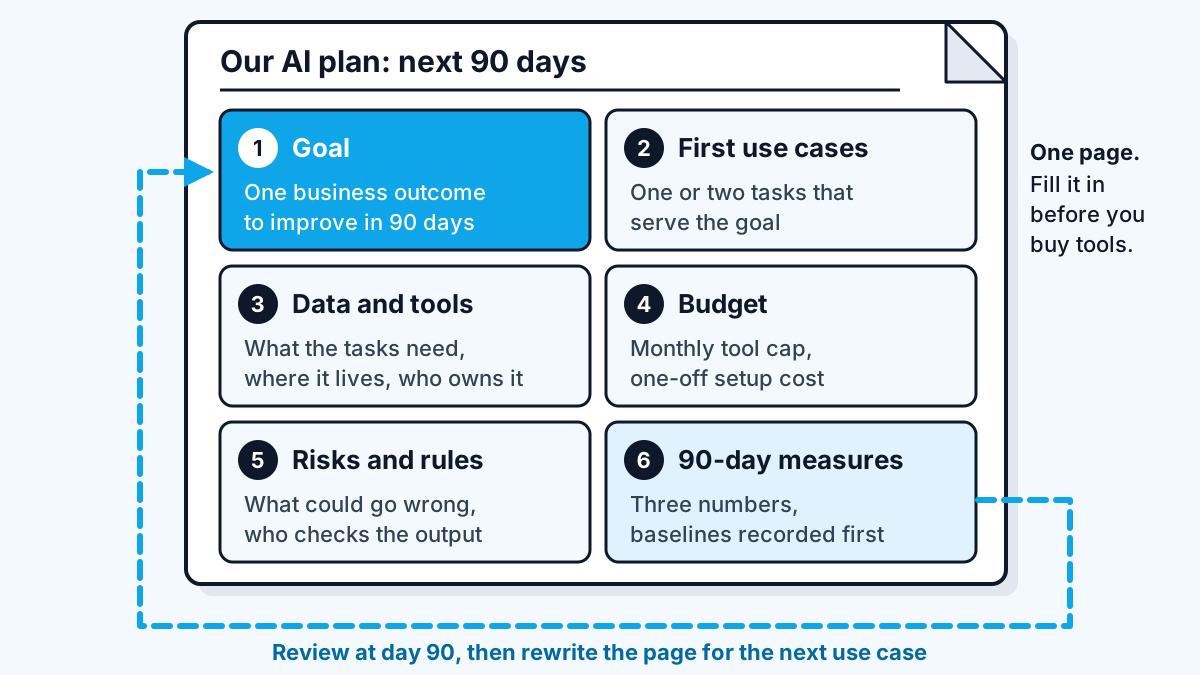
| Box | Question to answer | Keep it to |
|---|---|---|
| 1. Goal | What business outcome should improve in 90 days? | One sentence |
| 2. First use cases | Which one or two tasks, if AI helped, would move that goal? | Two lines each |
| 3. Data and tools | What information do those tasks need, and where does it live? | A short list |
| 4. Budget | What is the monthly cap for tools, and any one-off build cost? | Two numbers |
| 5. Risks and rules | What could go wrong, and who checks output before it reaches a customer? | Three bullets |
| 6. 90-day measures | Which three numbers will tell you whether it worked? | Three numbers with a baseline |
How to fill in each box
Goal. Start from a business problem, not from AI. "Reply to new enquiries faster", "cut the time spent on monthly invoicing", "stop losing quotes in the inbox". If you cannot name the problem, AI is not the next step; a conversation with your team about where time goes is.
First use cases. Pick tasks that happen often, follow a pattern, and where a person can check the result easily. Drafting replies, summarising calls, pulling details from documents and sorting incoming requests are common first wins. Leave anything that moves money or makes promises to customers on its own for later. My guide to AI automation for small business goes deeper on choosing.
Data and tools. List what each use case needs to read: past emails, a price list, a help document, a spreadsheet. Note where each lives and who owns the account; who owns your automations explains why that matters. Sorting this out early saves the most time later.
Budget. Set two numbers: a monthly cap for subscriptions and usage, and any one-off cost for setup or a build. For scale, as of late 2026 Anthropic listed its Claude Team plan at $25 per standard seat per month on monthly billing, with a two-seat minimum. A tool budget for a small team can be modest; the larger cost is usually setup time, whether yours or a consultant's.
Risks and rules. Write down what could go wrong and the rule that prevents it. Typical rules: a person reviews anything sent to a customer, no personal or financial data pasted into personal AI accounts, and business accounts owned by the business rather than by one employee.
90-day measures. Pick three numbers and record today's value before you start: hours spent on the task per week, response time, error rate, or enquiries converted. Without a baseline, day 90 becomes a matter of opinion. My post on AI automation ROI explains how to turn those numbers into a payback figure.
A worked example (a made-up business)
Here is the template filled in for a hypothetical eight-person bookkeeping practice. It is an illustration, not a client, and the numbers are placeholders to show the format.
| Box | Example entry |
|---|---|
| Goal | Reply to new client enquiries within one working day instead of three |
| First use cases | 1. Draft replies to enquiries from the website form using our service list and FAQ. 2. Summarise each discovery call into a short note for the client file. |
| Data and tools | Service list and FAQ (shared drive), past enquiry replies (inbox), call recordings (video tool). All accounts owned by the practice. |
| Budget | Monthly cap for AI tools set by the owner; one-off setup budget agreed before work starts |
| Risks and rules | A person edits and sends every reply. No client financial data in prompts. Business accounts only, no personal ones. |
| 90-day measures | Average reply time (baseline: three days), weekly hours on enquiries (baseline measured in week 1), enquiry-to-client conversion rate |
Notice how little technology appears on the page. The plan is about a business outcome, two tasks and how success will be judged. The tools follow from that, not the other way round.
What happens at day 90?
At day 90 you compare the three measures with their baselines and make one of three decisions: keep and extend, fix and retest, or stop. Then you rewrite the page with the next goal and use case, reusing whatever accounts, data clean-up and rules you already set up.
Three things are worth knowing before you get there:
- The second use case is cheaper than the first, because the accounts, data and rules already exist.
- Box 3 is where plans usually stall, because data turns out to be scattered or locked in one person's account. Fix that first.
- Unmeasured wins get abandoned. If nobody recorded the baseline, the tool gets cancelled at the next budget review, even when it helped.
If you want help with the first page, a short paid discovery is usually enough. I describe what one should produce in what an AI consultant delivers in 30 days, and typical prices are in how much an AI consultant costs.
Work with me
I help small businesses turn a one-page plan into working automations and AI features their team actually uses. See workflow automation and AI integration, browse my work, and book a call to work through your first page together.
Frequently asked
How do I create an AI strategy for my small business?
Answer six questions on one page: the business goal for the next 90 days, one or two tasks AI could help with, the data those tasks need, a monthly budget cap, the risks and who checks output, and three numbers you will measure. Record baselines before you start and review at day 90.
What is the best first AI use case for a small business?
The best first use case is a frequent, repetitive task where a person can easily check the result, such as drafting replies, summarising calls or extracting details from documents. Avoid anything that sends, pays or promises without review until you have evidence the tool behaves.
How much should a small business budget for AI?
Set two figures: a monthly cap for subscriptions and usage, and any one-off setup cost. As of late 2026, team plans for general AI assistants such as Claude Team were priced in the tens of dollars per seat per month, so the larger cost is usually setup time or outside help.
Do I need an AI consultant to write an AI strategy?
No. Most owners can fill in a one-page plan in an afternoon. A consultant helps when you cannot pick a first use case, your data is scattered across systems, or you need someone to build and connect the tools once the plan is written.
How do I measure whether AI is working in my business?
Pick three numbers tied to your goal, such as hours spent on a task, response time or error rate, and record their values before you start. Compare them at day 90 and decide whether to extend, fix or stop.
Sources
Related services
Building something like this?
Naman Gundaniya takes on full-stack and AI projects fixed quote after a free 30-minute scoping call, replies within 24 hours.
Get in touch