 By Naman Gundaniya
Context Engineering for Client Codebases You Don't Know
Context engineering in an unfamiliar codebase means choosing what the AI agent sees for each task: let it map the code itself, write down only what the code cannot tell it, retrieve files just in time instead of up front, and scope every task small enough that the relevant context fits. The model already reads code well; your job is supplying what is missing.
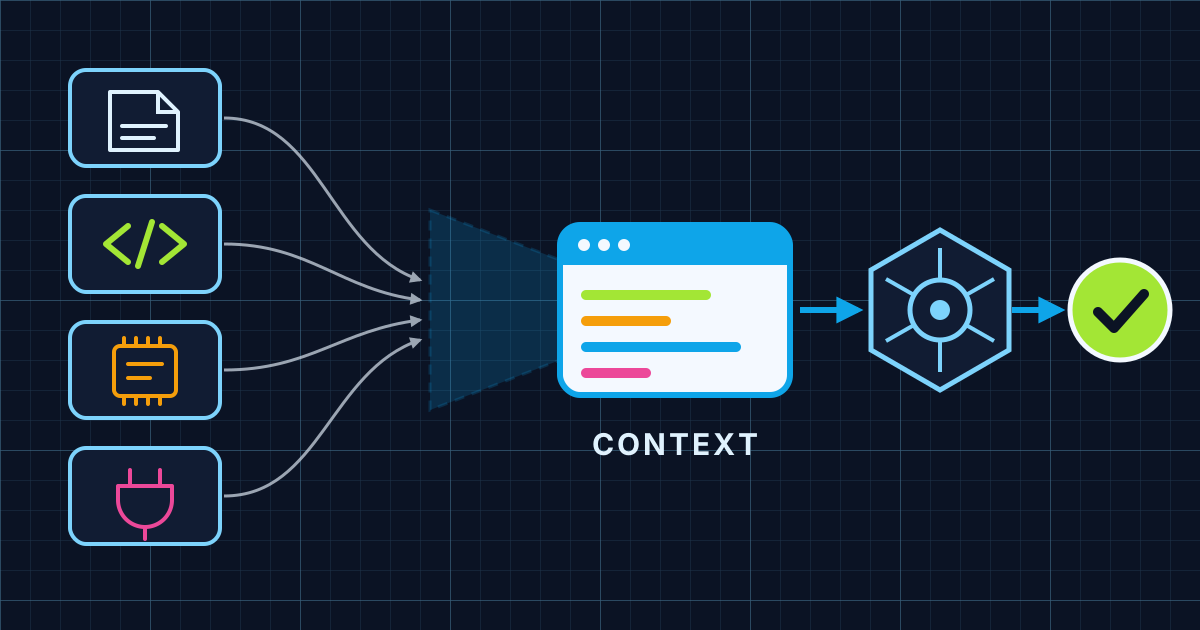
As a Forward Deployed Engineer I usually start in someone else's repository: a client's product, built by a team I have not met, with decisions nobody wrote down. Coding agents can make that faster, though the research on how much is more mixed than the marketing, and only if they see the right things. Give them too little and they guess. Give them everything and they drown. This post is the method I use on day one of a new codebase.
What is context engineering, and why does it matter more in a new codebase?
Context engineering is the work of deciding which information sits in the model's window when it acts. Anthropic defines it as the set of strategies for curating and maintaining the optimal set of tokens during inference, and gives a useful warning: as the number of tokens grows, recall accuracy falls. Models have an "attention budget", and every token spends some of it.
In your own codebase, your head fills the gaps. You know which directory is dead, which helper the team prefers, and which test is flaky. In a client's codebase, you and the agent are both new. The agent can read code faster than you, but neither of you can read a meeting that happened two years ago. That gap is where context engineering earns its keep.
Step 1: let the agent map the codebase before it edits anything
The first session in a new repository should be read-only. I ask the agent to explore and explain: the main entry points, how a request flows from the UI to the database, where tests live and how to run them, and anything that looks inconsistent. Claude Code's best practices note that current models find "your file layout, your conventions, your test framework, and how existing components are built, usually faster than you could explain them."
Two habits make this mapping cheaper and more useful:
- Run broad exploration in a subagent. The docs say broad codebase searches go to a built-in Explore agent, which keeps long search output out of the main conversation. Anthropic's article describes the same pattern: sub-agents explore in clean windows and return a condensed summary, often 1,000 to 2,000 tokens.
- Ask for a written map, then check it. I have the agent write a short summary of the architecture and the commands it found, then I run the commands myself. A map that says "tests run with npm test" is worthless until someone has seen them pass.
For a large repository, a code intelligence plugin helps further. Anthropic's guide to large codebases explains that connecting the agent to a language server lets it jump to definitions and references instead of scanning many files to find them.
Step 2: write down only what the code cannot tell the agent
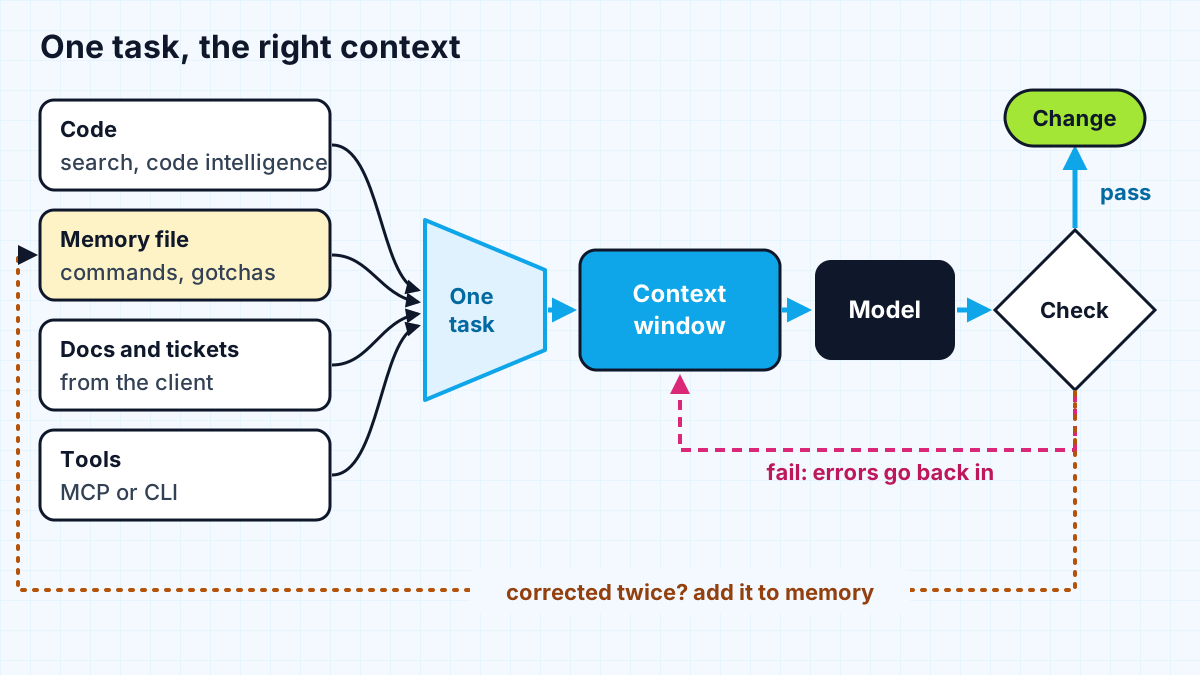
Once the agent has its own map, the memory file holds the rest. The test from the best practices page is the one I use: could the agent find this by reading the code, and would it actually go and look? If both answers are yes, leave it out.
In a client codebase the useful lines usually come from people, not files. I collect them in the first calls with the client's team, the discovery week of a typical FDE pilot:
| Context type | Example | Where it goes |
|---|---|---|
| How to confirm work | Exact test, typecheck and lint commands | Memory file, near the top |
| Misleading code | "The legacy folder is still live, don't copy its patterns" | Memory file |
| Decisions not in the repo | Which error helper the team settled on | Memory file |
| Area-specific conventions | Rules for the API package only | Per-directory file or path-scoped rule |
| Long procedures | Release steps, data migration runbook | A skill, loaded on demand |
| Rules with no exceptions | Never read secrets, never edit generated code | Deny rules or hooks, not prose |
The last row matters on client work. A rule the client cannot afford to have broken belongs in configuration the tool enforces, not a sentence the model might weigh against other instructions. The docs are direct about it: CLAUDE.md "is for guidelines, and Claude is allowed to decide a guideline doesn't apply."
Keep the file short. Claude Code loads it into every session, and the memory documentation recommends staying under 200 lines, because "longer files consume more context and reduce adherence." If the client already has an AGENTS.md file for other tools, Claude Code can read that instead, so I do not create a second source of truth.
Step 3: retrieve just in time instead of loading everything
Pasting a whole codebase into the window feels thorough and works badly. Anthropic describes the alternative as just-in-time retrieval: the agent keeps lightweight identifiers such as file paths, queries and links, and loads the actual content when it needs it. Claude Code works this way, with project memory loaded up front and search tools like glob and grep pulling files in as the task requires.
My part is to make retrieval easy rather than to do it by hand:
- name the files or directories a task touches when I know them, and let the agent find the rest,
- block generated code, build output and vendored libraries with deny rules so searches do not waste reads on them,
- connect the systems the agent cannot see, such as the issue tracker or a design system, through a CLI or MCP server, keeping each connection read-only where possible.
On the design system MCP server project, that last point was the whole idea: coding agents query the team's real components and tokens instead of inventing them. If you want to build a connection like that yourself, see how to build an AI agent with MCP and Claude.
Step 4: scope each task so the context fits
The best context strategy is a smaller task. A single change with a clear "done" needs a few files, one memory file and a check. A vague request across the whole product needs everything, and the model will attend to it unevenly.
For anything larger than a small fix, I plan first. The large codebases guide recommends plan mode for cross-package changes, and notes that Claude Code re-injects the plan file after the conversation is compacted, so the plan survives where chat history may not. I also clear the session between unrelated tasks, which the docs describe as costing nothing while stopping the next task paying for the last one's history.
Then I give the agent a way to check its work. Context gets the change started; a passing type check or test tells everyone it is finished. That habit gets its own post later in this series.
Step 5: feed what you learn back into memory
Every correction in a new codebase is context that was missing. When I have to tell the agent the same thing twice, it goes into the memory file, the relevant rule file, or a skill. The large codebases guide suggests reviewing these files in pull requests like any other documentation, and revisiting them after major model releases, since a workaround for an older model can become overhead.
This is also part of the handover. When I leave a client project, the memory file, rules and skills stay behind, so the client's own engineers and their agents start with the context I spent weeks collecting. It is one of the more practical deliverables a Forward Deployed Engineer can leave.
Work with me
I join client codebases as a Forward Deployed Engineer and set up the context, checks and tool connections that let coding agents work well in them. See AI integration and full-stack development, or browse my work and book a scoping call.
Frequently asked
What is context engineering?
Context engineering is deciding what information an AI model sees when it acts, so that it has what it needs and little else. Anthropic describes it as curating the optimal set of tokens during inference. For coding agents it covers memory files, retrieval, tool connections and how tasks are scoped.
How is context engineering different from prompt engineering?
Prompt engineering is about wording a single instruction well, while context engineering manages everything in the model's window across a whole task. That includes project memory, retrieved files, tool results and conversation history. In agent work, the context usually matters more than the phrasing of any one prompt.
How do I get an AI coding agent up to speed on a new codebase?
Start with a read-only session where the agent explores and writes a short map of the architecture and commands, then verify those commands yourself. Add a short memory file with only what the code cannot reveal, such as decisions, gotchas and test commands. Keep tasks small and give the agent a check it can run.
Should I put the whole codebase into the AI's context window?
No, loading everything usually makes results worse because recall drops as context grows. Let the agent retrieve files just in time with search and code intelligence, block generated and vendored code, and name the relevant files when you know them.
Sources
Related services
Building something like this?
Naman Gundaniya takes on full-stack and AI projects fixed quote after a free 30-minute scoping call, replies within 24 hours.
Get in touch