 By Naman Gundaniya
How AI Agents Authenticate: OAuth, Scopes and Secrets
AI agents authenticate the way other software does: with a credential the surrounding application attaches to each request, never one the model handles. The agent either acts on behalf of a signed-in user through a delegated OAuth token, or as a service with its own identity. In both cases the token should be short-lived, limited to the scopes the task needs, and bound to one server.
Authentication is where an agent stops being a demo. The moment it reads a real inbox or writes to a real CRM, someone has to decide whose permissions it carries, where the token lives and who can see what it did. This post covers those decisions using the OAuth standards and the Model Context Protocol authorization specification (revision 2026-07-28, current as of late 2026). It is general engineering guidance, not a security audit of your system.
How does an AI agent authenticate?
An AI agent authenticates through the application that runs it: the application obtains a credential, stores it outside the model's context and attaches it when a tool makes a request. The model decides which tool to call. It should never see the token, because anything in the context window can be echoed into an answer or extracted by a prompt injection. Anthropic's guidance on mitigating prompt injections makes the same point from the other side: do not give the model access to secrets it does not need.
Three kinds of credential are in common use:
- A delegated user token. The user signs in and approves access through the OAuth authorization code flow, and the agent receives a token that represents that user's consent.
- A service identity. The agent authenticates as itself, typically with the OAuth client credentials grant, and receives a token that represents the agent, not a person.
- A static API key. A long-lived secret issued by the target system, held in the application's secret store.
Static keys are the simplest and the weakest: they rarely expire, are often broad and say nothing about who the agent was working for. Use them where nothing better exists, and treat the rest of this post as the direction to move in.
Should an agent act as the user or as a service?
An agent should act as the user when it works on one person's data at that person's request, and as a service when it runs a process that belongs to the organisation. The choice sets the ceiling on what the agent can reach and decides whose name appears in the logs.
| Acting for a user | Acting as a service | |
|---|---|---|
| OAuth mechanism | Authorization code flow with PKCE | Client credentials grant |
| Whose permissions | The user's, narrowed by scopes | The agent's own, set by an administrator |
| Consent | The user approves on a consent screen | Arranged in advance with the authorization server |
| Fits | Assistants working in a user's mail, files, calendar or CRM view | Scheduled jobs, back-office pipelines, shared inbox triage |
| Main risk | Scopes broader than the task | One identity that can see every user's data |
| When a person leaves | Their grant ends with their account | Nothing changes unless someone revokes it |
The OWASP guidance on Excessive Agency favours the first column where a user is involved: run actions in the user's context, with the minimum privileges necessary, so the agent cannot do more than the person it serves. It also says authorization should be enforced in downstream systems, not left to the model to decide.
The service column has rules of its own. The OAuth 2.1 draft says the client credentials grant must only be used by confidential clients, meaning software that can keep a secret on a server, not an app on a user's device.
There is a middle case: a backend agent that calls a second service while still working for a user. RFC 8693, OAuth 2.0 Token Exchange, defines two semantics for this. Under impersonation, the agent is indistinguishable from the user. Under delegation, the agent keeps its own identity and the token records that it is acting for the user. Delegation is the better fit for agents, because the audit trail can show both the person and the software.
What do OAuth scopes do for an agent?
OAuth scopes limit what a token can be used for, which makes them the main tool for giving an agent least privilege. RFC 9700, the IETF's best current practice for OAuth security published in January 2025, says the privileges associated with an access token should be restricted to the minimum required for the particular application or use case, and that tokens should be audience-restricted to a specific resource server.
For agents, that means asking for scopes per task, not per integration. The MCP security best practices describe the pattern: start with a minimal scope set covering low-risk read operations, then elevate through a targeted challenge when a privileged operation is first attempted. The same page lists the mistakes to avoid:
- Wildcard or omnibus scopes such as
*,allorfull-access. - Bundling unrelated privileges to avoid future consent prompts.
- Treating the scopes claimed in a token as sufficient, without server-side authorization logic.
That last point matters. A scope such as tickets:write says the agent may write tickets. It does not say which tickets. The check that this user may edit this ticket still belongs in the system that owns the data, on every request.
How does MCP authorization work?
MCP authorization works by treating the MCP server as an OAuth 2.1 resource server and the MCP client as an OAuth 2.1 client. The authorization specification applies to HTTP transports and is optional. Servers running over stdio are told to take credentials from the environment instead.
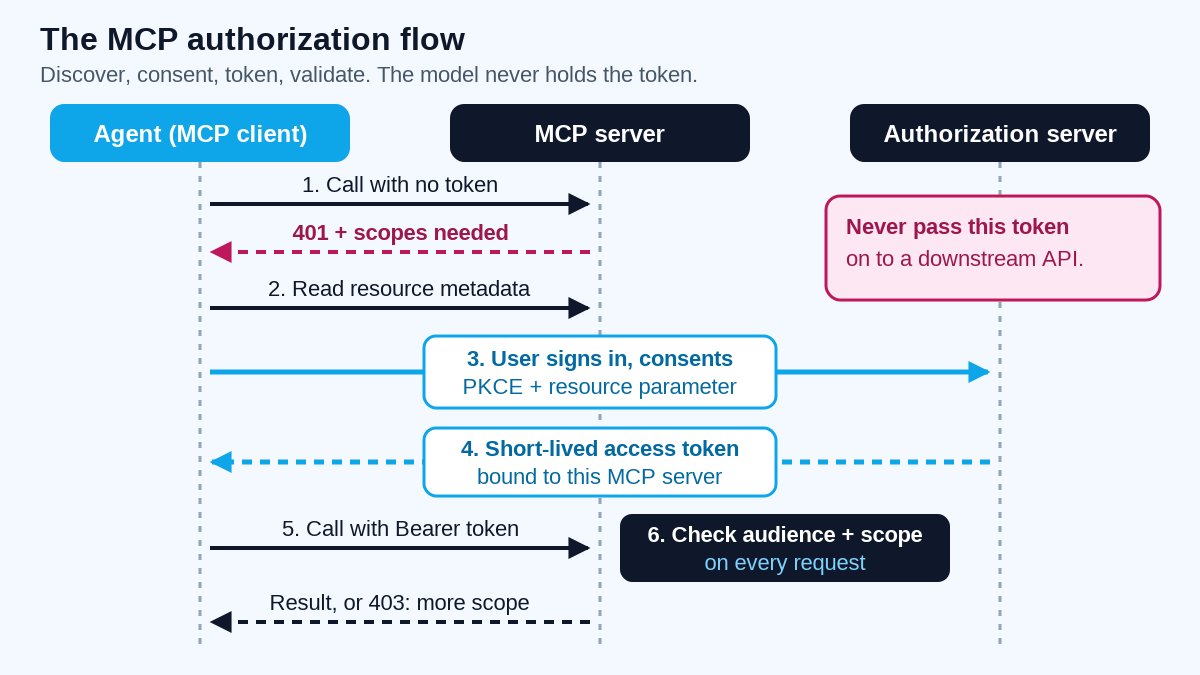
The flow, in the specification's terms:
- The client makes a request without a token. The server replies with HTTP 401 and a
WWW-Authenticateheader that should include the scopes required. - The client reads the server's OAuth 2.0 Protected Resource Metadata, which servers must implement, to find the authorization server.
- The client runs the authorization code flow. PKCE is mandatory, and the request must carry a
resourceparameter that identifies the MCP server the token is for. - The authorization server issues an access token. The specification says such servers should issue short-lived tokens.
- The client sends the token in the
Authorizationheader on every request. Tokens must not appear in the URL query string. - The server validates that the token was issued specifically for it. If the scopes are insufficient, it returns 403 with the scopes needed, and the client can run a step-up authorization.
Two rules in the specification deserve attention because they are easy to break. First, an MCP server must only accept tokens issued for itself and must not pass a client's token through to a downstream API. The best practices page calls this token passthrough and explains why it is forbidden: it bypasses controls and leaves both sides unable to tell who made a request. Second, a client must only send an MCP server tokens issued by that server's own authorization server. My post on MCP security risks covers the attacks these rules prevent.
Where should an agent's tokens and secrets live?
An agent's tokens and secrets should live in server-side storage that the application controls, outside the prompt, the conversation history and the logs. The MCP security considerations page notes that attackers who obtain tokens stored by the client, or tokens cached or logged on the server, can make requests that look legitimate, and requires clients and servers to implement secure token storage.
My working rules on client projects:
- Keep credentials out of the model's context. Tools receive them from the runtime. They are never written into system prompts, tool descriptions or tool results.
- Store per-user tokens encrypted and keyed to the user. One user's agent session must not be able to load another user's grant.
- Prefer short-lived access tokens with refresh. The specification requires authorization servers to rotate refresh tokens for public clients, so a stolen one is detected when the old token is replayed.
- Use a secret manager for service credentials and API keys, with rotation, and give each agent its own identity so one can be revoked without stopping the others.
- Scrub logs and traces. Tool arguments and HTTP headers end up in observability tools unless you remove them.
For web applications that call model APIs directly, my earlier posts on protecting API keys and securing LLM apps in the cloud cover the infrastructure side.
What should an agent's audit trail record?
An agent's audit trail should record who the agent acted for, which agent acted, what it did and under what authority. Authentication only pays off if you can answer, after the fact, "who did this?" with something better than "the AI".
For every tool call I log:
- The user or service identity the agent was acting for.
- The agent or client identifier, kept separate from the user.
- The tool name and arguments, with secrets and personal data masked.
- The scopes of the token used, and any step-up that was requested.
- The outcome, the approval if one was required, and a correlation ID that ties the call to the conversation.
The MCP best practices page makes the audit argument directly: when a server forwards a client's token, the downstream system's logs show requests from the wrong identity, which makes incident investigation harder. It also recommends logging scope elevation events with correlation IDs. Combine that record with the limits in my post on AI agent guardrails, and a compromised or confused agent becomes an incident you can scope instead of a mystery.
Work with me
I build agents and MCP servers with authentication designed in: per-user OAuth, scoped tools, token storage and audit logs. See AI agent development and MCP server development, or browse my work and book a scoping call.
Frequently asked
Can I give an AI agent my username and password?
You should not. A password gives the agent everything you can do, cannot be limited to a task and cannot be revoked without changing it. RFC 9700 states that the OAuth password grant must not be used. Use an OAuth flow that issues a scoped, revocable token instead.
Is an API key enough for an AI agent?
It can be for a single internal system with low-risk, read-only access. An API key is long-lived, usually broad and carries no information about the user. Once an agent acts for different people or can change data, move to OAuth tokens with scopes and expiry.
Does MCP require OAuth?
No. The MCP specification says authorization is optional. When an HTTP-based server does protect its tools, it should follow the specification's OAuth 2.1 flow. Local servers using stdio take credentials from the environment instead.
What happens when the agent needs more access mid-task?
The server returns HTTP 403 with an insufficient scope error naming the scopes required. A client acting for a user should then run a step-up authorization, which asks the user to approve the extra scope. A client acting on its own behalf may attempt the step-up or abort the request.
Sources
- mitigating prompt injections (platform.claude.com)
- Excessive Agency (genai.owasp.org)
- OAuth 2.1 draft (ietf.org)
- RFC 8693 (rfc-editor.org)
- RFC 9700 (rfc-editor.org)
- security best practices (modelcontextprotocol.io)
- authorization specification (modelcontextprotocol.io)
- security considerations (modelcontextprotocol.io)
Related services
Building something like this?
Naman Gundaniya takes on full-stack and AI projects: fixed quote after a free 30-minute scoping call, replies within 24 hours.
Get in touch