 By Naman Gundaniya
Tool Calling Explained, and How It Differs From MCP
Tool calling, also called function calling, is the mechanism that lets a language model ask your application to run a function. You describe each tool with a name, a description and a JSON Schema. The model replies with a structured request naming a tool and its arguments, your code runs it, and the result goes back to the model. The model never executes anything itself.
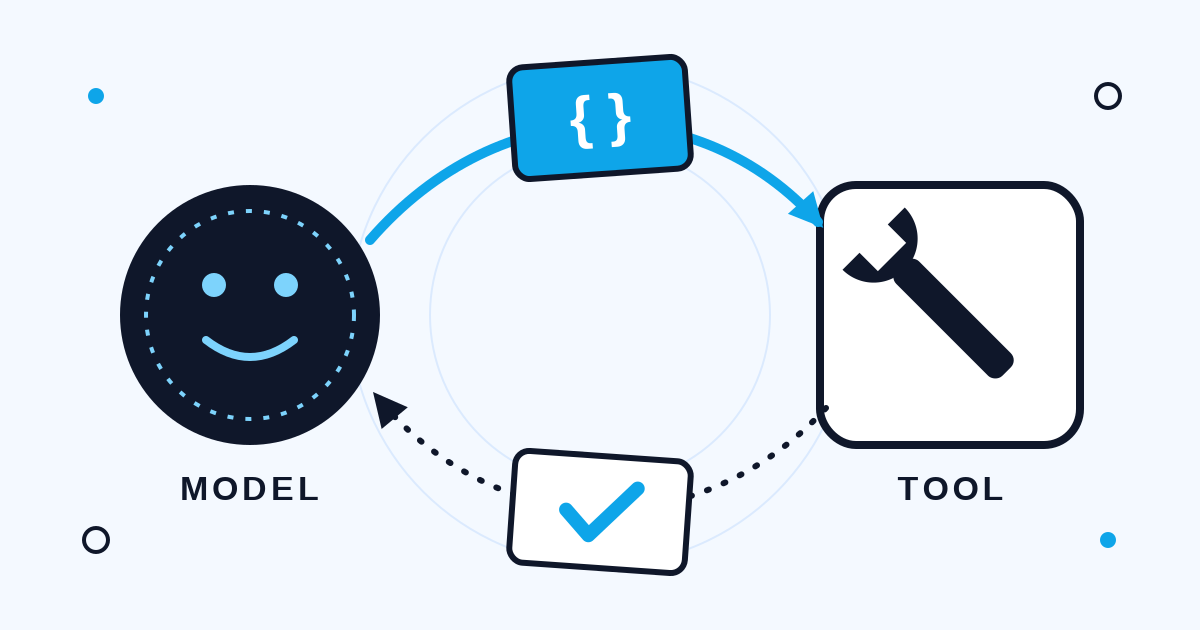
Every AI agent that books, searches, updates or sends something does it through this loop. The idea is simple, but most production bugs I see in agent code live in the details: loose schemas, results returned in the wrong shape, retries that repeat a side effect. This post walks through the loop using the current provider documentation from Anthropic, OpenAI and Google, as of late 2026.
How does tool calling work, step by step?
Tool calling works as a round trip in which the model writes a request and your application does the work. OpenAI's function calling guide describes five steps, and the other providers follow the same pattern:
- You send the model a request that includes the tools it may call.
- The model returns a tool call: a tool name plus JSON arguments.
- Your application runs the matching code with those arguments.
- You send a second request that contains the tool's output.
- The model returns a final answer, or more tool calls if the task needs them.
Google's Gemini function calling documentation puts the key point bluntly: the model "doesn't execute the function itself". Your application extracts the name and arguments and executes them.
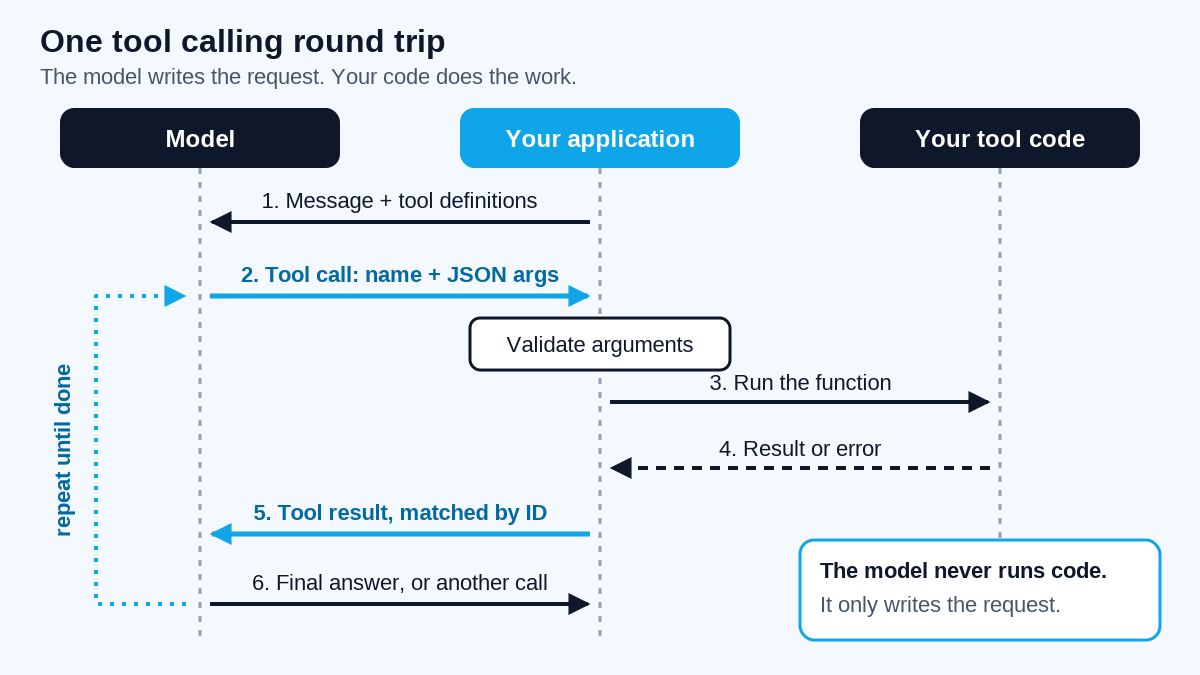
The wire format differs by provider. In Anthropic's tool use documentation, Claude responds with stop_reason: "tool_use" and one or more tool_use blocks, and your code replies with a tool_result block. OpenAI returns a function call item with a call_id and expects a function_call_output that references it. The shape is the same everywhere: an identifier ties each result to the call that asked for it.
An agent is this loop repeated until the model stops asking for tools. If the term is new, my post on what an AI agent is covers the wider picture.
What goes into a tool definition?
A tool definition has three parts: a name, a plain-language description and a JSON Schema for the arguments. OpenAI's guide lists name, description, parameters and an optional strict flag. Anthropic uses name, description and input_schema.
The description does more work than most people expect. The model decides whether to call a tool by matching the request against that description, so a vague description produces wrong or missing calls. Anthropic's guide to handling tool calls says an invalid call "usually means that there wasn't enough information" for the model to use the tool correctly, and recommends more detailed descriptions as the first fix.
Things I put in every description on client projects:
- What the tool does and what it returns, in one or two sentences.
- When to use it and, just as usefully, when not to.
- The format of each argument, with an example value.
- Any limit the model should know, such as a maximum date range.
Tool definitions are not free. OpenAI states that callable function definitions "count against the model's context limit and are billed as input tokens". Anthropic adds a small tool use system prompt on top, listed in its pricing documentation as 286 tokens for Claude Opus 5.5 as of late 2026. This is one reason both OpenAI and Google advise small tool sets: OpenAI suggests aiming for fewer than 20 functions at the start of a turn, as a soft guideline, and Google recommends keeping the active set to 10 to 20 tools.
How do you make sure the arguments are valid?
You make arguments valid by turning on strict schema enforcement and still validating in your own code. By default the model is only guided by the schema. Anthropic's strict tool use page explains that without strict mode the model might return "2" instead of 2, or omit a required field.
Strict mode closes that gap. Setting strict: true constrains the model's token sampling to schema-valid output, so the arguments always match the schema and the tool name is always one you supplied. OpenAI's strict mode makes the same promise and adds two schema rules: every object must set additionalProperties to false, and every field must be listed as required, with optional fields expressed as a type that can be null. Gemini offers a validated mode that enforces schema adherence.
| Provider | Flag or mode | What the provider documents |
|---|---|---|
| Anthropic | strict: true on the tool | Arguments always match input_schema; tool name always valid |
| OpenAI | strict: true on the function | Requires additionalProperties: false and all fields required |
| Google Gemini | validated function calling mode | Model ensures function schema adherence |
A valid shape is not a valid action. Strict mode guarantees that order_id is a string. It does not guarantee the order exists, belongs to this user or can still be refunded. Google's best practices include "validate function calls before executing", and the MCP specification says servers must validate all tool inputs and implement access controls. Treat arguments from a model the way you treat a form submitted from a browser. My post on structured outputs covers the same schema machinery for plain JSON responses.
What are parallel tool calls?
Parallel tool calls are several tool requests returned in a single model response. Anthropic's parallel tool use page says Claude may call multiple tools in one response by default, and OpenAI and Gemini support the same behaviour. A question such as "compare the weather in Paris and Tokyo" produces two calls at once instead of two round trips.
How you run them is your decision. Anthropic's documentation says the API does not prescribe an execution order: independent, read-only operations are usually safe to run concurrently, while tools with side effects, shared state or ordering requirements may be better run one after another. Two rules matter in practice:
- Return one result for every call, matched by its identifier. With Claude, all results go together in a single user message.
- If you skip a call, for example because an earlier one failed, still return a result for it, marked as an error with a short explanation.
You can switch parallelism off when it causes trouble. Anthropic uses disable_parallel_tool_use inside tool_choice, and OpenAI uses parallel_tool_calls: false. I turn it off for write-heavy tools until the surrounding code can handle partial failure.
How should a tool report errors?
A tool should report errors as a normal result that the model can read, flagged as an error, with a message that says what went wrong and what to try next. With Claude this is a tool_result with is_error: true. Anthropic's advice is to write instructive messages, for example "Rate limit exceeded. Retry after 60 seconds." instead of "failed". The same page notes that when a call is invalid or missing parameters, Claude will retry two or three times with corrections before giving up.
The MCP specification draws a useful line between two kinds of failure. Protocol errors, such as an unknown tool or a malformed request, are returned as JSON-RPC errors and are unlikely to be fixed by the model. Tool execution errors, such as a date in the wrong format or a failed API call, are returned inside the result with isError: true so the model can correct itself and try again.
That split is worth copying even if you never use MCP. Ask of every failure: can the model do anything about this? If yes, tell it how. If no, stop the loop and surface the problem to a person.
Why does idempotency matter for tool calls?
Idempotency matters because a tool call can be issued more than once for the same intent. The model may retry after an error, your code may retry after a timeout, and a parallel batch may be re-sent after a partial failure. A read is harmless when repeated. A payment, an email or a database insert is not.
The habits I apply to any tool that changes something:
- Accept an idempotency key, or derive one from the conversation and call identifiers, and refuse to act twice on the same key.
- Split reads from writes into separate tools, so permissions and approvals can differ.
- Return the resulting state ("refund 123 created, status pending"), so a repeated call can report what already happened instead of doing it again.
- Put a time limit on every call. The MCP specification recommends that clients implement timeouts and log tool usage for audit.
For actions that cannot be undone, add a confirmation step before execution. The MCP specification says there should always be a human in the loop with the ability to deny tool invocations, and my post on human-in-the-loop approvals shows how to design that step without slowing everything down.
MCP vs function calling: what is the difference?
Function calling is how a model asks for an action inside one API request, while MCP is a protocol for how an application discovers and runs tools that live in a separate server. The two work at different layers, so an agent that uses MCP still relies on function calling to let the model choose a tool.
With plain function calling, you write the tool definitions into your request and your own code executes each call. With MCP, the architecture overview describes a host application that opens one MCP client per MCP server, exchanging JSON-RPC 2.0 messages over stdio for local servers or Streamable HTTP for remote ones. The client sends tools/list to fetch each tool's name, description and inputSchema, hands those to the model as ordinary tool definitions, and sends tools/call when the model picks one. The same page says MCP "does not dictate how AI applications use LLMs".
| Function calling | MCP | |
|---|---|---|
| Defined by | Each model provider's API | An open protocol specification |
| Where tools are listed | In your API request | Fetched from a server with tools/list |
| Who runs the tool | Your application code | The MCP server, after tools/call |
| Reuse across apps | Copy the code into each app | Any MCP host can connect to the server |
Some providers now handle the MCP side for you. Anthropic's MCP connector lets the Messages API connect to remote MCP servers "without a separate MCP client". My rule on client projects: plain function calling for tools only one app needs, MCP when several apps or agents should share the same tools.
Work with me
I design tool layers for agents: schemas, validation, error handling and the approval steps around risky actions. See AI agent development and AI integration, or browse my work and book a scoping call to talk through your use case.
Frequently asked
Is tool calling the same as function calling?
Yes. Anthropic's documentation introduces the feature as "tool use (also called function calling)", OpenAI and Google mostly say function calling, and all three describe the same mechanism: the model returns a structured request and the application runs it. "Tool" is the broader word because it also covers provider-hosted tools such as web search.
Does the model run my code?
No. For tools you define, the model only produces the name and arguments, and your application executes the function. The exception is provider-hosted tools: Anthropic's documentation describes server tools such as web search and code execution that run on Anthropic's infrastructure and return results directly.
Is MCP a replacement for function calling?
No. MCP standardises how tools are discovered and invoked across applications, using tools/list and tools/call requests, but the model still decides which tool to use through ordinary function calling. MCP sits one layer below, between your application and the system that owns the tool. See what MCP is for the full picture.
How many tools can I give a model?
There is no single hard number, but the providers advise restraint. OpenAI suggests fewer than 20 functions available at the start of a turn as a soft guideline, and Google recommends an active set of 10 to 20 tools. Beyond that, load tools on demand or split the work between agents.
Sources
- function calling guide (developers.openai.com)
- Gemini function calling documentation (aistudio.google.com)
- tool use documentation (platform.claude.com)
- guide to handling tool calls (platform.claude.com)
- pricing documentation (platform.claude.com)
- strict tool use page (platform.claude.com)
- MCP specification (modelcontextprotocol.io)
- parallel tool use page (platform.claude.com)
- architecture overview (modelcontextprotocol.io)
- MCP connector (platform.claude.com)
Related services
Building something like this?
Naman Gundaniya takes on full-stack and AI projects: fixed quote after a free 30-minute scoping call, replies within 24 hours.
Get in touch