 By Naman Gundaniya
Document Processing With AI: From Invoices to Insights
AI document processing turns invoices, contracts and forms into structured data in six steps: ingest the file, classify it, extract fields with a document model or an LLM, validate them against rules, send low-confidence results to a person, then export clean rows to your systems. Accuracy comes from validation and review, not from the model alone.
Most businesses still have someone retyping numbers from PDFs into a spreadsheet or accounting system. It is dull work, it is easy to get wrong, and it is one of the best-paying AI projects I know of, precisely because it is unglamorous. Nobody demos it on stage, but the time it frees up is real and easy to measure.
This post walks through the pipeline I build for document workflows, the choice between dedicated document services and general LLMs, how to measure accuracy honestly, and how to design the review queue so people trust the output.
What is AI document processing?
AI document processing is the use of OCR, document models and large language models to read business documents and output structured fields, such as supplier, invoice number, dates, line items and totals, ready for another system to use. Older template-based tools needed a template per layout; modern models handle layouts they have not seen before.
Typical documents and what businesses pull from them:
- Invoices and receipts: supplier, dates, line items, tax, totals, for accounts payable.
- Purchase orders and delivery notes: quantities and references, for three-way matching.
- Contracts: parties, dates, renewal terms, notice periods, for a contract register.
- Forms and applications: names, IDs, answers, for onboarding or claims.
- Bank statements: transactions, for reconciliation.
The "insights" part comes after: once documents become rows, you can chart spend by supplier, flag duplicate invoices, or list every contract renewing next quarter. None of that is possible while the data sits in PDFs.
What does the pipeline look like?
The pipeline has six stages, and the model is only one of them. The stages around it are what make the output reliable.
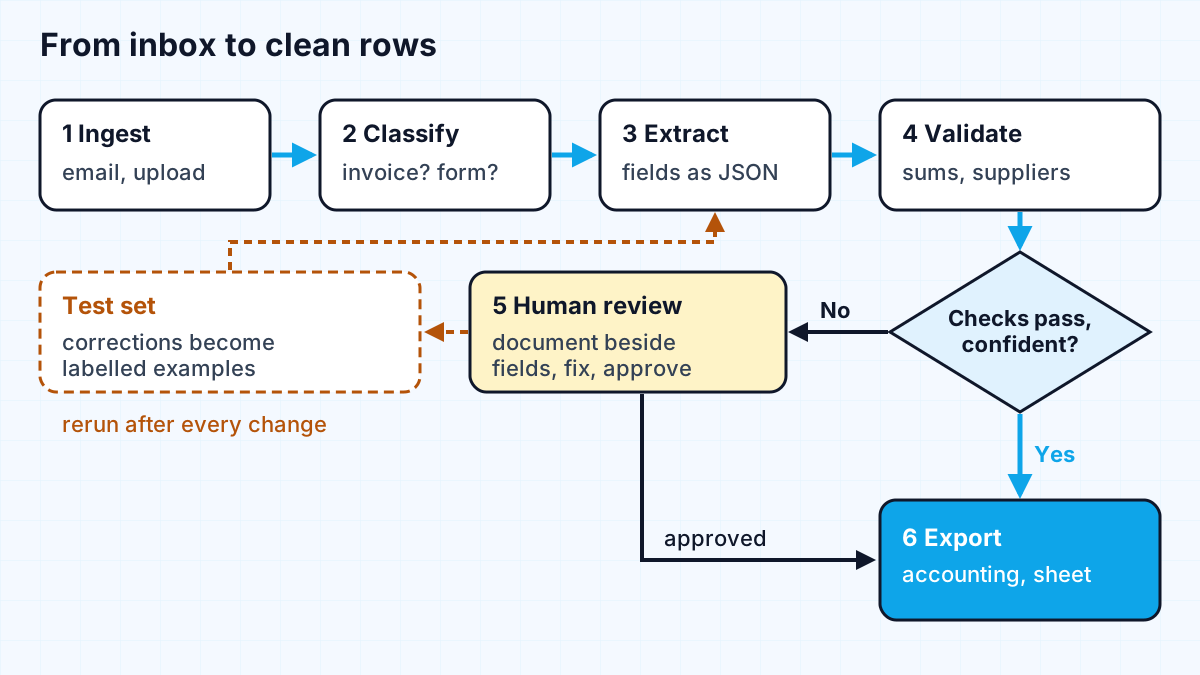
- Ingest. Pick up files from an inbox, an upload form or a shared folder. Store the original, give it an ID, and record where it came from.
- Classify. Decide what the document is, because an invoice and a contract need different schemas. A cheap model call or a document service's classifier is enough.
- Extract. Pull the fields into a fixed schema. More on the tool choice below.
- Validate. Check what came out: required fields present, line items adding up to the subtotal, tax matching the rate, supplier in your supplier list, purchase order number real, no duplicate invoice number from the same supplier.
- Review. Anything that fails a check, or has low confidence, goes to a person.
- Export. Write clean rows to the accounting system, spreadsheet or database, with a link back to the original file.
Should you use a document AI service or a general LLM?
Use a dedicated document service for high-volume, standard documents like invoices and receipts, and a general LLM when layouts vary widely or you need reasoning over the text, such as contract terms. Many pipelines use both: OCR and layout from a service, interpretation from an LLM.
| Option | Strengths | Watch out for |
|---|---|---|
| AWS Textract | Per-page pricing, dedicated expense and form analysis | Fields beyond its models need extra logic |
| Azure Document Intelligence | Prebuilt invoice model, confidence per field and table cell | Prebuilt schema may not match your needs |
| LLM with PDF input (for example Claude) | Handles unusual layouts and free-text clauses, flexible schema | Cost per page, values still need validation |
Some numbers from the official pages, as of late 2026:
- AWS Textract pricing lists, for the first million pages in US West (Oregon), $0.0015 per page to detect text, $0.01 per page for Analyze Expense, $0.015 per page for tables and $0.05 per page for forms.
- Microsoft's invoice model documentation says it extracts fields such as customer name, billing address, due date and amount due, supports invoices in 27 languages, and processes PDFs of up to 2,000 pages. Its JSON output includes tables and cells "with their bounding boxes, confidence".
- Anthropic's PDF support docs explain that Claude converts each page into an image and extracts its text, and that "each page typically uses 1,500–3,000 tokens" of text, with image tokens on top. A request can include up to 600 pages, or 100 when the context window is under 1M tokens.
For LLM extraction, ask for structured output so every response matches your schema. Anthropic's structured outputs feature constrains responses "to follow a specific schema, ensuring valid, parseable output", but notes exceptions such as refusals and truncated responses. Valid JSON is not the same as correct values: a perfectly formed invoice total can still be wrong, which is why validation is its own stage.
How do you measure extraction accuracy?
Measure accuracy per field, on a labelled sample of your own documents, not with one overall percentage. A model can read supplier names perfectly and misread VAT numbers one time in ten, and an overall score hides that.
The method I use on client projects:
- Build a test set. Collect a representative sample of real documents, including bad scans, phone photos, multi-page invoices and the awkward suppliers everyone complains about. Have a person record the correct values.
- Score each field. For every field, count exact matches, near misses (formatting only) and errors. Dates and amounts need normalising before comparison.
- Track straight-through rate. The share of documents that pass every check and need no human touch is the number that predicts time saved.
- Rerun on every change. A new prompt, model version or document service update can move the numbers. The test set is your regression test.
- Keep the source location. Store the page and, where the service provides it, the position of each value, so a reviewer can check it at a glance. In ScanX, a PDF note-taking app I built, answers cite the source pages for the same reason: people trust what they can verify.
If you are building the business case, the straight-through rate and review time per document are the inputs that matter. I walked through the arithmetic in AI automation ROI.
How should the human review queue work?
The review queue should show the original document next to the extracted fields, highlight exactly what failed, and let the reviewer fix and approve in one screen. A good queue makes a person faster than retyping; a bad one makes them slower and they will stop using it.
Design rules for the queue:
- Route by reason. "Total does not match line items" and "unknown supplier" are different problems and may go to different people.
- Show, do not hide, confidence. Highlight low-confidence fields instead of asking reviewers to check everything.
- Make approval the default for clean documents only. Never auto-approve a document that failed a business rule, however confident the model was.
- Capture corrections. Every correction is a labelled example. Add the difficult ones to your test set.
- Set a threshold you can move. Start strict, with most documents reviewed, and loosen it as the field-level numbers prove themselves.
This is the same human-in-the-loop pattern I covered for agents in human-in-the-loop AI agents: automate the confident cases, and give people a fast, well-designed way to handle the rest.
Where do you start?
Start with one document type, one source and one destination: for example, supplier invoices from one inbox into one accounting system. Measure how long a person takes today, build the pipeline with a strict review threshold, and compare after a few weeks. If you are not sure which document workflow to pick, the scoring method in my AI automation audit ranks them by value, risk and effort.
Work with me
I build document pipelines end to end: extraction, validation rules, the review screen and the export into your systems. See workflow automation and AI integration, browse my work, and book a scoping call with a sample of your documents.
Frequently asked
What is AI document processing?
AI document processing uses OCR, document models and large language models to read documents such as invoices, contracts and forms and turn them into structured data. A full pipeline also classifies documents, validates the extracted fields against business rules and sends uncertain results to a person for review.
How accurate is AI invoice extraction?
It depends on your documents, so measure it yourself. Build a labelled test set from your own invoices, score each field separately, and track the share of invoices that pass every check without human review. Overall accuracy figures from vendors rarely match a specific business's mix of suppliers and scan quality.
Is an LLM or a dedicated document AI service better for invoices?
For high volumes of standard invoices and receipts, dedicated services such as AWS Textract or Azure Document Intelligence are cheap per page and return confidence scores. LLMs suit unusual layouts and free-text documents like contracts. Many pipelines combine them: a service for OCR and layout, an LLM for interpretation.
Do you still need humans in AI document processing?
Yes, for the documents that fail validation or have low confidence. The goal is to review exceptions rather than retype everything. A good review queue shows the original beside the extracted fields, highlights what failed and feeds corrections back into the test set.
How much does AI document processing cost?
Running costs are per page or per token and are usually small next to staff time. As of late 2026, AWS lists Textract text detection at $0.0015 per page and expense analysis at $0.01 per page in its example region. Build costs depend on the number of document types and integrations, so they belong in a scoping call.
Sources
Related services
Building something like this?
Naman Gundaniya takes on full-stack and AI projects fixed quote after a free 30-minute scoping call, replies within 24 hours.
Get in touch