 By Naman Gundaniya
AI Agent Frameworks Compared: LangGraph, CrewAI and SDKs
The main AI agent frameworks differ in who controls the loop. LangGraph gives you an explicit graph with saved state, CrewAI gives you role-based agent teams inside event-driven flows, and the OpenAI Agents SDK and Claude Agent SDK give you a vendor-built loop with tools and approvals included. Plain code against a model API remains a sound choice for small, well-understood agents.
Most framework comparisons rank tools by popularity. That is not much help when you have to pick one for a system you will maintain for years. This post compares four frameworks and the no-framework option on the things that decide maintenance cost: control, state, observability and lock-in. Everything here comes from each project's own documentation as of late 2026.
What does an AI agent framework actually do?
An AI agent framework packages the loop that every agent runs, plus the plumbing around it. The loop itself is short. In OpenAI's function calling guide it is five steps: send the model a request with tools it could call, receive a tool call, execute code on the application side, send the tool output back, and receive a final response or more tool calls.
What a framework adds is everything a production system needs around that loop: saved state, retries, human approvals, tracing, memory, and ways to split work across several agents.
That convenience has a price. Anthropic's guide to building effective agents suggests that developers "start by using LLM APIs directly" and warns that frameworks "often create extra layers of abstraction that can obscure the underlying prompts". The practical test for any framework is whether you can still see exactly what was sent to the model when something goes wrong.
How do LangGraph, CrewAI and the vendor SDKs compare?
LangGraph, CrewAI, the OpenAI Agents SDK and the Claude Agent SDK differ most on control and lock-in, and least on basic features. All four can run a model in a loop with tools that you define, so the feature lists look alike at first glance.
| LangGraph | CrewAI | OpenAI Agents SDK | Claude Agent SDK | Plain code | |
|---|---|---|---|---|---|
| What it is | Low-level orchestration framework and runtime | Crews of agents inside Flows | Lightweight SDK with a built-in agent loop | Claude Code's loop and tools as a library | Your own loop on a model API |
| Control | You draw the graph; hand-coded and model-driven steps mix | Flows for explicit control, Crews for autonomy | Agents, handoffs and guardrails; the SDK runs the loop | The SDK runs the loop; hooks and permissions shape it | Total |
| State | Saved state, resumes after failures or pauses | Flow state persists across steps and runs | Sessions keep working context | Sessions can be resumed or forked | Whatever you store |
| Observability | LangSmith, a separate product | Tracing in the Crew Control Plane | Tracing on by default, sent to OpenAI's dashboard | Hooks at key points in the lifecycle | Whatever you log |
| Lock-in | MIT; works without LangChain | MIT; commercial suite for managed hosting | MIT; other model providers supported | Anthropic commercial terms; built on Claude Code | The model API only |
When is LangGraph the right choice?
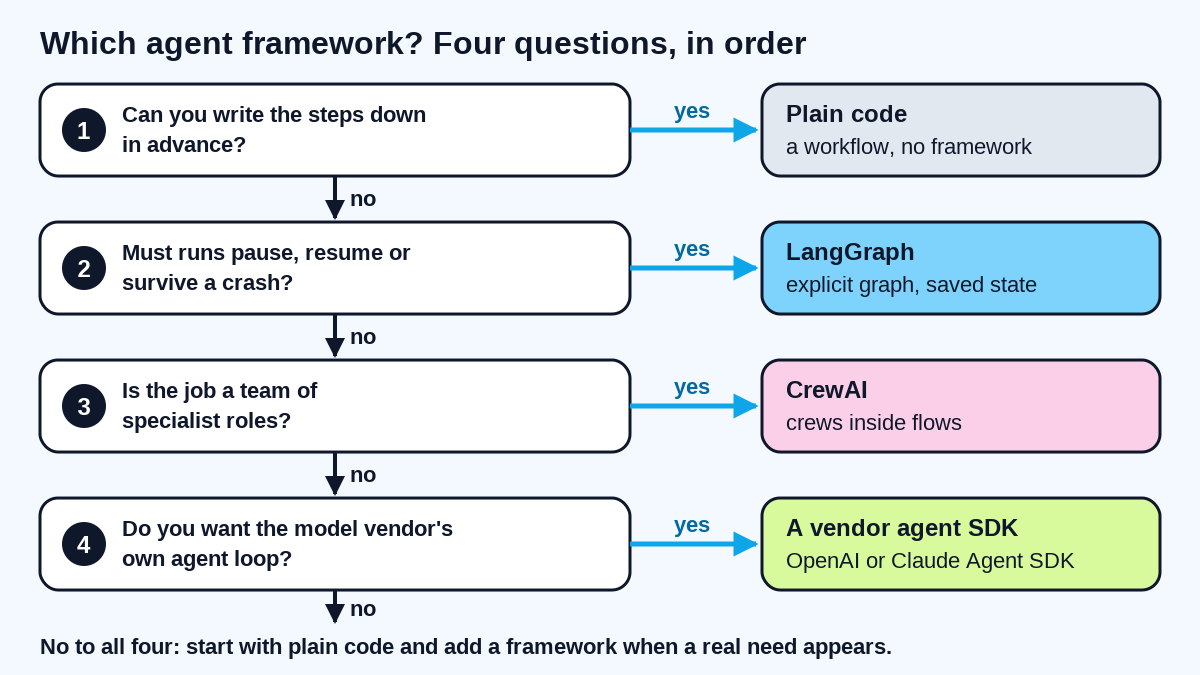
LangGraph is the right choice when a run has to survive interruptions and you want to decide the shape of the work yourself. Its documentation describes it as "a low-level orchestration framework and runtime for long-running, stateful agents" and says plainly that it "does not prescribe prompts or agent architecture".
The features that matter are the ones around state: saving progress so work can continue after a failure or a pause, stopping for human review with the option to inspect or edit state, and both short-term and longer-term memory. You model the system as a graph and choose which nodes are ordinary code and which are model calls.
The costs are a steeper learning curve and more code than the alternatives. On lock-in, the LangGraph repository is MIT-licensed and states that the library can be used without LangChain. Tracing and managed deployment come from LangSmith, which is a separate product from the same company, so check what you would be paying for before you depend on it.
When is CrewAI the right choice?
CrewAI is the right choice when the work divides naturally into roles and you want a readable way to describe them. The CrewAI documentation splits the framework in two. Crews are teams of role-playing agents that collaborate and delegate. Flows are the event-driven layer that handles state, conditionals, loops and branching.
The documentation's own advice on choosing between them is worth repeating: use both, start with a Flow for a production application, and call a Crew inside a Flow step when a task really needs a team of autonomous agents. That is a sensible reading of where autonomy pays off. If you want to check whether your problem needs several agents at all, I wrote about that in multi-agent systems: when one agent isn't enough.
The framework is MIT-licensed. The CrewAI repository describes a commercial suite around it that adds managed deployment, observability, governance and support, with tracing listed as a feature of its control plane. Budget for either that suite or your own tracing.
When do the OpenAI Agents SDK and Claude Agent SDK make sense?
The OpenAI Agents SDK and the Claude Agent SDK make sense when you want the model vendor's own loop and are comfortable building close to that vendor. Both are thinner than a general framework, and each reflects how its vendor thinks agents should run.
The OpenAI Agents SDK is built on a small set of primitives: agents (models with instructions and tools), handoffs between agents, and guardrails that validate inputs and outputs. It adds sessions, human-in-the-loop mechanisms and MCP integration. Its GitHub repository is MIT-licensed and says the SDK is provider-agnostic, supporting more than 100 other LLMs besides OpenAI's own APIs.
One default deserves attention. The SDK's tracing documentation says tracing is enabled by default and that traces, which include model generations and tool calls, are exported to OpenAI's backend. It can be disabled or pointed at other trace processors, and it is unavailable to organisations on a Zero Data Retention policy. Decide where traces go before real customer data flows through.
The Claude Agent SDK takes a different approach: it gives you the same tools, agent loop and context management that power Claude Code, as a Python or TypeScript library. That means built-in tools for reading and editing files, running commands and searching the web, plus hooks, subagents, permissions, sessions and MCP connections. It suits agents that work on files and code. Its use is governed by Anthropic's commercial terms, not an open-source licence, and the library runs the Claude Code binary, so it is the most vendor-specific option of the four.
When is no framework the right answer?
No framework is the right answer when the agent has a handful of tools, a short loop and one clear job. In that case the loop is a few dozen lines against a model API, every prompt is visible in your own code, and there is nothing to upgrade or work around.
This is not a contrarian position. Anthropic's guide recommends "finding the simplest solution possible, and only increasing complexity when needed", and the Claude documentation lists calling the API directly, where "you write the tool loop yourself", as a normal way to build.
On client projects I usually start this way and add a framework only when a specific need appears:
- Runs must pause for days and resume. Durable state is hard to write well, so adopt a framework that has it.
- Several people need to read traces. Use a tracing tool with a real interface. See observability for LLM apps.
- Approvals are part of the product. A framework with built-in interrupts saves time. I cover the design in human-in-the-loop approvals for AI agents.
Whichever route you take, keep tools behind a standard interface. If your integrations are MCP servers, both vendor SDKs can connect to them out of the box, and a change of framework later does not mean rewriting the integrations themselves.
Work with me
I build production agents for teams abroad, working remotely from India, and I choose the framework after the workflow is understood, not before. See AI agent development and AI integration, or browse my work, including a multi-agent delivery pipeline with human approval steps, and book a scoping call.
Frequently asked
Is LangGraph the same as LangChain?
No. LangGraph is a separate library built by LangChain Inc. Its repository states that it can be used without LangChain, and its documentation describes it as a low-level orchestration framework for stateful agents, not a collection of ready-made chains or prompts.
Can I use the OpenAI Agents SDK with models that are not from OpenAI?
Yes, according to its repository, which describes the SDK as provider-agnostic with support for more than 100 other LLMs. The default path uses OpenAI's Responses API, so check that the features you rely on behave the same way on the provider you choose.
Which AI agent framework is best for a first project?
For a first project with a few tools, plain code against a model API teaches you the most and hides the least. If you want a framework straight away, pick the one whose abstractions match the problem: roles suggest CrewAI, long-running stateful work suggests LangGraph, and file or code work suggests the Claude Agent SDK.
How hard is it to switch frameworks later?
It depends on where your logic lives. Prompts, tools and evaluation sets move easily if they are kept separate from framework code. State handling and orchestration do not. Keeping tools behind MCP and prompts in plain files makes a later switch much cheaper.
Sources
- OpenAI's function calling guide (developers.openai.com)
- building effective agents (anthropic.com)
- documentation (docs.langchain.com)
- LangGraph repository (github.com)
- CrewAI documentation (docs.crewai.com)
- CrewAI repository (github.com)
- OpenAI Agents SDK (openai.github.io)
- GitHub repository (github.com)
- tracing documentation (openai.github.io)
- Claude Agent SDK (code.claude.com)
Related services
Building something like this?
Naman Gundaniya takes on full-stack and AI projects: fixed quote after a free 30-minute scoping call, replies within 24 hours.
Get in touch