 By Naman Gundaniya
pgvector vs Pinecone vs Qdrant vs Weaviate: How to Choose
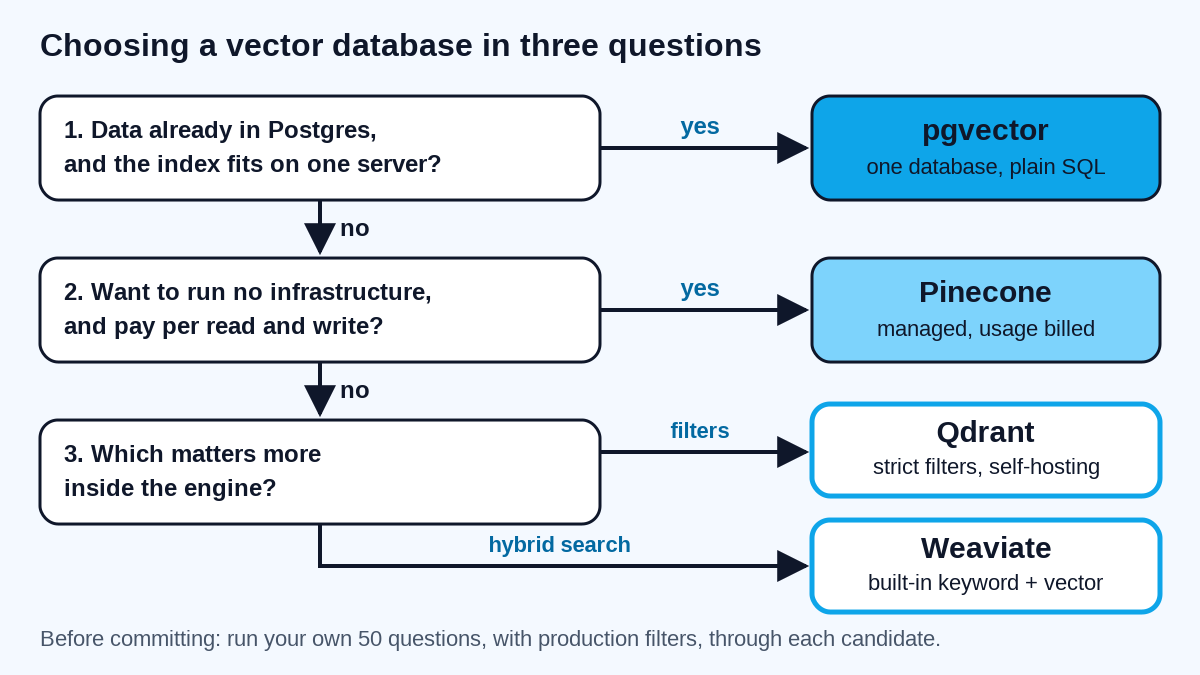
Use pgvector if your data already lives in Postgres and the vector index fits on one database server. Choose Pinecone when you want no servers to run and can accept usage-based billing. Choose Qdrant when filtered search and self-hosting matter most, and Weaviate when you want keyword and vector search fused inside one engine.

Most vector database comparisons rank the four by benchmark speed. For the retrieval systems I build for clients, speed is rarely the deciding factor. The deciding factors are who operates the thing, how well filtered queries hold up, whether keyword search comes built in, and what the bill looks like at your query volume. This post compares the four on those points, using each vendor's own documentation and pricing pages as read in November 2026.
If you are still deciding whether you need retrieval at all, start with RAG vs fine-tuning.
Which vector database fits which situation?
The four options split by who runs the database and how the search engine treats filters and keywords. The table summarises what each vendor documents.
| pgvector | Pinecone | Qdrant | Weaviate | |
|---|---|---|---|---|
| What it is | Postgres extension | Managed service | Open-source engine plus cloud | Open-source engine plus cloud |
| Who runs it | You, or your Postgres host | Pinecone | You or Qdrant Cloud | You or Weaviate Cloud |
| Filtering | After the index scan, with iterative scans | Metadata filter, then rank | During the graph search | Pre-filter with an allow-list |
| Keyword plus vector | Combine with Postgres full-text yourself | Filter then rank, or fuse on the client | Built in, RRF or DBSF | Built in, BM25F plus vector |
| Free entry point | Free extension | Starter plan | 1 GB RAM cluster | Free plan |
| Paid entry point | Your Postgres bill | $20 a month | Usage, billed hourly | From $45 a month |
When is Postgres with pgvector enough?
Postgres with pgvector is enough when your application data is already in Postgres and the vector index fits in memory on a single instance. You keep one database, one backup routine and ordinary SQL joins between vectors and the rows they describe.
The pgvector README, at version 0.8.7 when I checked, documents two approximate index types. HNSW has the better speed and recall trade-off but builds more slowly and uses more memory; IVFFlat builds faster and uses less memory with lower query performance. The vector type can be indexed up to 2,000 dimensions and the half-precision halfvec type up to 4,000, so check your embedding model's output size against those limits.
Three limits are worth knowing before you commit:
- Filtering happens after the index scan. The README says so directly and gives an example where a condition matching 10% of rows leaves about four results at the default search setting. Iterative index scans, added in version 0.8.0, keep scanning until enough rows pass the filter. Partial indexes and partitioning also help.
- Hybrid search is assembled by hand. The README suggests pairing pgvector with Postgres full-text search and merging the two result lists with Reciprocal Rank Fusion or a cross-encoder. It works, but you write and maintain that query.
- Scaling is Postgres scaling. The README's advice is to scale up the instance, add replicas, or shard with a tool such as Citus. If vector load starts to compete with transactional load, that is the signal to move vectors out.
On client projects I start with pgvector whenever Postgres is already there, and move only when one of those three limits shows up in measurements.
What does Pinecone cost, and what do you get for it?
Pinecone is a fully managed service billed on storage, reads and writes, with nothing to operate. As of November 2026 the Pinecone pricing page lists a free Starter plan (up to 2 GB of storage, 1 million read units and 2 million write units a month), a Builder plan at a flat $20 a month, a Standard plan with a $50 monthly minimum, and an Enterprise plan with a $500 monthly minimum. Standard usage is priced at $0.33 per GB of storage a month, $16 to $18 per million read units and $4 to $4.50 per million write units, depending on cloud and region.
The number to understand is the read unit. Pinecone's cost documentation says a query uses 1 read unit for every 1 GB of namespace size, with a minimum of 0.25. So query cost grows with the size of the namespace you search, not with how many results you ask for.
A worked example from those public numbers, as my own arithmetic: one million queries a month against a 10 GB namespace is 10 million read units, or $160 to $180 on Standard, plus about $3.30 for storage. The same million queries against ten 1 GB tenant namespaces would use a tenth of the read units. Namespace design is the main cost lever.
For keyword plus vector search, Pinecone's hybrid search guide describes two patterns: filter then rank in a single request, or run separate searches and fuse the lists on the client with Reciprocal Rank Fusion. Pinecone runs in its own cloud; a bring-your-own-cloud option is priced through sales.
When do Qdrant and Weaviate beat both?
Qdrant and Weaviate make sense when you need a dedicated search engine but want control over where it runs, or need filtering and hybrid search handled inside the engine. Both are open source (Qdrant under Apache 2.0, and Weaviate describes itself as an open-source vector database) and both sell a managed cloud.
Qdrant is the one I reach for when queries carry strict filters, such as tenant, date range and document type together. Qdrant's filtering guide explains that the engine filters during the graph search instead of before or after: a query planner scores matches directly when few points pass the filter, and otherwise walks a filterable HNSW index with extra edges built from indexed payload fields. An ACORN mode for combinations of strict filters is available from version 1.16 and is off by default. Hybrid queries, available from version 1.10, fuse dense, sparse and BM25 results with RRF or DBSF, and can re-score candidates with a multi-vector model such as ColBERT in the same request.
The Qdrant pricing page lists a free single-node cluster with 1 GB of RAM and 4 GB of disk, and a Standard tier billed hourly on vCPU, memory and storage. It shows no per-unit prices; you size a cluster in the calculator. A Hybrid Cloud option runs managed clusters on your own infrastructure.
Weaviate treats hybrid search as a first-class query. Per the Weaviate hybrid search docs, a hybrid query fuses a BM25F keyword search with a vector search; an alpha of 1 is pure vector, 0 is pure keyword, and Relative Score Fusion has been the default fusion method since version 1.24. For filters, Weaviate's filtering docs describe pre-filtering through an inverted index that builds an allow-list, with the ACORN strategy as the default from version 1.34.
The Weaviate pricing page lists a free plan, a Flex plan starting at $45 a month and a Premium plan from $400 a month. Billing is based mainly on stored vector dimensions, from $0.00465 per million on Flex, plus storage from $0.12 per GiB.
How should you test before committing?
Test candidates with your own documents and questions, because published benchmarks measure someone else's data and filters. A short bake-off is enough:
- Collect 50 real questions and mark which passages answer each one.
- Load the same chunks and embeddings into each candidate.
- Run every question with the filters production will use, and record recall at your chosen cut-off.
- Compare filtered recall against an exact search to see how much the approximate index loses.
- Estimate the monthly bill from each pricing page at your expected storage and query volume.
Step 3 is where the differences appear. Unfiltered search on a small corpus looks much the same everywhere. The retrieval layer is also only one part of answer quality; agentic RAG covers what happens after the search returns, and cutting LLM app costs covers the model side of the bill.
Work with me
I build retrieval and search features for product teams, remotely from India, and I usually start on the database you already run. See AI integration and AI chatbot development, or look through my work and book a scoping call to talk through your data and query load.
Frequently asked
Is pgvector fast enough for production?
For many applications, yes. pgvector supports HNSW indexes, which its README describes as having the better speed and recall trade-off of its two index types. The practical limits are memory for the index on a single instance and recall on heavily filtered queries, both of which you can measure before launch.
Can I switch vector databases later?
Yes, if you keep the source text and chunk IDs in your own storage. Moving means re-loading vectors and rewriting the query layer, not re-doing the whole project. Re-embedding is only needed if you change the embedding model at the same time.
Do I need a vector database for a small knowledge base?
Not always. Anthropic's write-up on contextual retrieval notes that a knowledge base under about 200,000 tokens, roughly 500 pages, can be placed directly in the prompt with no retrieval step at all. Prompt caching makes that approach cheaper for repeated queries.
Which vector database is cheapest?
It depends on the shape of the workload. pgvector adds nothing if your Postgres instance has headroom. Pinecone charges per read, so cost follows query volume and namespace size. Qdrant and Weaviate clouds charge mainly for provisioned resources or stored dimensions, so cost follows data size.
Sources
- pgvector README (github.com)
- Pinecone pricing page (pinecone.io)
- Pinecone's cost documentation (docs.pinecone.io)
- Pinecone's hybrid search guide (docs.pinecone.io)
- Qdrant (github.com)
- Weaviate (github.com)
- Qdrant's filtering guide (qdrant.tech)
- Hybrid queries (qdrant.tech)
- Qdrant pricing page (qdrant.tech)
- Weaviate hybrid search docs (docs.weaviate.io)
- Weaviate's filtering docs (docs.weaviate.io)
- Weaviate pricing page (weaviate.io)
- contextual retrieval (anthropic.com)
Related services
Building something like this?
Naman Gundaniya takes on full-stack and AI projects: fixed quote after a free 30-minute scoping call, replies within 24 hours.
Get in touch